
WAN IP Alias / Port forwarding / WAN IP Alias / "source port already exists"

Hi,
I have a WAN connection with several public IPs (28 subnet). I have configured the WAN2 like:
IP: 82.216.XXX.242
SM: 255.255.255.240
GW: 82.216.XXX.141
I then added all IPs (like 82.216.XXX.243, 82.216.XXX.244, 82.216.XXX.245, etc.) as WAN IP alias adresses.
Then, under "Transmission" "NAT" I added some port forwardings. I have port 10000 to be forwarded on the main IP (82.216.XXX.242). Hence, I left the "WAN IP" selection empty.
When trying to add another port forwarding for the same port, but selecting another WAN IP (82.216.XXX.243) I get the error "The source port already exists for the chosen interface(s). Please change the source port.".
I even tried to set another WAN IP for my first port forwarding. Simply, so that a WAN IP is selected and that this field is not empty. Same result.
Is this a bug? Anything I did wrong?
BR
C
- Copy Link
- Subscribe
- Bookmark
- Report Inappropriate Content

The name IP subnet is a bit misleading, there is no subnet but you have to enter one IP address that is in the pool you have.
- Copy Link
- Report Inappropriate Content
@MR.S Not working on my side. Tried it exactly like that. Tried different gateway models. Always the same error message. Enoying.

Whenever I try to change the source port of Test2 to 443 I get the error message. Also creating from scratch is not working.
But thank you for helping out! C
- Copy Link
- Report Inappropriate Content
What router do you have, version and firmware, and what version of Omada controller do you have?
- Copy Link
- Report Inappropriate Content
@MR.S Latest version of Omada. 6.1.0.19
I tried in the config: ER8411 (the one that I have) and ER7070.
C
- Copy Link
- Report Inappropriate Content
ok, I have an ER8411 too but it has a dynamic public IP so I can't test it with it, but I did a test with an ER605v2 here which has a private IP, it went fine without any errors.

- Copy Link
- Report Inappropriate Content
@MR.S I have not yet adoped the device to my Omada. Just tried to configure it by selecting that device for the "Internet" settings.
I now tried to create a new site. Same issue.
Running out of ideas. Anhow. No Omada gateways for me then. That's sh .... as this is the last issue I have to fix to get rid of my Fortigates.
BR
C
- Copy Link
- Report Inappropriate Content
- Copy Link
- Report Inappropriate Content


@Honkman I also tested on a new test organization and it worked fine...Just to confirm your process, you added the WAN IP Aliases, and then created the port forwarding rules? Can you send a screenshot of your WAN configuration, censoring any specific public IP details and such?
- Copy Link
- Report Inappropriate Content
- Created a new site
- Enabled WAN Override
- Selected ER8411
- WAN POrt: WAN1
- Static IP
- 10.1.1.100, 255.255.255.0, 10.1.1.1
- Two alias: 10.1.1.101 and 10.100.1.102
- NAT
- Added one rule for Port 443

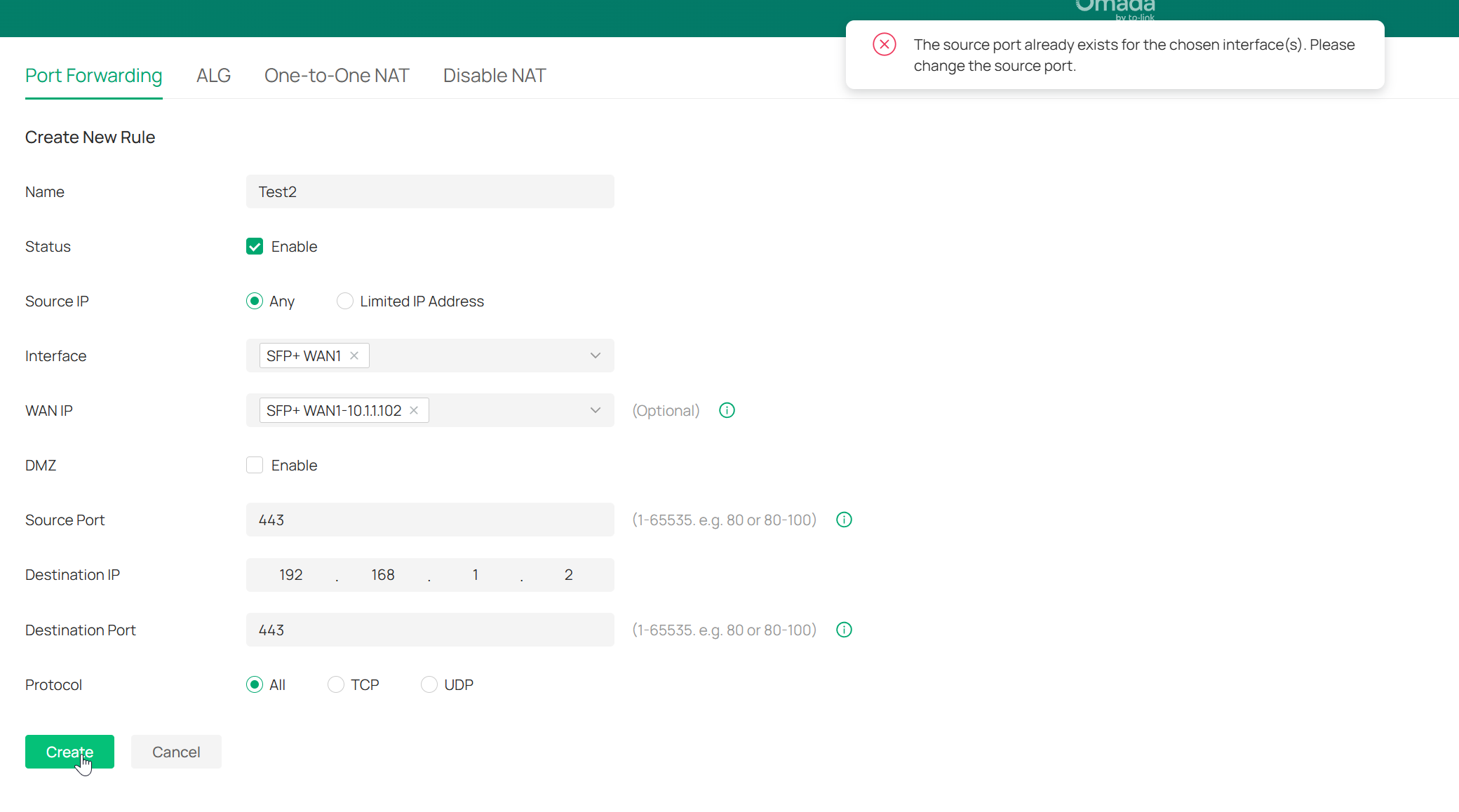
C
- Copy Link
- Report Inappropriate Content
@Honkman I see. I was replicating your setup and actually managed to recreate the issue...but only because I was trying to do it via WAN Overrides before adopting the device. I can confirm that once you actually adopt the router, it will allow you to do the port forwarding as you wish.
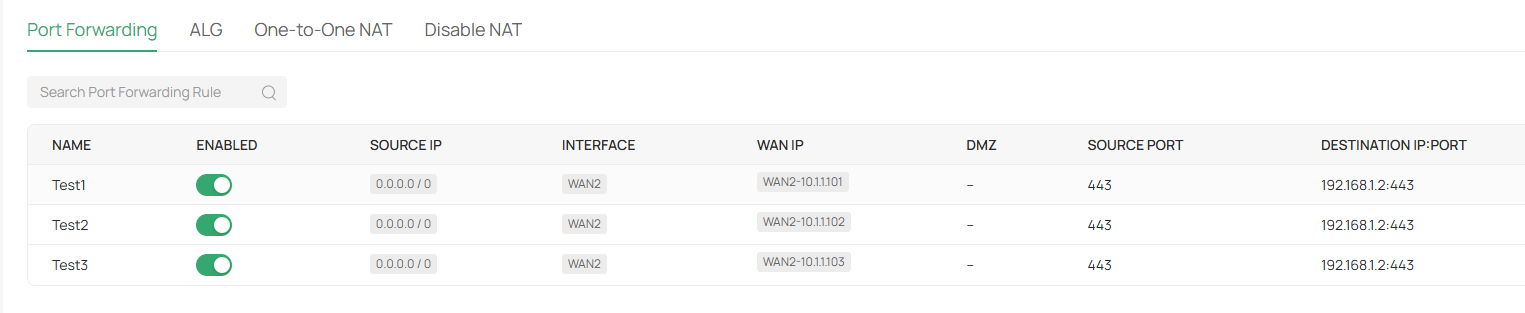
I'll see if I can find out exactly why this is the case, but go ahead and try it after adopting the gateway.
- Copy Link
- Report Inappropriate Content
Information
Helpful: 0
Views: 3635
Replies: 35
Voters 0
No one has voted for it yet.