
Early Access EAP773 | EAP783 v1.1.1 Pre-release Firmware (Update on 4th Nov, 2025)


This Article Applies to:
EAP783 V1, Fully Adapted to Omada SDN Controller v5.14 or above;
EAP773 V1, Fully Adapted to Omada SDN Controller v5.14 or above;
Release Notes:
New Feature/ Enhancement:
- Supported Portal Logout.
- Supported cluster deployment in Local Controller mode (Omada Central doesn’t support).
- Supported RADIUS Proxy(Global View> Server Settings> Radius Proxy Server).
- Supported OWE.
- Supported upgrading firmware through cloud in standalone mode.
- Supported Rate Limit with Portal Authentication.
- Supported disabling HTTP protocol in Standalone mode.
- Supported DHCP Option43.
- Supported multiple Radius servers when using MAC-Based Authentication (Site View Settings>MAC-Based Authentication).
- Added support for configuring NAS ID with WPA-Enterprise encryption.
- Supported DNS Queries (Network Tools>Network Check>DNSLookup).
- Supported DNS Adoption.
- Supported configuring the Device Name in Controller mode.
- Supported viewing status information and simple configuration through standalone management page when devices managed by the Controller.
- Supported displaying the maximum associated clients range in Controller mode(EAP Config>Advanced>Load Balance).
- Supported displaying the bandwidth of the EAP in Controller mode.
- Added Support for 11 a/n mixed mode for 5GHz radio in Controller mode.
- Supported multicast and broadcast data statistics.
- Supported disabling HTTP, HTTPS and APP discovery in Controller mode (Only with Pro controller).
- Supported Non-stick Roaming function.
- Supported authentication type of EKMS and Generic Radius with Unbound MAC for PPSK with Radius.
- Supports 1024 PPSK entries.
- Supported Multicast Filtering with IPv6 address.
- Supported Multicast/Broadcast Rate Limit
- Supported displaying Configuration Result.
- Optimized roaming function.
- Optimized Automatic Power Optimization function.
- Optimized the configuration of Beacon Interval.
- Optimized Portal Function.
- Optimized MLO connection stability.
- Improved Device and Network security.
- Improved time to configure SSID.
- Improved stability.
Bug Fixed:
- Fixed the issue that RSSI display error in WLAN Optimization.
- Fixed the issue that URL Filtering cannot work properly after TLS1.3 is enabled in the browser.
- Fixed the issue that HTTPS Redirection and Pre-Authentication Access don’t take effect when use portal.
- Fixed the issue that IPv4 multicast packets can’t be transmitted from mesh AP to root AP.
- Fixed the issue that one hop mesh AP’s client on SSID with VLAN would have slow Network speed.
- Fixed the issue that CoA doesn’t take effect with some MLO clients.
Pre-release Firmware Download
Attention
Please be sure you have read the Beta Test Agreement before upgrading the Beta firmware!
EAP783_V1_1.1.1_20251103 (Pre-release)
EAP773_V1_1.1.1_20250818 (Pre-release)
EAP783_V1_1.1.1_20250818 (Pre-release)
Notes:
(1) The above firmware is applied to EAP783 V1.
(2) Your device’s configuration won’t be lost after upgrading.
(3) The above firmware is fully adapted to Omada SDN Controller v5.14 and above
Update Log
4th Nov, 2025
Provide the pre-release link for EAP783
EAP783_V1_1.1.1_20251103 (Pre-release)
31th Oct, 2025
Remove the download links.
19th Aug, 2025
Provide the following pre-release link:
EAP773_V1_1.1.1_20250818 (Pre-release)
EAP783_V1_1.1.1_20250818 (Pre-release)
19th Aug, 2025
Update the release note.
Feedback
Any further feedback on the new firmware, please feel free to comment below or start a new thread from HERE.
To get better assistance, you may check Tips For Efficiently Reporting an Issue In The Community.
When reporting an issue, especially it's about firmware upgrade, it's suggested to include the following info:
- Management mode (Controller or Standalone)
- Device Model(s) and Hardware
- Device Firmware (previous and current)
Thank you in advance for your great cooperation and support.
Recommended Threads
Experience the Latest Omada EAP Firmware - Trial Available Here, Subscribe for Updates!
Current Available Solutions to Omada EAP Related Issues [Constantly Updated]
Get the Latest Omada SDN Controller Releases Here - Subscribe for Updates
- Copy Link
- Subscribe
- Bookmark
- Report Inappropriate Content

@Vincent-TP Good afternoon,
Upon updating my EAP783 from V1_1.1.92 to V1.1.1 and updating my controller from the latest v5.x to v6.0.0.23 I am having MLO issues with various Apple devices ranging from older Apple TVs and iPad Pros to iPhone 16 Pros and 17 Pros.
Issue 1: After a period of time, iPhone 16 Pro (iOS 26) loses all Wifi connectivity to LAN and WAN until I toggle Wifi on and off a few times.
Issue 2: iPhone 17 Pro is unable to join MLO SSID at all.
Issue 3: When 5Ghz channel width is set to 80Mhz, iPhone 16 Pro and 17 Pro are unable to join my 5Ghz-only SSID. The same devices will connect to 5ghz when using a MLO SSID.
Please let me know if I any specific logs would be of troubleshooting use. Thanks!
- Copy Link
- Report Inappropriate Content
Hi @JIN_JPN
Thanks for the info.
May I ask, does your company (TP-Link) have an iPhone 17 series device for verification?
>>We are working on it.
- Copy Link
- Report Inappropriate Content

Reply:
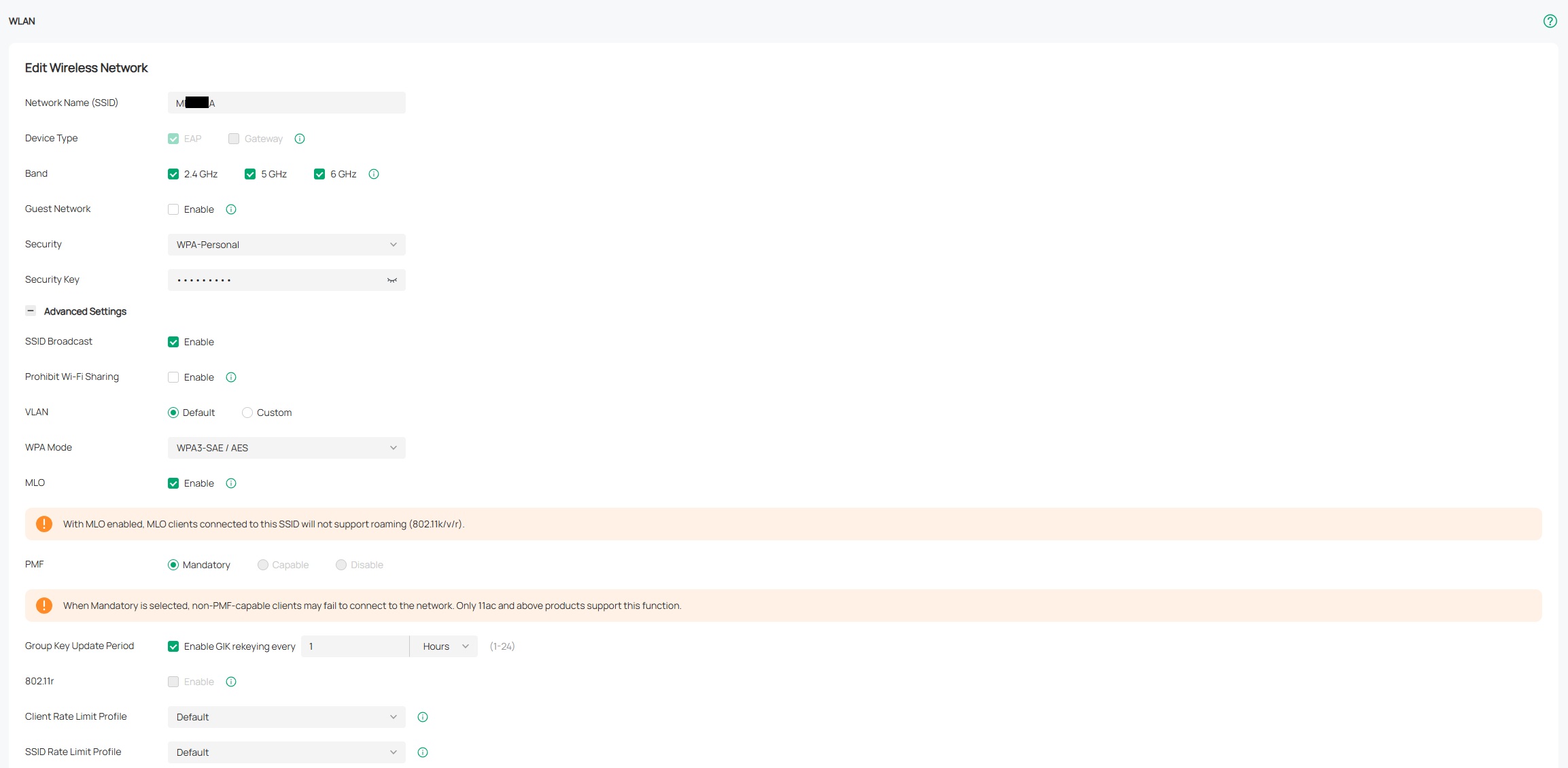
- The behavior when the iPhone 17 Pro fails to connect is an error message saying:“Unable to join the network ‘M**_A’.”*
- This issue only occurs with the iPhone 17 Pro.
- For reference, the iPhone 16 (also MLO-capable) can connect, but it seems to connect only via 6 GHz, not using MLO.
- Unfortunately, I do not have another Wi-Fi 7 network available for comparison testing.
May I ask, does your company (TP-Link) have an iPhone 17 series device for verification?
I believe this issue can likely be reproduced with a high probability if tested on your side.
Attached below is the screenshot of the MLO SSID settings.
- Copy Link
- Report Inappropriate Content
Hi @DarthRay
Thanks for the feedback.
For security reasons, shell access is no longer supported on EAP devices.
EAP V1.0 is same as V1.6. The numbers 0 and 6 are simply used to identify production locations. In reality, they are identical in every way, so there's no need to worry about this distinction
DarthRay wrote
Thank you, @Vincent-TP. I installed the pre-release version and will test it out over the next day or so. In the meantime, a couple of things I noticed:
1. Don't see the immediate crash when connecting from an iPhone 16 Pro to an MLO-enabled SSID. Will continue to monitor
2. Connection via SSH now drops onto an EAP app with a "EAP>" prompt instead of a shell. I was planning to get information about connected stations via SSH. Will there be a way to get to the shell once this firmware is released?
3. Once in the EAP app, there's no way to exit from it. Neither "quit" not "exit" disconnects from it, and there isn't a "logout" command either.\
4. The main status page still says my hardware version is 1.0 after the upgrade.
Thanks!
- Copy Link
- Report Inappropriate Content
Hi @mrmbman
Thanks for posting here.
Does this only happen with the iPhone 17 Pro?
Do you have any other Wi-Fi 7 network that can run a comparison test? That is, can the iPhone 17 Pro connect to other MLO networks?
mrmbman wrote
Running the latest beta posted here. Tried both 2.4/5/6ghz MLO and just 5/6ghz MLO and the new iPhone 17 Pro doesnt like it. Most of the time it fails to connect. Restarted phone. Restarted Eap783s.
After about 10 min of not connecting and giving error "could not connect" it connected? Something flakey here.
Are we ever getting a new stable firmware?
- Copy Link
- Report Inappropriate Content
Hi @JIN_JPN
Thanks for the feedback.
Please share a screenshot of the settings of the MLO SSID.
What's the exact behavior when the iPhone can't connect to the MLO network?
Does this only happen with the iPhone 17 Pro?
Do you have any other Wi-Fi 7 network that can run a comparison test? That is, can the iPhone 17 Pro connect to other MLO networks?
JIN_JPN wrote
Hello!
I am currently using the EAP783 with firmware version v1.1.1 (Pre-release).
I would like to report an issue I have encountered with my new iPhone 17 Pro.
The iPhone 17 Pro cannot connect to the SSID configured with MLO.
When connecting to a non-MLO SSID, the connection works without any problem.
Have you tested the iPhone 17 Pro with MLO SSIDs on this firmware?
I believe you may encounter the same connection issue during your verification.
I would like to share this report with you and kindly ask for confirmation and further guidance.
Thank you for your support.
- Copy Link
- Report Inappropriate Content
Hello!
I am currently using the EAP783 with firmware version v1.1.1 (Pre-release).
I would like to report an issue I have encountered with my new iPhone 17 Pro.
-
The iPhone 17 Pro cannot connect to the SSID configured with MLO.
-
When connecting to a non-MLO SSID, the connection works without any problem.
Have you tested the iPhone 17 Pro with MLO SSIDs on this firmware?
I believe you may encounter the same connection issue during your verification.
I would like to share this report with you and kindly ask for confirmation and further guidance.
Thank you for your support.
- Copy Link
- Report Inappropriate Content

Running the latest beta posted here. Tried both 2.4/5/6ghz MLO and just 5/6ghz MLO and the new iPhone 17 Pro doesnt like it. Most of the time it fails to connect. Restarted phone. Restarted Eap783s.
After about 10 min of not connecting and giving error "could not connect" it connected? Something flakey here.
Are we ever getting a new stable firmware?
- Copy Link
- Report Inappropriate Content

Thank you, @Vincent-TP. I installed the pre-release version and will test it out over the next day or so. In the meantime, a couple of things I noticed:
1. Don't see the immediate crash when connecting from an iPhone 16 Pro to an MLO-enabled SSID. Will continue to monitor
2. Connection via SSH now drops onto an EAP app with a "EAP>" prompt instead of a shell. I was planning to get information about connected stations via SSH. Will there be a way to get to the shell once this firmware is released?
3. Once in the EAP app, there's no way to exit from it. Neither "quit" not "exit" disconnects from it, and there isn't a "logout" command either.\
4. The main status page still says my hardware version is 1.0 after the upgrade.
Thanks!
- Copy Link
- Report Inappropriate Content
Hi @DarthRay
EAP783 V1.6 use the same firmware version as EAP783 V1.0. You can upload this pre-release version for your device. Thanks.
DarthRay wrote
@Vincent-TP, I'm experiencing crashes on MLO while using an iPhone 16 Pro (which has since been disabled), and drop outs on non-MLO ever since upgrading from an EAP660 HD to this EAP783. I'd like to try this pre-release firmware to see if things have improved.
However, I may be on hardware version 1.6 -- while the label on the device says "US/1.6" next to the model number, the dashboard on the device itself says "hardware version: 1.0". Will there be a pre-release firmware compatible with hardware v1.6?
Thanks.
- Copy Link
- Report Inappropriate Content
Information
Helpful: 0
Views: 12787
Replies: 104
Voters 0
No one has voted for it yet.