
How to use RTSP stream from the NVR?
 This thread has been locked for further replies. You can start a new thread to share your ideas or ask questions.
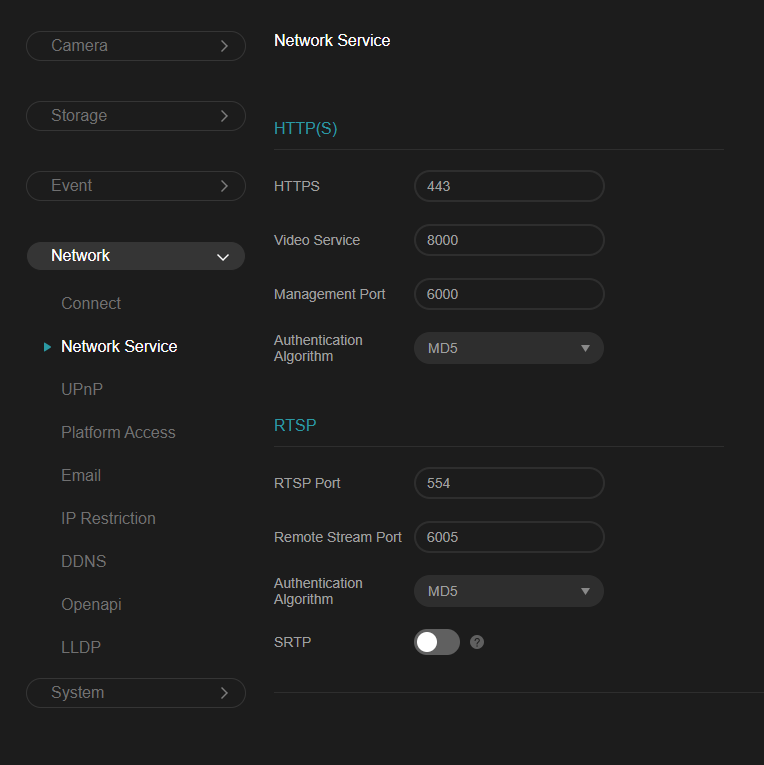
From the screenshot below, I could see the port 554 is being used for RTSP, but I dont know how to use it.
I have cam0, cam1, cam2 setup in the nvr. I would like to access the RTSP stream from devices in the tailnet.
- Copy Link
- Subscribe
- Bookmark
- Report Inappropriate Content


https://community.tp-link.com/en/business/forum/topic/828716?replyId=1573504
https://community.tp-link.com/en/business/forum/topic/745182
rtsp://ip/live/0/1/avm
IP is the IP of NVR, live is live broadcast, channel 0 only has live broadcast, 0 represents channel 0, 1 represents the main stream, and there is only the main stream.
- Copy Link
- Report Inappropriate Content
Hi Clive,
Thank you for the details.
For the model (VIGI NVR1004H), the camera channels seems to start with index 1, not 0. I can confirm that the following works. Do let me know if I understand this right.
Also let me know if playback is also possible.
cam0
mainstream: rtsp://<username>:<password>@<NVR_IP>/live/1/1/avm
substream: rtsp://<username>:<password>@<NVR_IP>/live/1/2/avm
cam1
mainstream: rtsp://<username>:<password>@<NVR_IP>/live/2/1/avm
substream: rtsp://<username>:<password>@<NVR_IP>/live/2/2/avm
cam2
mainstream: rtsp://<username>:<password>@<NVR_IP>/live/3/1/avm
substream: rtsp://<username>:<password>@<NVR_IP>/live/3/2/avm
Thanks,
LineSNT
- Copy Link
- Report Inappropriate Content
- Copy Link
- Report Inappropriate Content
https://community.tp-link.com/en/business/forum/topic/828716?replyId=1573504
https://community.tp-link.com/en/business/forum/topic/745182
rtsp://ip/live/0/1/avm
IP is the IP of NVR, live is live broadcast, channel 0 only has live broadcast, 0 represents channel 0, 1 represents the main stream, and there is only the main stream.
- Copy Link
- Report Inappropriate Content
Hi Clive,
Thank you for the details.
For the model (VIGI NVR1004H), the camera channels seems to start with index 1, not 0. I can confirm that the following works. Do let me know if I understand this right.
Also let me know if playback is also possible.
cam0
mainstream: rtsp://<username>:<password>@<NVR_IP>/live/1/1/avm
substream: rtsp://<username>:<password>@<NVR_IP>/live/1/2/avm
cam1
mainstream: rtsp://<username>:<password>@<NVR_IP>/live/2/1/avm
substream: rtsp://<username>:<password>@<NVR_IP>/live/2/2/avm
cam2
mainstream: rtsp://<username>:<password>@<NVR_IP>/live/3/1/avm
substream: rtsp://<username>:<password>@<NVR_IP>/live/3/2/avm
Thanks,
LineSNT
- Copy Link
- Report Inappropriate Content

Here’s how to get it working.
rtsp://<NVR IP>:554/ch<Channel number>/<main or sub>/av_stream
For example:
rtsp://192.168.0.123/ch1/main/av_stream
rtsp://192.168.0.123/ch4/sub/av_stream
- Copy Link
- Report Inappropriate Content
Information
Helpful: 0
Views: 1693
Replies: 4
Voters 0
No one has voted for it yet.