
Wireless mesh connecting a F65-Outdoor AP to a F4365 Wirless router

I'm having trouble getting the Festa controller to recognize a F65-Outdoor as a wireless device. Does it not work like the Omada controller were, after power up and after a few minutes, the controller finds and allows provisioning as a wireless mesh? If i plug in the AP to the network it provisions fine, but i would like to use this more as a repeater to a remote location. I am trying to mesh the AP to a FR365 wirless router.
Any ideas on what I'm missing?
Thanks
- Copy Link
- Subscribe
- Bookmark
- Report Inappropriate Content


Hi @Subtech
Thanks for posting here.
Yes, unlike Omada, the Festa wireless gateway cannot form a mesh with APs. We recommend adding a new indoor Festa AP to create the mesh network.
Below is a product link for your reference:
https://www.tp-link.com/en/business-networking/soho-festa-access-point/
- Copy Link
- Report Inappropriate Content
Hi @Subtech
Thanks for posting here.
Yes, unlike Omada, the Festa wireless gateway cannot form a mesh with APs. We recommend adding a new indoor Festa AP to create the mesh network.
Below is a product link for your reference:
https://www.tp-link.com/en/business-networking/soho-festa-access-point/
- Copy Link
- Report Inappropriate Content
Vincent-TP wrote
Hi @Subtech
Thanks for posting here.
Yes, unlike Omada, the Festa wireless gateway cannot form a mesh with APs. We recommend adding a new indoor Festa AP to create the mesh network.
Below is a product link for your reference:
https://www.tp-link.com/en/business-networking/soho-festa-access-point/
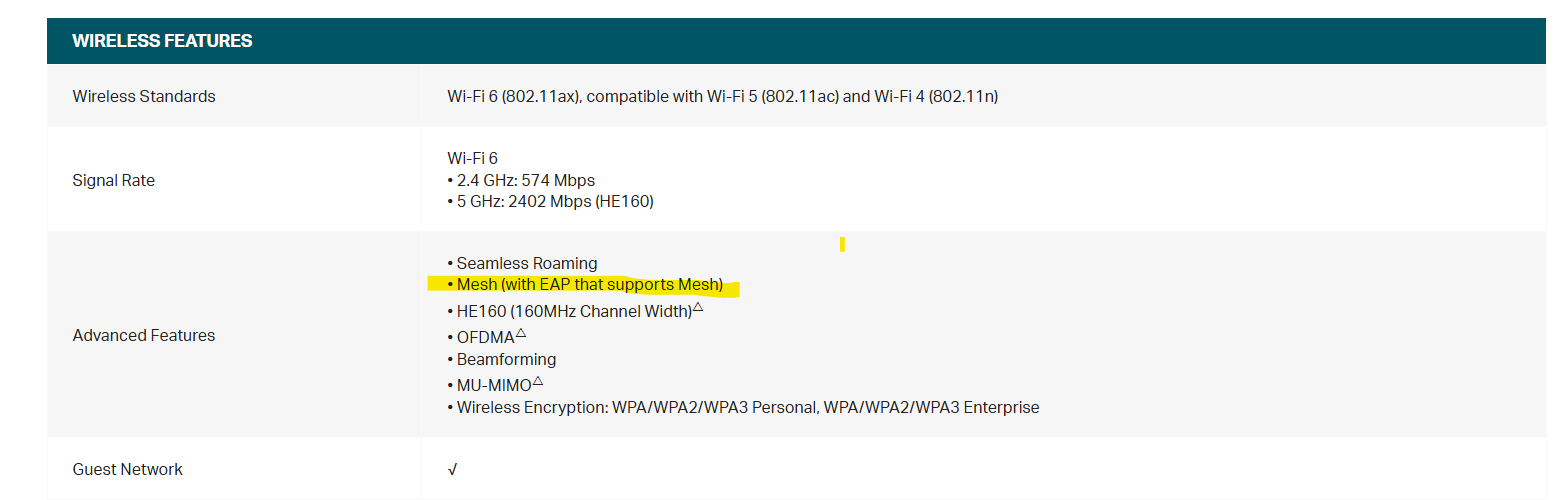
@Vincent-TP Thanks for that information. Might I suggest an edit to the spec sheet for the FR365 then as it clearly states it will Mesh(with EAP that supports Mesh). Do you know will that functionality will be rolled out in future firmware updates?
- Copy Link
- Report Inappropriate Content
Hi @Subtech
Thanks for the feedback.
The FR365 is classified as a gateway router (with wireless functionality) rather than a wireless access point(EAP), so this statement is not inaccurate.
Unfortunatelty, we don't have a plan to provide firmware update to add this feature.
- Copy Link
- Report Inappropriate Content
Vincent-TP wrote
Hi @Subtech
Thanks for the feedback.
The FR365 is classified as a gateway router (with wireless functionality) rather than a wireless access point(EAP), so this statement is not inaccurate.
Unfortunatelty, we don't have a plan to provide firmware update to add this feature.
Hello @Vincent-TP
I just wanted to post what I found, for you and anyone who may read this post, after getting my mesh set up. After you telling me the gateway couldn't mesh with an EAP, I followed your recommendation and purchased an indoor F65. You were correct, after connecting the F65 hardwired the F65-outdoor became available to adopt wireless to the F65. All of this worked flawlessly. What i found was after establishing all my connections and running a scan in the uplink(Wireless) tab of the mesh connected EAP, it showed the gateway as an available option to mesh. I clicked link on the gateway and sure enough my f65-outdoor was happy to connect to it now. I unplugged the indoor F65 and still have data connection at my F65-outdoor. So in short, it seams to me the gateway can establish mesh connections with mesh capable EAPs. It apparently just can't create the first mesh connection. This seems like a bug to me.
Thanks,
Subtech
- Copy Link
- Report Inappropriate Content

@Subtech Can you point me how did you do? I do not have Tplink router, but I have F65 indoor. I added F65 outdoor via lan and configure it. But when I disconnect it, it does not automatically connect to F65 Indoor. Do I need to have TpLink so that mesh is working? Can I have only F65 Indoor and outdoor?
@Vincent-TP Can you also help me?
- Copy Link
- Report Inappropriate Content
Hi @Gregoriusus
F65-outdoor can mesh with F65 indoor, doesn't require a Festa Gateway.
Below is a guide:
How to Build a Mesh Network via Omada EAP in Controller Mode
It's for Omada EAP, but the steps are similar.
- Copy Link
- Report Inappropriate Content
Information
Helpful: 0
Views: 734
Replies: 6
Voters 0
No one has voted for it yet.