
Cell phones (S22, S25,iPhone) losing internet connection - drop packets to external networks

Cell phones (S22, S25,iPhone) losing internet connection - drop packets to external networks

Cell phones (S22, S25,iPhone) losing internet connection - drop packets to external networks
2025-11-02 18:19:15 - last edited 2025-11-17 02:53:43
Model: EAP225  
Hardware Version: V3
Firmware Version: 5.1.11

I am having issues with cell phones on my Omada network. I have the follwoing devices. I also am running the Omada controller inside a LXC container in Proxmox.

 

I have no issues on any wired devices. I also have no issues with my laptop or older android phones. The newer cell phones keep dropping the WIFI due to no internet connection. I disabled the "Auto -Disconnect" on my S22 but I still have issues with loading websites and social media. I use a ping app too ping my local LAN. I ping my router which is 192.168.1.1, and this ping never fails and has 100% pass rate. If I ping an external IP (8.8.8.8 or 1.1.1.1) I start getting "Destination Net Unreachable" back as a result.
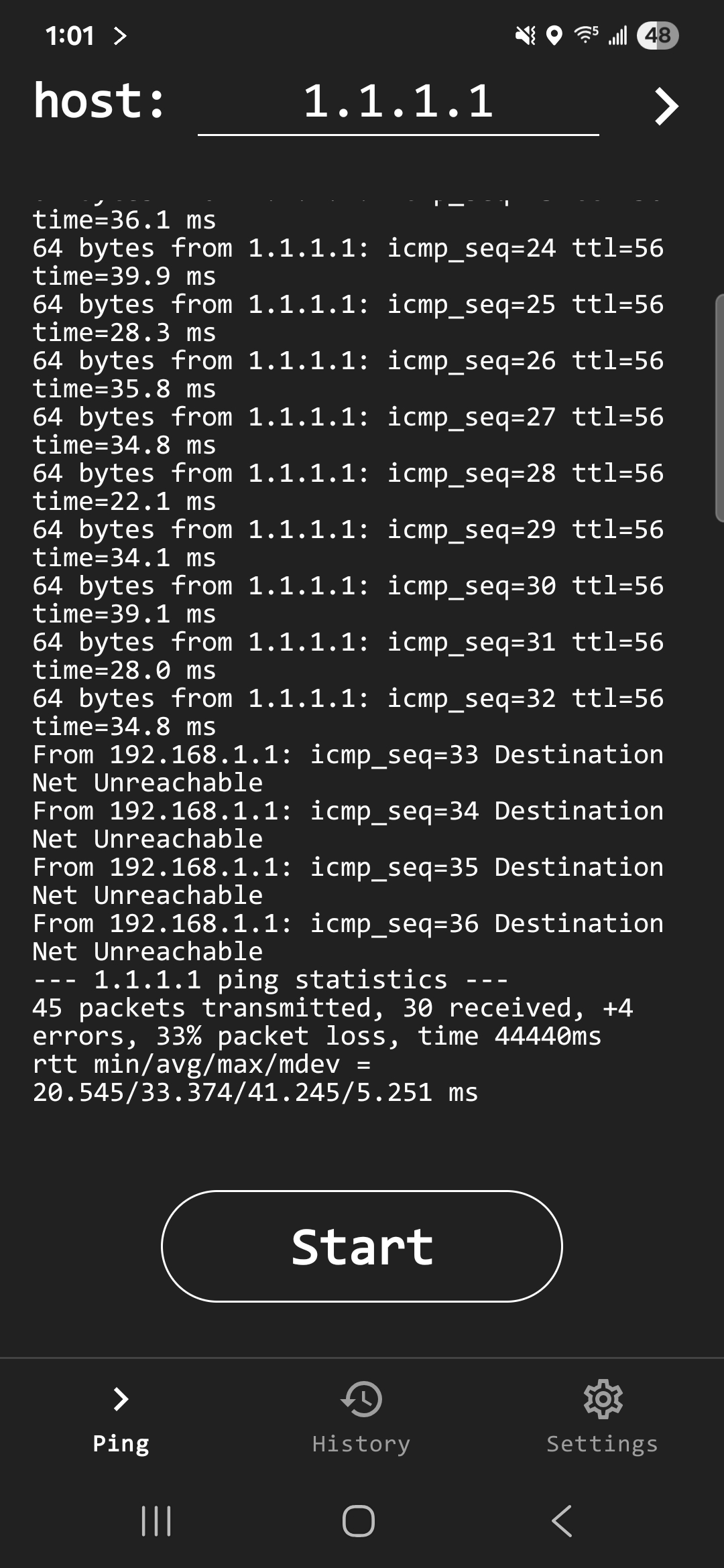
 

Like I said earlier I can have all my wired devices ping the same address' for extended amounts of times and I get 100% pass rate. I also get a 100% pass rate on an older Motorola cell phone and my Laptop (Linux Mint). I have searched the forum and google but can not find a solution. I have changed many settings on the wireless side of Omada but nothing seems to help. I have also placed the EAP225 in standalone mode but this did not help neither, I have purchased an EAP610 but have not tried it yet in fear it will not fix the problem.
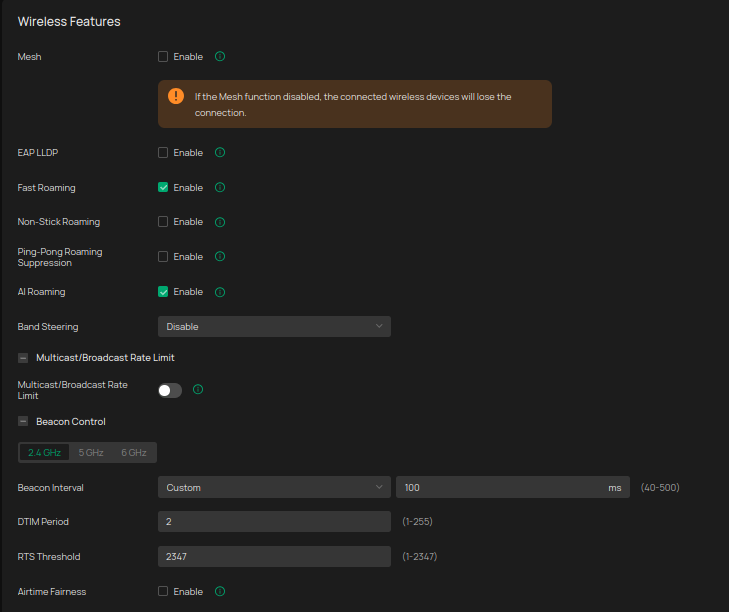
 

If any one has been able resolve this please let me know.


Thanks everyone!

  0      
  0      
#1
Options
1 Accepted Solution
Re:Cell phones (S22, S25,iPhone) losing internet connection - drop packets to external networks-Solution
2025-11-17 02:36:30 - last edited 2025-11-17 02:53:43

  @Vincent-TP Thank you for the response.


The issue with dropping packets would happen whether I was using DHCP or Static.


I do have my wifi ssid's split with one being 2.4ghz and one being 5ghz.


I have done a couple things that seem to have improved our cell phone wifi service.


One was I created a new LXC in Proxmox and installed the latest version of Omada on it. This seem to be a big help. I then did WiFi optimization which caused my issues to come back. I reverted the optimization and I seem to be back at a good place with cell phones and WIFI.


I am guessing using the newest version of Omada fixed my issues at least for now.

Recommended Solution
  0  
  0  
#3
Options
3 Reply
Re:Cell phones (S22, S25,iPhone) losing internet connection - drop packets to external networks
2025-11-05 03:06:35 - last edited 2025-11-05 03:08:38

Hi  @Cogerber 


Thanks for posting here.

Please refer to the following to troubleshoot:


Devices retain LAN IP but cannot access the internet, possibly due to DHCP lease or gateway misconfiguration.
>>>

  • Access the main router's management interface and verify the DHCP pool is sufficient (to avoid IP conflicts).
  • Confirm that new phones obtain the correct IP, subnet mask, default gateway, and DNS (compare with wired devices).
  • Try assigning a static IP to the new phones to check for improvement.


Possible Cause: New phones support Wi-Fi 6 (802.11ax), which may cause compatibility issues when mixed with older devices.
>>>Split the SSIDs for 2.4GHz and 5GHz (e.g., name them “WiFi-2G” and “WiFi-5G”) and prioritize 5GHz for new phones.
Adjust channels:
For 2.4GHz: Use non-overlapping channels like 1, 6, or 11, and set bandwidth to 20MHz.
For 5GHz: Choose less congested channels like 36 or 149, with bandwidth set to 80MHz.


Update Firmware and Drivers
Upgrade the EAP225 to the latest firmware (we have a newer firmware version for EAP225 V3, you can download from TP-Link’s official website).
Check if new phones have the latest Wi-Fi drivers (system updates may include fixes).


Symptom: New phones may aggressively put Wi-Fi to sleep to save power.
Actions:
On the phone: Disable “Wi-Fi sleep” or “Smart battery saver” (Settings > Wi-Fi > Advanced).


  0  
  0  
#2
Options
Re:Cell phones (S22, S25,iPhone) losing internet connection - drop packets to external networks-Solution
2025-11-17 02:36:30 - last edited 2025-11-17 02:53:43

  @Vincent-TP Thank you for the response.


The issue with dropping packets would happen whether I was using DHCP or Static.


I do have my wifi ssid's split with one being 2.4ghz and one being 5ghz.


I have done a couple things that seem to have improved our cell phone wifi service.


One was I created a new LXC in Proxmox and installed the latest version of Omada on it. This seem to be a big help. I then did WiFi optimization which caused my issues to come back. I reverted the optimization and I seem to be back at a good place with cell phones and WIFI.


I am guessing using the newest version of Omada fixed my issues at least for now.

Recommended Solution
  0  
  0  
#3
Options
Re:Cell phones (S22, S25,iPhone) losing internet connection - drop packets to external networks
2025-11-17 02:53:38

Hi  @Cogerber 


Thanks for the feedback.

It appears this issue is caused by the wireless environment. You can record and keep the current wireless settings.

Anything new comes up, don't hesitate to let us know. 

  0  
  0  
#4
Options