
ER8411 v1.0 Firmware 1.3.6 issues

Hello,
I had my ER8411 v1.0 on 1.2.3 Firmware for a long while. I decided to upgrade today to the latest (1.3.6) and since the update i have connectivity issues. On my mac and iphone AppStore login, iCloud login, PeperLess vToken app are not connecting and giving me a timeout. I did a full restart, not helped, no issues in the logs of my OC200. This issue was not a problem on 1.2.3. If i connect my mac to a hotspot it works, i connected it directly to the ISP router all fine. Any advice? can i downgrade back to 1.2.3 even if it says its ireversable?
- Copy Link
- Subscribe
- Bookmark
- Report Inappropriate Content
@Geotrupus interesting that yours seems to be working again, I also disabled those features and restarted but still see ongoing issues. Are you using PPPoE for your WAN connection?
- Copy Link
- Report Inappropriate Content
@Geotrupus I have DPI disabled on my side and no improvement unfortunately, I actually had this disabled before and after the update.
- Copy Link
- Report Inappropriate Content
@cykz Yes, it's a PPPoE connection (1 Gbit/s Fiber Link from Deutsche Telekom)
- Copy Link
- Report Inappropriate Content
@cykz You may check if you have any other TLS Layer-related services enabled (Proxy / DPI / DNS Proxy / Secure DNS / DoH/DoT). I guess the bug is related to the TLS / OCSP layer - somehow.
- Copy Link
- Report Inappropriate Content

@Geotrupus I dont have, ids, dpi nor doh enabled.. still having the issue.
Edit checked it again... all off rebooted an extra time.. still not working.
- Copy Link
- Report Inappropriate Content

Hey, I have a quite similar issue regarding ER8411, and PPPoE WAN:
Most of the http/2 traffic, especially in apps like Cursor, Docker on Windows (in WSL) did fail until i set the MTU on the windows adapter to 1492.
I have a ER8411 gateway, latest firmware. No clue if MSS-Clamp borked or PMTUD failed, but setting the MTU to regard the PPPoE header seems to fix the situation.
Of course its not a solution for all devices in my network, but for now it works for me. I eventually have to switch to the Fritzbox in DMZ again, if TP Link won't fix this.
It can't be an IPv6 issue, i have full dual stack at my provider - and the issues persist disabling the stack on wan and LAN.
It's also possible that the gateway doesn't play well with multi WANs and different MTU there, since my other WAN is a 1500 MTU uplink to a router/modem (that does the clamping just fine). I tried setting the 1492 MTU on all enabled WAN ports, but that didn't help.
Of course, all kind of processing, IDP or QoS is disabled, but I have setup policy routing and do failover myself toggling the policies for my two WAN uplinks.
- Copy Link
- Report Inappropriate Content
@fr34kyn01535 Hey im the guy from reddit! thankyou for posting!
I can confirm on my windows machine this worked:
```
PS C:\Users\john> netsh interface ipv4 set subinterface "Ethernet" mtu=1492 store=persistent
Ok.
PS C:\Users\john> function Test-Connection-Pattern {
>> param(
>> [string]$Url,
>> [int]$Attempts = 10,
>> [int]$Timeout = 10
>> )
>>
>> 1..$Attempts | ForEach-Object {
>> $code = curl.exe -s -o nul -w "%{http_code}" --max-time $Timeout $Url 2>$null
>>
>> if ($code -eq "000") {
>> Write-Host "Attempt $_ - FAILED" -ForegroundColor Red
>> } elseif ($code -match "^(200|302)$") {
>> Write-Host "Attempt $_ - SUCCESS ($code)" -ForegroundColor Green
>> } else {
>> Write-Host "Attempt $_ - $code" -ForegroundColor Yellow
>> }
>>
>> Start-Sleep -Seconds 1
>> }
>> }
PS C:\Users\john> Test-Connection-Pattern -Url "hxxps://[URL]" -Attempts 5 -Timeout 3
Attempt 1 - SUCCESS (302)
Attempt 2 - SUCCESS (302)
Attempt 3 - SUCCESS (302)
Attempt 4 - SUCCESS (302)
Attempt 5 - SUCCESS (302)
```
- Copy Link
- Report Inappropriate Content
I think i solved it!!!
I set the custom dhcp option with a lower MTU value and it worked!
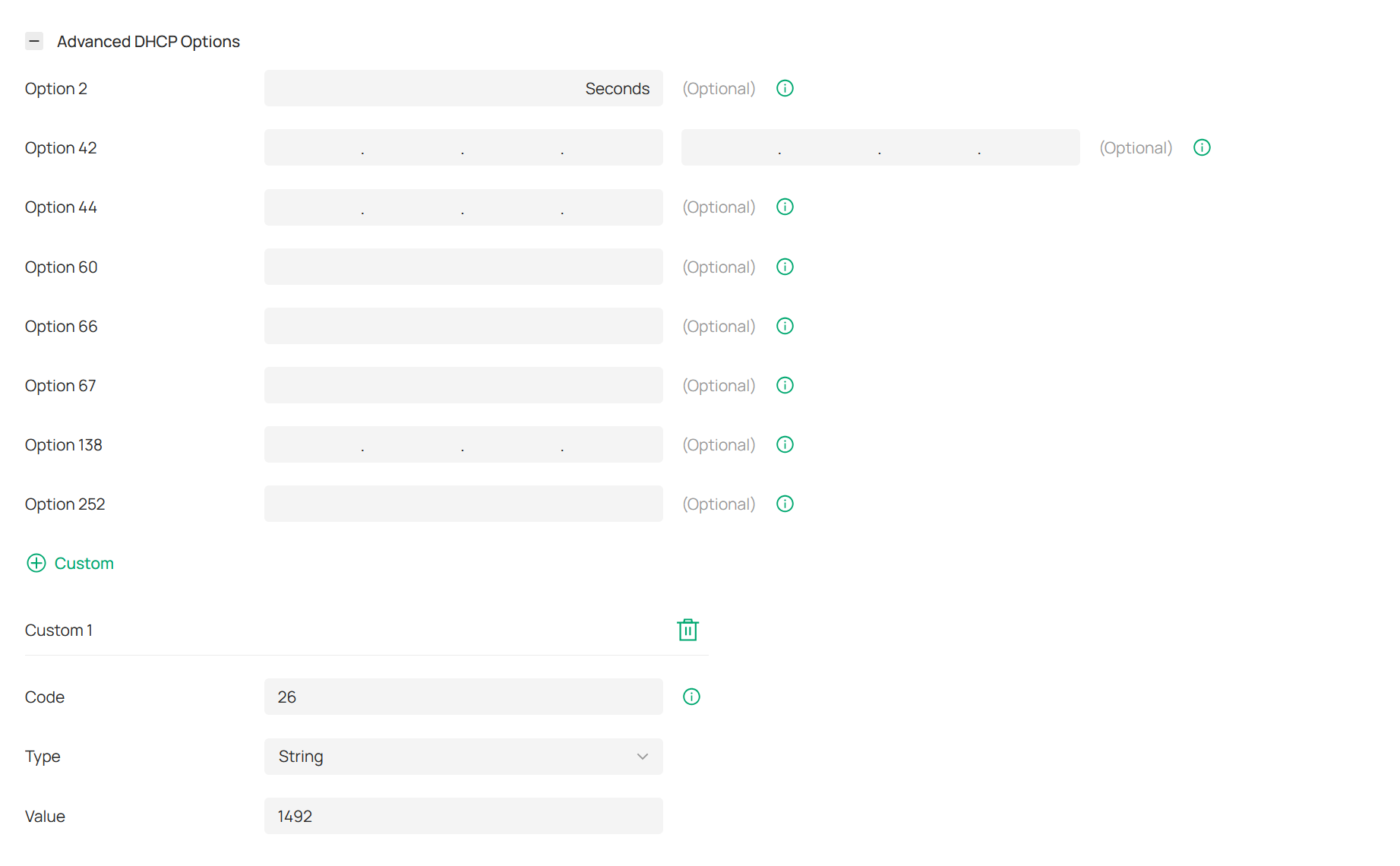

- Copy Link
- Report Inappropriate Content
@-CyRaX- Thanks for the update & suggestion! Did you reverse the windows machine "fix" before testing? I am trying this DHCP setting but so far still seeing failed requests, will keep testing.
- Copy Link
- Report Inappropriate Content
@cykz i did not reverse the netsh fix. After appling the dhcp option. I reconnected my phone to wifi. Then the apps started working again.
- Copy Link
- Report Inappropriate Content
Information
Helpful: 3
Views: 7961
Replies: 54
Voters 1
