
TL-SG108E VLAN Configuration problem

TL-SG108E VLAN Configuration problem

TL-SG108E VLAN Configuration problem
2025-12-05 05:15:52 - last edited 2025-12-09 12:01:18
Model: TL-SG108E  
Hardware Version: V6
Firmware Version: 1.0.0 Build 20230218 Rel.50633

Hello!


While trying to set up 802.1Q VLAN in my system which has TL-SG108E and two TL-SG105E I ran into a problem where no matter what PVID I give to a port, if it's different from 1, there's NO connectivity.


I nailed it down to the simplest configuration with just a SINGLE TL-SG108E.

Configuration:

1. Single TL-SG108E, 192.168.1.230

2. PC connected to Port 6, 192.168.1.77

3. Router connected to Port 2, 192.168.1.1
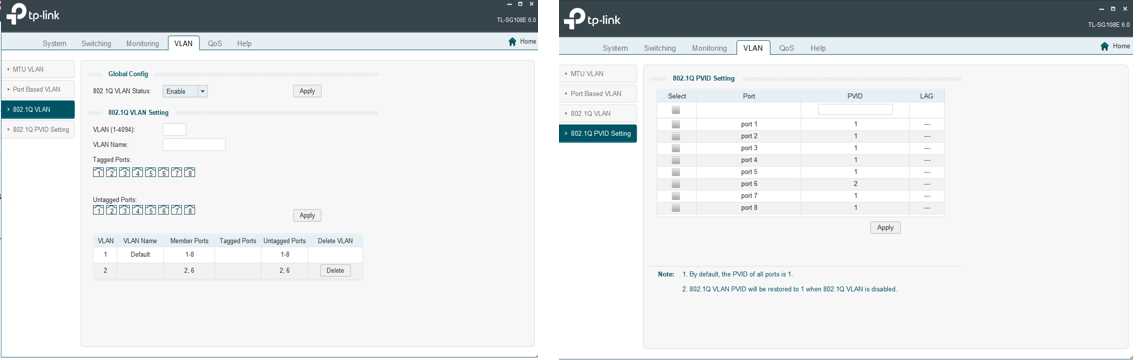
Config I can access TL-SG108E (192.168.1.230).
If I change PVID of port 6 to 1 - everything works. If it's 2 - no connectivity to any node beyond TL-SG108E.


If  PVID of Port 6 = 2, arp of 192.168.1.1 and ping to 192.168.1.1 don't work.


What's wrong and how to fix this?

Thx,

D

  0      
  0      
#1
Options
1 Accepted Solution
Re:TL-SG108E VLAN Configuration problem-Solution
2025-12-06 11:36:53 - last edited 2025-12-09 12:01:18

  @qwer1304 


In looking at your configuration, you need to make some changes:


1. On the 802.1Q VLAN screen, the VLAN 1 untagged ports should be 1,3-5,7-8.  Only one VLAN should be untagged on any given port.

2. On the 802.1Q PVID Setting screen, the PVID should be 2 for ports 2 and 6.


After these changes, VLAN 1 and VLAN 2 will be isolated from each other on the switch.  If you are going to trunk both VLANs to other devices, you need to make VLAN 2 a tagged member of each trunk port.


I would recommend that you use different subnets for the different VLANs. 

1x ER7406 1x OC300 4x SG2008 1x EAP610 3x EAP650-Desktop
Recommended Solution
  0  
  0  
#2
Options
2 Reply
Re:TL-SG108E VLAN Configuration problem-Solution
2025-12-06 11:36:53 - last edited 2025-12-09 12:01:18

  @qwer1304 


In looking at your configuration, you need to make some changes:


1. On the 802.1Q VLAN screen, the VLAN 1 untagged ports should be 1,3-5,7-8.  Only one VLAN should be untagged on any given port.

2. On the 802.1Q PVID Setting screen, the PVID should be 2 for ports 2 and 6.


After these changes, VLAN 1 and VLAN 2 will be isolated from each other on the switch.  If you are going to trunk both VLANs to other devices, you need to make VLAN 2 a tagged member of each trunk port.


I would recommend that you use different subnets for the different VLANs. 

1x ER7406 1x OC300 4x SG2008 1x EAP610 3x EAP650-Desktop
Recommended Solution
  0  
  0  
#2
Options
Re:TL-SG108E VLAN Configuration problem
Thursday - last edited Thursday

  @qwer1304 


I was running into the same kind of problem on SG108E Hardware revision 6.0 with latest firmware (latest today at least):

With a SG108E uplinked (port 1) to a bigger VLAN OK Netgear Switch, i wanted the sg108e to be like this:


Port 1 (trunk/uplink) to NETGEAR Bigger switch

 => VLAN 1 Tagged, VLAN 5 Tagged (same on Netgear side..)  (PVID: 1)


Port 5 Only VLAN 5 Untag (PVID: 5) [Excluded from VLAN 1]

All other ports VLAN 1 Untag (PVID: 1)


==> All this above never worked ! ! ! Because of horrible VLAN limitations of the SG108E !

-----------------------------------------------

What has finaly worked ?


Just put Port 5 also a member of VLAN 1 (Untagged) ! ! !


Device on Port 5 was then able to communicate with all VLAN5 devices elsewhere BUT (hoppefully) UNABLE to see devices on VLAN 1..................

Why ? Because on that bul#@&§ SG108E, what you setup on PVID page is the autority to separate VLAN and is prior to VLAN membership ! And each port has to be member of VLAN 1.....yes, so strange but real !

-------------------------------------------------

Please read below for the Gemini AI conclusions:

Subject: Fix for TL-SG108E v6.0 VLAN Isolation Bug
I found a workaround for the infamous VLAN bug on the   TL-SG108E v6.0. On this specific hardware revision, the switch often fails to pass traffic on a secondary VLAN unless the port remains a member of the default VLAN 1, which is technically non-standard and frustrating.
Here is the "Asymmetric" configuration that actually works:
  1. The Setup:
    • Port 1 (Uplink to Main Switch/Router): Set as Tagged on both VLAN 1 and VLAN 5.
    • Port 5 (Access Port): Set as Untagged on VLAN 5.
  2. The "Fix" (The Weird Part):
    • Contrary to logic, you MUST keep Port 5 as a member of VLAN 1 (Untagged) as well. If you remove it, communication breaks.
    • Go to VLAN > 802.1Q PVID Setting and set Port 5 to PVID 5.
  3. Why this works:
    • Ingress: When a packet enters Port 5, the PVID 5 forces it into VLAN 5 immediately. It never "sees" VLAN 1 because the PVID takes precedence for untagged incoming traffic.
    • Egress: Keeping the port in VLAN 1 (Untagged) seems to satisfy a hard-coded requirement in the v6.0 chipset's MAC forwarding table. It "unlocks" the port's ability to talk to the uplink, but the PVID ensures your traffic stays on the correct subnet.
Result:  Your device on Port 5 will correctly communicate with VLAN 5 and will be unable to see or ping devices on VLAN 1, despite being a "member" of it. It’s an accidental   Asymmetric VLAN  setup that solves the TP-Link hardware limitation.


  0  
  0  
#3
Options