
VPN Site-to-Site with Internet Access through remote site gateway
VPN Site-to-Site with Internet Access through remote site gateway

Hello Everyone,
We have a branch office with an TP-Link ER7206 and we want to connect this branch office through VPN to our main office as if it would be locally. The remote site should use all the resources at our main office but most important, all of the Internet traffic from the branch office should be over the VPN with the gateway on the main office. We have software which looks at the public IP address.
We use the latest f/w on an OC220.
Can anyone point us to the right direction to achieve the above?
Kind regards,
- Copy Link
- Subscribe
- Bookmark
- Report Inappropriate Content

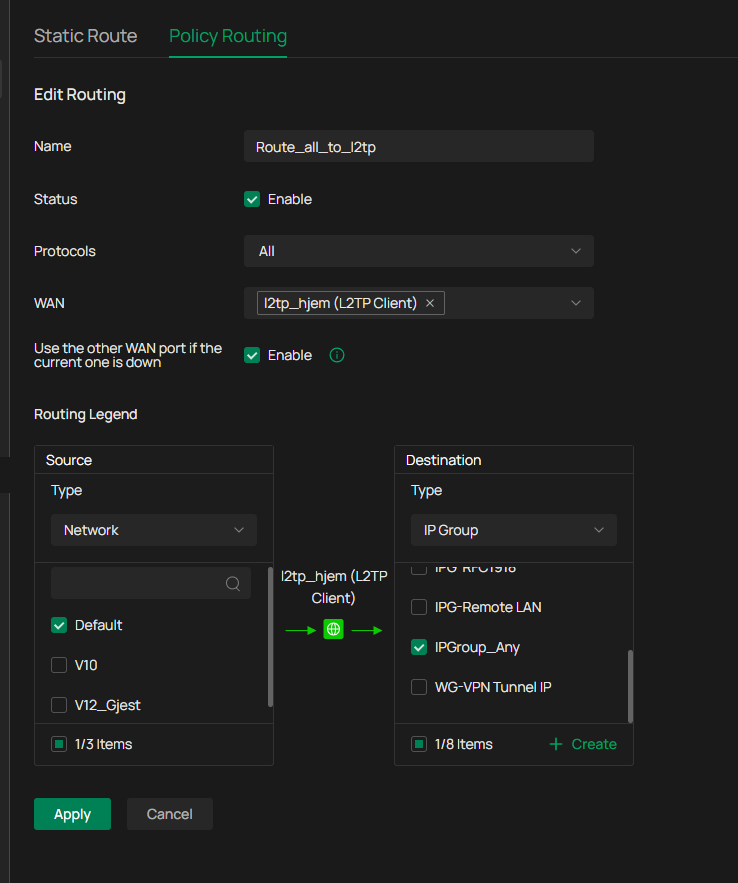
if you have a working l2tp site to site, go to remote site and create a policy route like that to rute everything to main site.
- Copy Link
- Report Inappropriate Content
use sd-wan.
gobal settings, sd-wan
or folow this guide
https://community.tp-link.com/en/business/stories/detail/502060
- Copy Link
- Report Inappropriate Content
I think I misunderstood your question., you can use wireguard to solve your problem. here is a guide,
on remote site set allowed ip to 0.0.0.0/0 then all trafill will go out to main office.
https://community.tp-link.com/en/business/forum/topic/620506
- Copy Link
- Report Inappropriate Content
Thanks for the explanation, we have followed the instructions in the link you send me and on remote site set allowed ip to 0.0.0.0/0. The tunnel is working but on the remote site all Internet connections we're dropped also on the VLAN's we didn't add to the WireGuard Peer.
What should be the settings on the devices at the Remote Site to direct all Internet (Browsing/connecting) traffic through the tunnel and out of the Gateway of the main Site?
- Copy Link
- Report Inappropriate Content
you are right, it doesn't work between two omada routers, i did a test here with an ER605. it ended up that i had to do a full reset on the router, i have the same router against another wireguard server and there it works with 0,0,0,0/0
you can try with l2tp site to site and policy route on remote site. that should work. i'll see if there is any documentation to find on that.
- Copy Link
- Report Inappropriate Content
I didn't find anything useful, but on short, creating an l2tp server on the main site, then create a user and select network extention mode. define remote network.
vpn pool should not overlap with any of your other networks.
then create an l2tp client on the remote site, on working mode select routing.
once that is done, go to routing and policy route on the remote site and route what you want via the main site.
- Copy Link
- Report Inappropriate Content
Thank you, but this path we already tried, a tunnel was created perfectly but we couldn't get the Internet configured on the remote site to use the gateway/DNS od the Head Quarter.
- Copy Link
- Report Inappropriate Content
Theeyeinthesky wrote
Thank you, but this path we already tried, a tunnel was created perfectly but we couldn't get the Internet configured on the remote site to use the gateway/DNS od the Head Quarter.
what du you try? wireguard or l2tp?
- Copy Link
- Report Inappropriate Content
We've tried L2TP with Network Extension Mode and policy routing to (re)direct the Internet traffic through the gateway of the Headquarter. But we couldn't get this working either..
- Copy Link
- Report Inappropriate Content
l2tp works fine, I tested that this weekend. Have you created a policy route? You can do that under network config and route
- Copy Link
- Report Inappropriate Content
Can you explain the steps for successful L2TP connection and the Policy Route? Maybe we have made a little (thinking) error about the settings..
- Copy Link
- Report Inappropriate Content
Information
Helpful: 0
Views: 851
Replies: 13
Voters 0
No one has voted for it yet.