
EAP783 resolves DNS query to itself

Hello,
I have the following devices and an OC300 (version: 6.0.0.36).
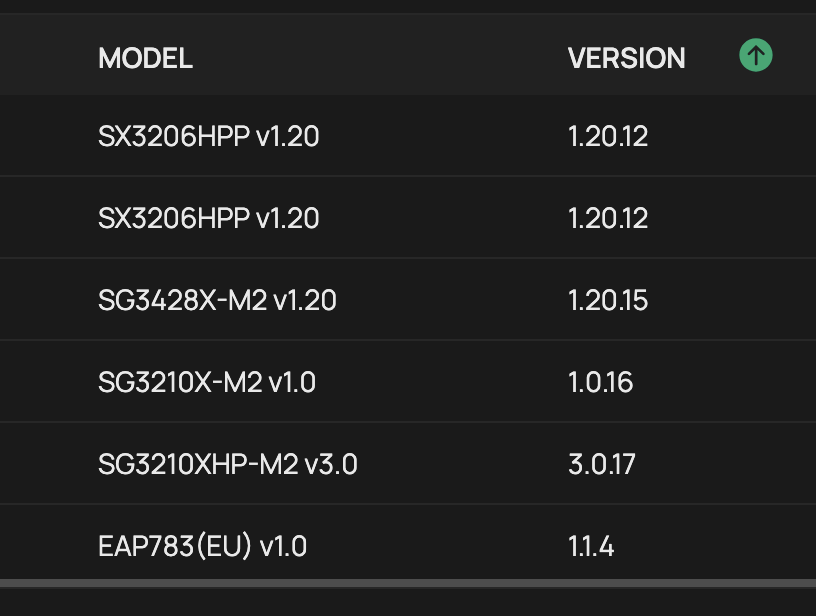
I have configuerd portal auth for a certain SSID.
On OC300 in Global View -> Settings -> System Settings I configured a portal dot example dot com URL that resolves to the OC300 IP address.

The clients successfully authenticated on the portal and connected to the SSID.
Then I updated the EAP firmware from 1.0.14 Build 20240801 Rel. 78844 -> 1.1.2 Build 20251030 Rel. 58575 -> 1.1.4 Build 20251030 Rel. 57645
Then clients started to complain they no longer can get connected. So what happened?
The EAP started to resolve the DNS query to portal dot example dot com to itself and clients fail to connect to the OC300 portal.
I can reproduce this from the wireless and from the wired connection.
On the wired connection I query the DNS-Server on 10.1.2.1 and I get the OC300 IP address (10.0.0.12):
macosx-prompt> dig @10.1.2.1 portal dot example dot com
; <<>> DiG 9.10.6 <<>> @10.1.2.1 portal dot example dot com
; (1 server found)
;; global options: +cmd
;; Got answer:
;; ->>HEADER<<- opcode: QUERY, status: NOERROR, id: 310
;; flags: qr rd ra ad; QUERY: 1, ANSWER: 1, AUTHORITY: 0, ADDITIONAL: 0
;; QUESTION SECTION:
;portal dot example dot com. IN A
;; ANSWER SECTION:
portal dot example dot com. 0 IN A 10.0.0.12
;; Query time: 1 msec
;; SERVER: 10.1.2.1#53(10.1.2.1)
;; WHEN: Tue Jan 06 21:07:25 CET 2026
;; MSG SIZE rcvd: 59
On the wired connection I query the EAP to resolve portal dot example dot com and I get the EAP IP Address (10.0.0.5):
macosx-prompt> dig @10.0.0.5 portal dot example dot com
; <<>> DiG 9.10.6 <<>> @10.0.0.5 portal dot example dot com
; (1 server found)
;; global options: +cmd
;; Got answer:
;; ->>HEADER<<- opcode: QUERY, status: NOERROR, id: 59792
;; flags: qr rd ra ad; QUERY: 1, ANSWER: 1, AUTHORITY: 0, ADDITIONAL: 0
;; QUESTION SECTION:
;portal dot example dot com. IN A
;; ANSWER SECTION:
portal dot example dot com. 0 IN A 10.0.0.5
;; Query time: 8 msec
;; SERVER: 10.0.0.5#53(10.0.0.1)
;; WHEN: Tue Jan 06 21:07:42 CET 2026
;; MSG SIZE rcvd: 59
On the wireless connection I send a DNS query to a non-existing IP and the EAP resolves it to itself:
macosx-prompt> dig @10.20.30.40 portal dot example dot com
; <<>> DiG 9.10.6 <<>> @10.20.30.40 portal dot example dot com
; (1 server found)
;; global options: +cmd
;; Got answer:
;; ->>HEADER<<- opcode: QUERY, status: NOERROR, id: 43309
;; flags: qr rd ra ad; QUERY: 1, ANSWER: 1, AUTHORITY: 0, ADDITIONAL: 0
;; QUESTION SECTION:
;portal dot example dot com. IN A
;; ANSWER SECTION:
portal dot example dot com. 0 IN A 10.0.0.5
;; Query time: 1 msec
;; SERVER: 10.20.30.40#53(10.20.30.40)
;; WHEN: Tue Jan 06 21:08:09 CET 2026
;; MSG SIZE rcvd: 59
Any other URL than portal dot example dot com will be forwarded to the DNS-Server.
As a mitigation that clients can connect the portal again I set the portal URL to "Auto Refresh".
I enforced a Provision of the EAP but no change.

