
Allow WAN Trunk on Gateways

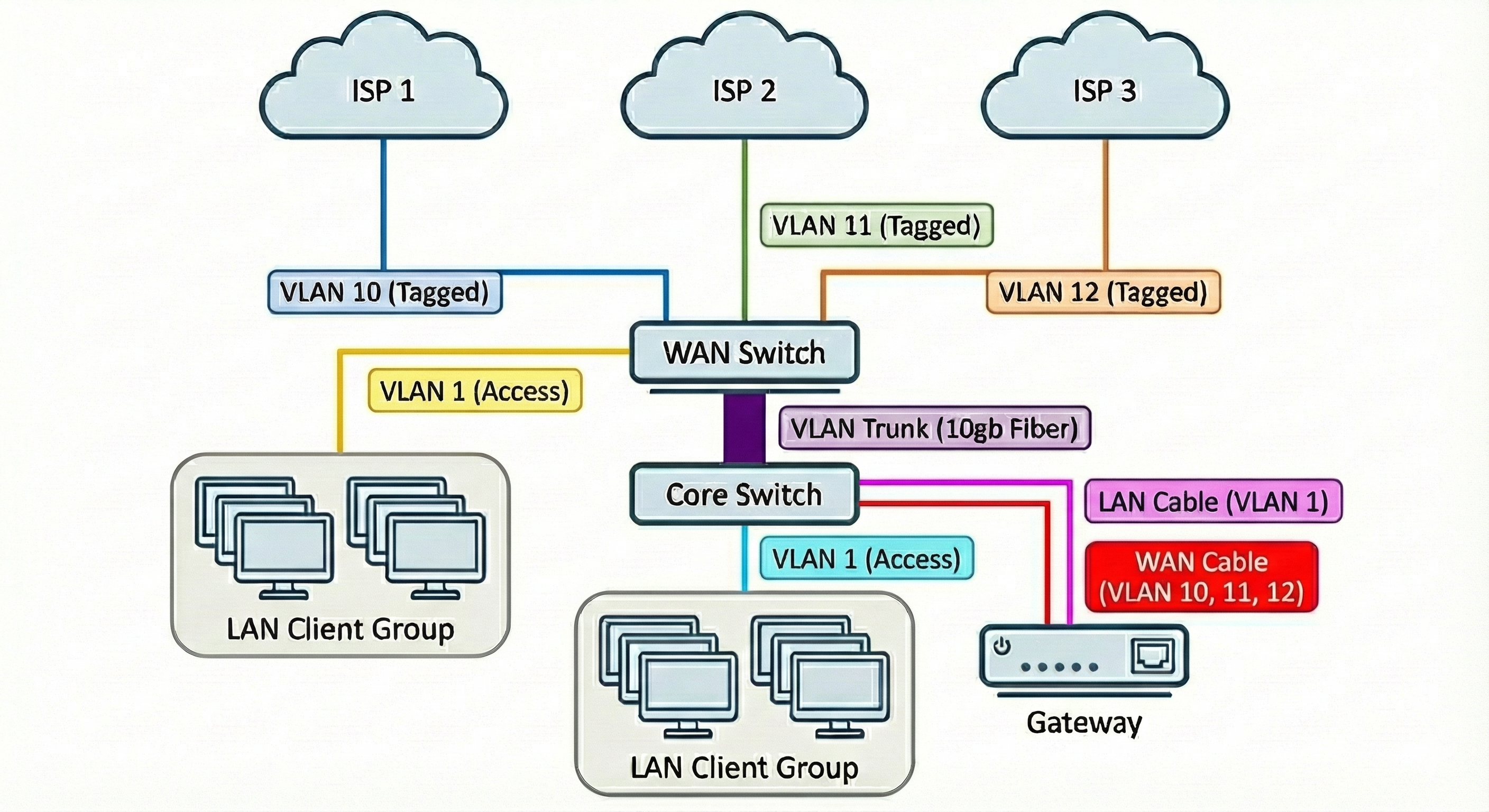
The new Virtual WAN feature demonstrates that the gateways can handle multiple WANs per port, but the controller will not allow a WAN VLAN ID that is in use by a VLAN. Instead, allow a Virtual WAN to be associated with a VLAN so that the gateway can trunk WAN traffic as shown in the image.
- Copy Link
- Subscribe
- Bookmark
- Report Inappropriate Content


Hi @Dr_Marty
Thanks for taking the time to share your thoughts on the TP-Link community—your feedback and ideas are truly valued.
At this point, we can’t confirm whether this enhancement will be rolled out or provide a timeline, but rest assured, I’ve noted your request and will forward it to the development team. If you have any additional suggestions, don’t hesitate to drop them here; we’re always glad to pass them along.
At this juncture, we are unable to confirm whether the requested enhancement will be implemented or to provide a definitive timeline. We appreciate your understanding of the complexities inherent in our product-planning and development cycles.
Should you have any further suggestions or additional context to offer, please feel free to share them here. All supplementary input will be consolidated and forwarded to the relevant teams for continued consideration.
- Copy Link
- Report Inappropriate Content
Hi @Dr_Marty
Thanks for posting in our business forum.
You may refer to this article How to configure Virtual WAN on Omada Gateway to check more information on Virtual WAN.

- Copy Link
- Report Inappropriate Content
@Hank21 Thank you for the response. My experience is that the controller will not allow a virtual WAN VLAN ID that coincides with a defined VLAN, making this configuration impossible, hence the feature request / recommendation.
- Copy Link
- Report Inappropriate Content
Hi @Dr_Marty
Thanks for taking the time to share your thoughts on the TP-Link community—your feedback and ideas are truly valued.
At this point, we can’t confirm whether this enhancement will be rolled out or provide a timeline, but rest assured, I’ve noted your request and will forward it to the development team. If you have any additional suggestions, don’t hesitate to drop them here; we’re always glad to pass them along.
At this juncture, we are unable to confirm whether the requested enhancement will be implemented or to provide a definitive timeline. We appreciate your understanding of the complexities inherent in our product-planning and development cycles.
Should you have any further suggestions or additional context to offer, please feel free to share them here. All supplementary input will be consolidated and forwarded to the relevant teams for continued consideration.
- Copy Link
- Report Inappropriate Content

You can achieve exactly what you want, but its both untidy and in a different way, better
If you are using a seperate Omada switch for your WAN trunking and tagging management, you can adopt it to a new site - this will allow you to set up switch only vlans in whatever combination you want, and because the gateway isnt on this site, you can use those vlan tags on the gateway on the main site on virtual WAN
The switch can still have a management IP on the main site as well, you jsut need to manage your vlan configs properly. Keep the default vlan on the new site and edit it to the same IP range as the management vlan on the main site, so when the switch is adopted, it stays on the right IP and the controller can still speak to it.
In a way, this is untidy - as you have a whole site just for a switch doing nothing but trunking - but - it also means you dont have multiple extra WAN vlans on the main site to deal with
- Copy Link
- Report Inappropriate Content
Information
Helpful: 0
Views: 4042
Replies: 4
Voters 0
No one has voted for it yet.