
Gateway system time on ER706W issue

I've noticed that the system time on my ER706W managed by an Omada software controller is consistently behind time.
I have enabled the NTP server in my site

But gateway configuration shows this device (ER706W) is not compatible with NTP.

However if I change the time zone on the Site settings (change to another time zone and then back to my time zone) the gateway time is corrected, only for it to fall behind over the course of one minute.
The screenshot below is repeated terminal queries on the system time of the gateway ER706W after changing the time zone to another time zone and back again to my time zone. I'm running these queries approx once per second. You can see the time is correct and then drop back where it remains around 20 seconds behind.
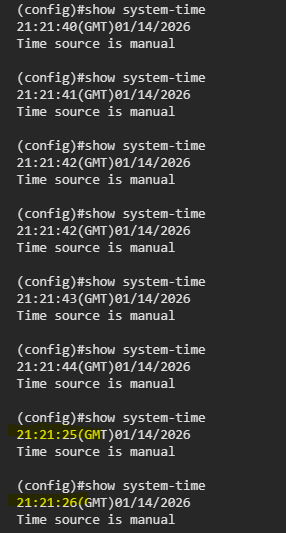
The behaviour is similar if I change the time on the server running the controller.
Can anyone help to understand and correct this behaviour?
- Copy Link
- Subscribe
- Bookmark
- Report Inappropriate Content


Hi @an_other
Thanks for posting in our business forum.
To get more detail and help you with this, may I ask the following information:
1. Is this your new ER706W and installed recently?
2. It seemed that you tried with the Controller mode and CLI interface, did you try to setup the time with NTP server in standalone mode as well?
3. May I ask your local time zone?
4. If the time zone changed to other one and changed back to your local time zone would correct the time while it is behind for around 20 seconds, would this come back to the right time afterwards or you need to do something like change the time zone again or else?
- Copy Link
- Report Inappropriate Content
Thanks for your reply
1. Is this your new ER706W and installed recently?
No, it has been running for about 1 year. However, I have only noticed the time issue recently, so I don't know if it has been this way for some time.
2. It seemed that you tried with the Controller mode and CLI interface, did you try to setup the time with NTP server in standalone mode as well?
It is a running system, in use, so I can't really change it to standalone mode.
3. May I ask your local time zone?
UTC Dublin / Edinburgh / Lisbon / London
4. If the time zone changed to other one and changed back to your local time zone would correct the time while it is behind for around 20 seconds, would this come back to the right time afterwards or you need to do something like change the time zone again or else?
Changing the time zone once does correct the time. I only change it back to keep my correct zone.
For example, I changed to "UTC Coordinated Universal Time" from "UTC Dublin / Edinburgh / Lisbon / London"
Both the time zones are currently on the same time.
The time corrected instantly on the gateway and then fell back by approx 20 seconds shortly after
This is the example trace while I am running show system-time while changing the time zone once:
(config)#show system-time
20:04:31(GMT)01/15/2026
Time source is manual
<------------------------------------- time zone changed here, correct time is now shown below
(config)#show system-time
20:05:01(GMT)01/15/2026
Time source is manual
(config)#show system-time
20:05:02(GMT)01/15/2026
Time source is manual
(config)#show system-time
20:05:03(GMT)01/15/2026
Time source is manual
(config)#show system-time
20:05:05(GMT)01/15/2026
Time source is manual
(config)#show system-time
20:05:06(GMT)01/15/2026
Time source is manual
(config)#show system-time
20:05:08(GMT)01/15/2026
Time source is manual
(config)#show system-time
20:05:09(GMT)01/15/2026
Time source is manual
(config)#show system-time
20:05:11(GMT)01/15/2026
Time source is manual
(config)#show system-time
20:05:12(GMT)01/15/2026
Time source is manual
(config)#show system-time
20:05:13(GMT)01/15/2026
Time source is manual
(config)#show system-time
20:05:14(GMT)01/15/2026
Time source is manual
(config)#show system-time
20:05:15(GMT)01/15/2026
Time source is manual
(config)#show system-time
20:05:17(GMT)01/15/2026
Time source is manual
(config)#show system-time
20:05:18(GMT)01/15/2026
Time source is manual
(config)#show system-time
20:05:19(GMT)01/15/2026
Time source is manual
<--------------------------------------- time reverts back by 20 seconds shortly after
(config)#show system-time
20:05:00(GMT)01/15/2026
Time source is manual
(config)#show system-time
20:05:01(GMT)01/15/2026
Time source is manual
<----------------------------------- this incorrect time contunues to be wrong by the same amount (observed over a few hours)
(note this is monitoring against a known correct value of time from the internet)
- Copy Link
- Report Inappropriate Content
How do Gateways maintain the correct time?
They do not seem to support NTP.
My Gateway shows time source - manual.
There are no commands to manually set the time.
- Copy Link
- Report Inappropriate Content
Hi @an_other
Thank you so much for taking the time to post the issue on the TP-Link community!
To better assist you, I've created a support ticket via your registered email address and escalated it to our support engineer to look into the issue. The ticket ID is TKID260130677 please check your email box and ensure the support email is well received. Thanks!
Once the issue is addressed or resolved, welcome to update this topic thread with your solution to help others who may encounter the same issue as you did.
Many thanks for your great cooperation and patience!
- Copy Link
- Report Inappropriate Content
Information
Helpful: 0
Views: 297
Replies: 4
Voters 0
No one has voted for it yet.