
Connecting two ER7212PC through WAN port

Hi,
Is it possible to connect two ER7212PC's via the WAN ports, each with a different subnet via DHCP, and still be able to access devices on both networks?
So:
Router 1:
static Internet IP / WAN: 192.168.4.1
DHCP IP range: 192.168.5.1/50
Router 2:
static Internet IP / WAN: 192.168.4.2
DHCP IP range: 192.168.6.1/50
I would like to connect these two to eachother, but I can't add the devices in de GUI.
My goal is:
And I'd like to see the video from the 3 cameras connected to ROUTER 1 while I'm connected to router 2. What should I do to ensure that router 1 forwards all its information to router 2?
- Copy Link
- Subscribe
- Bookmark
- Report Inappropriate Content


Hi @SCMAF
Thanks for your valuable reply.
Can you check if you use the ER7212PC V1? If so, then this model does not support the function of disabling NAT. Thus the static routing and disabling NAT does not work for you.
Since you have 2 networks with same subnet WAN IP ranges and this network is planing to be used on two different sites, so you can still consider the site to site IPsec VPN connection between these networks.
How to set up Site-to-Site Manual IPsec VPN Tunnels on Omada Gateway via Omada Controller
- Copy Link
- Report Inappropriate Content

Are they in different locations? if so, establish a VPN between them (at least one of them needs a static IP, or you have DDNS setup), include the Caera subnet in the tunnel
If they are in the same location, what is the reason for having two gateways?
- Copy Link
- Report Inappropriate Content
For testing they are now in the same room, but eventually they will be on 2 seperate locations with a VPN in between.
So I would like to configure them now with just a simple cable in between.
They both have a static Internet adress at this moment.
Router 1: 192.168.4.1
Router 2: 192.168.4.2
But I can't ping them from inside the GUI of the switches.
If I connect a laptop with IP 192.168.4.3 to the WAN port I can ping these ports.
- Copy Link
- Report Inappropriate Content
Hi @SCMAF
Thanks for posting in our business forum.
To meet the network requirements, please check the configuration suggestions below:
1. Launch to your site on ER7212PC 1, the Router 1, and go to Network Config>Transmission>Routing>Static Route to add an entry and allow the access to Router 2. (You can configure the Router 2 the same way.)
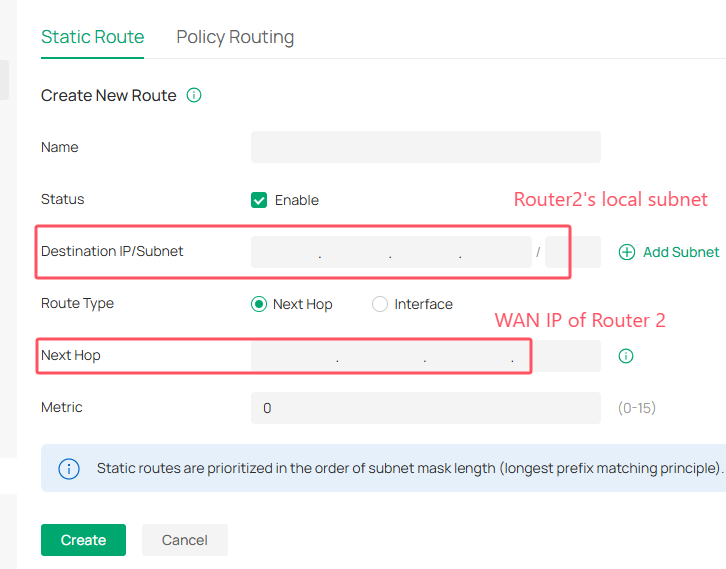
2. You may refer to this guide How to Disable NAT on Omada Gateway to disable the NAT on both router to allow external traffic for each other.
3. Test connectivity: Ping a camera on router 1 (e.g., 192.168.5.10) from a device connected to router 2 (e.g., a PC with IP 192.168.6.x).
- Copy Link
- Report Inappropriate Content
I looked for the option to disable NAT, but I can't find it... Is there a option to switch this option on?
- Copy Link
- Report Inappropriate Content
Hi @SCMAF
Thanks for your valuable reply.
Can you check if you use the ER7212PC V1? If so, then this model does not support the function of disabling NAT. Thus the static routing and disabling NAT does not work for you.
Since you have 2 networks with same subnet WAN IP ranges and this network is planing to be used on two different sites, so you can still consider the site to site IPsec VPN connection between these networks.
How to set up Site-to-Site Manual IPsec VPN Tunnels on Omada Gateway via Omada Controller
- Copy Link
- Report Inappropriate Content
Information
Helpful: 0
Views: 390
Replies: 5
Voters 0
No one has voted for it yet.