
can't get port forwarding (NAT) working

can't get port forwarding (NAT) working

can't get port forwarding (NAT) working
Saturday - last edited 23 hours ago
Model: ER7212PC  
Hardware Version:
Firmware Version:

Hi,


for some reason I can't get the ports open...


I've made a simple setup as in the picture below
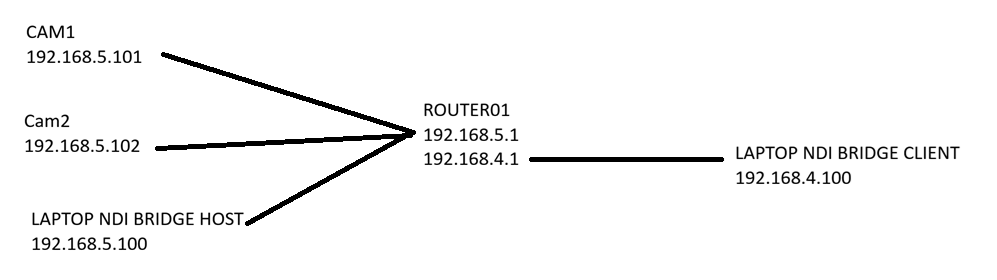
 

On the Laptop NDI Bridge there is software running which should tunnel the video through port 5990. The laptop with client software should pick it up and decode it.

At this moment I cant get through the router. Can someone help me how to get through the router?


The IP's on the router are static ip's.

If I open a constant ping, after startup of the router I get replies. But for some reason if the laptop goes into sleep mode I have to restart also the router again... it looks like the WAN port is being disabled. 

  0      
  0      
#1
Options
1 Accepted Solution
Re:can't get port forwarding (NAT) working-Solution
Sunday - last edited 23 hours ago

  @SCMAF 


is .5.X the LAN side and .4.X the WAN side of the router?

Are the both LAN side but different vlans?


If its the first, then you just need to set up one-2-one NAT for each camera IP and give it a translated IP in the .4.X range over the WAN port, this will achieve what you need


If its the second, then turn off any vlan isolation and gateway/switch ACLs that are isolating the two networks from each other.


Note - not all UDP / Broadcast stuff can cross a vlan boundary

Recommended Solution
  0  
  0  
#3
Options
2 Reply
Re:can't get port forwarding (NAT) working
Saturday
I also can't ping both laptop from one of the laptops
  0  
  0  
#2
Options
Re:can't get port forwarding (NAT) working-Solution
Sunday - last edited 23 hours ago

  @SCMAF 


is .5.X the LAN side and .4.X the WAN side of the router?

Are the both LAN side but different vlans?


If its the first, then you just need to set up one-2-one NAT for each camera IP and give it a translated IP in the .4.X range over the WAN port, this will achieve what you need


If its the second, then turn off any vlan isolation and gateway/switch ACLs that are isolating the two networks from each other.


Note - not all UDP / Broadcast stuff can cross a vlan boundary

Recommended Solution
  0  
  0  
#3
Options