
ER8411: Doesn't recover from the lost internet connection automatically

ER8411 doesn't recover from the lost internet connection automatically. I had to click on the connect button from the controller UI. It doesn't even allow me to connect from the tplink omada cloud. I had to do it when I'm connected to the local network.
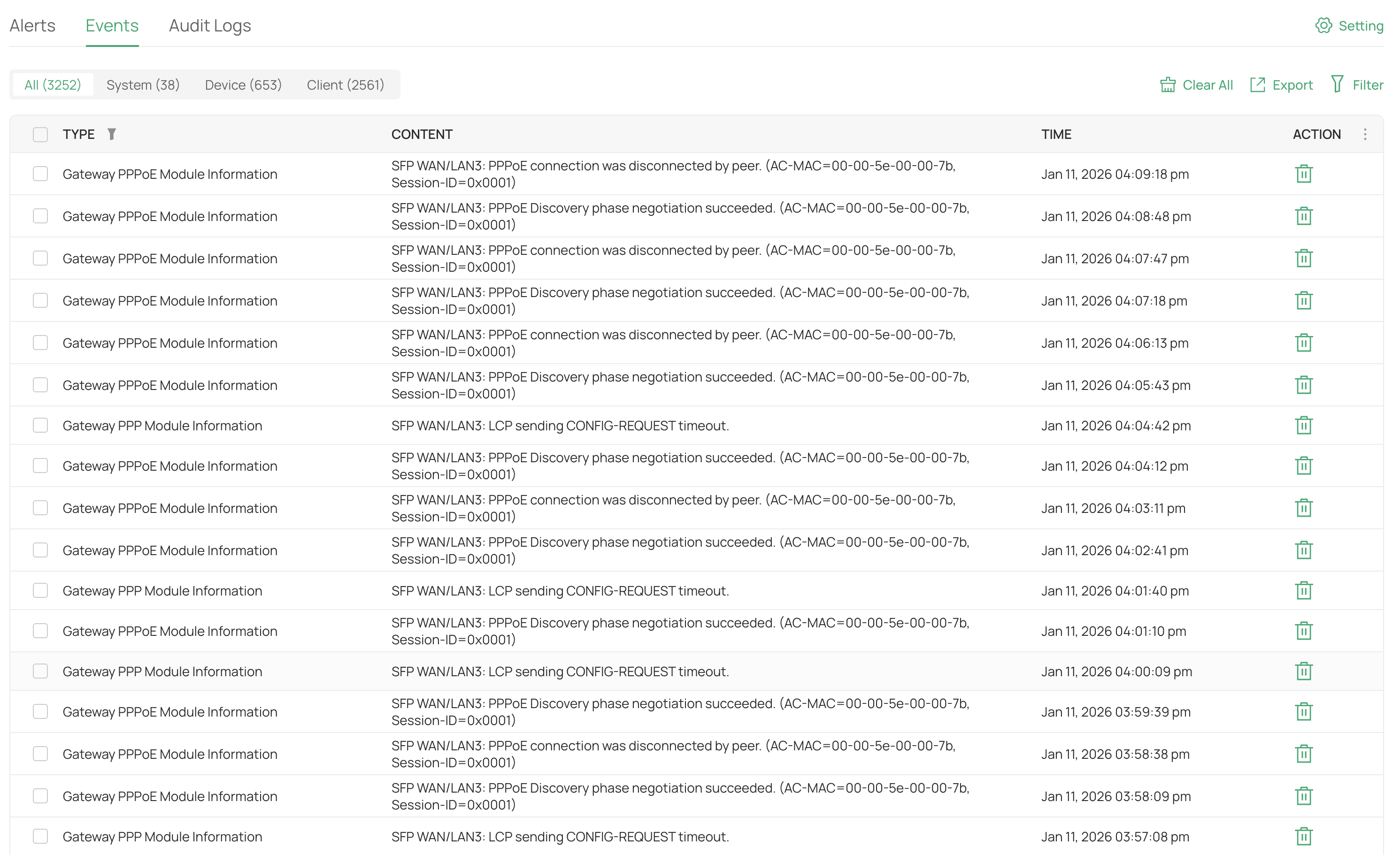 Connection attempt fail
Here are the logs. The connection attempt fails until I click on the button. It connects immediately when I click on the button.
- Copy Link
- Subscribe
- Bookmark
- Report Inappropriate Content


Hi @Sathiya
Thanks for posting in our business forum.
May I ask is this SFP WAN/LAN3 port the only WAN connection port on your ER8411? Is the connection button referred to the WAN configuration port on Internet settings? Can you descrbe your network topology as well?
Based on your situation, we suggest that you can try to connect the computer to the modem directly or try to replace the ER8411 with a different available router if possible.
- Copy Link
- Report Inappropriate Content
Thank you for the response.
May I ask is this SFP WAN/LAN3 port the only WAN connection port on your ER8411?
No, I have a WAN port which works fine.
Is the connection button referred to the WAN configuration port on Internet settings?
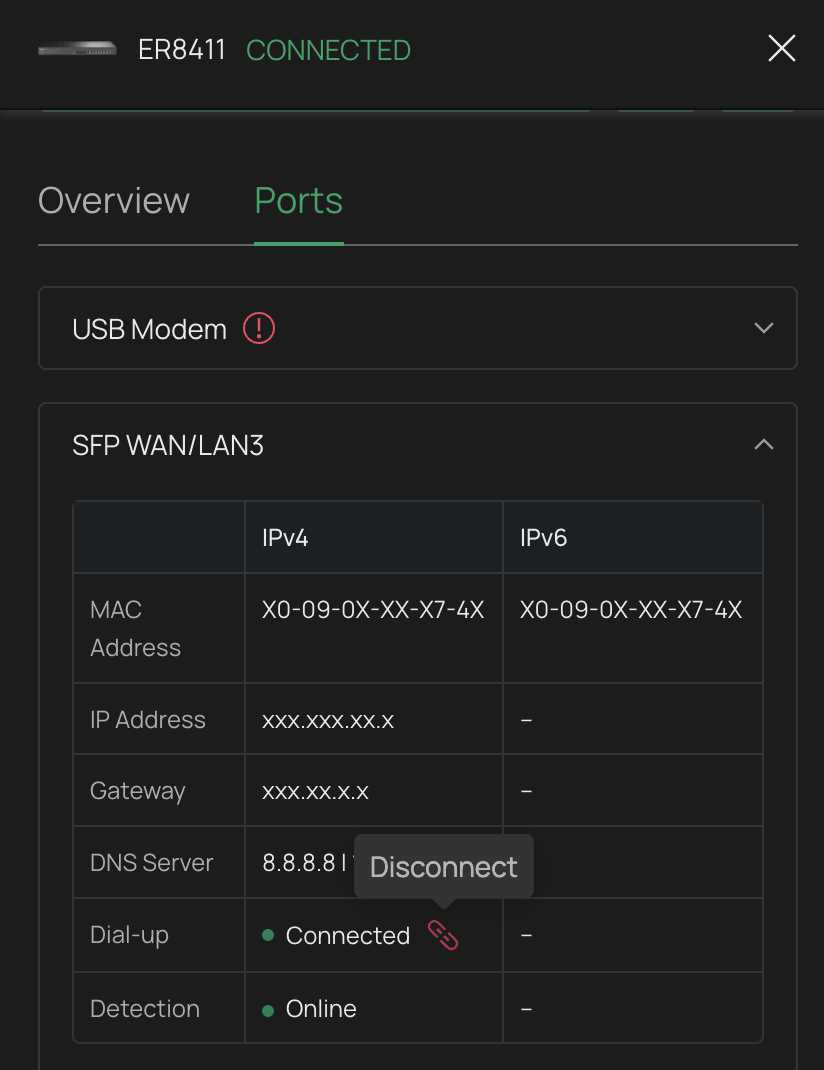
The connect button is in the device overview (right sidebar) > Ports tab > WAN tab. Please see the screenshot.
Can you descrbe your network topology as well?
ER8411 x 1
HSGQ-XPON-Stick x 2 (in WAN and WAN3 for connecting to ISP)
SX3206HPP x 1
EAP615-Wall x 1
Based on your situation, we suggest that you can try to connect the computer to the modem directly or try to replace the ER8411 with a different available router if possible.
Whenever I try to connect the computer, it always connects successfully. I just need to click the "connect" button manually, and it connects immediately. Unfortunately, I don’t have any other compatible router to test.
- Copy Link
- Report Inappropriate Content
Hi @Sathiya
Thanks for your valuable reply.
Since your WAN port works fine without such connection issue, may I know the Internet connection type of this port and the ISPs of these 2 ports (WAN&WAN/LAN3)?
Or you may try to setup the PPPoE connection with another SFP WAN port to prevent physical hardware issue if possible.
- Copy Link
- Report Inappropriate Content
@Hank21 Thank you for the swift reply.
Since your WAN port works fine without such connection issue, may I know the Internet connection type of this port and the ISPs of these 2 ports (WAN&WAN/LAN3)?
The WAN port uses GPON, while the WAN/LAN3 port uses EPON. One thing to note is that the ISP in the WAN port is stable and rarely disconnects. I never faced similar issues on the WAN port. Either it is not occurring, or I'm unaware.
Or you may try to setup the PPPoE connection with another SFP WAN port to prevent physical hardware issue if possible.
That's a great idea, but it requires considerable effort and is not immediately feasible.
- Copy Link
- Report Inappropriate Content
Hi @Sathiya
Thank you so much for taking the time to post the issue on the TP-Link community!
To better assist you, I've created a support ticket via your registered email address and escalated it to our support engineer to look into the issue. The ticket ID is TKID260153394 please check your email box and ensure the support email is well received. Thanks!
Once the issue is addressed or resolved, welcome to update this topic thread with your solution to help others who may encounter the same issue as you did.
Many thanks for your great cooperation and patience!
- Copy Link
- Report Inappropriate Content
Information
Helpful: 0
Views: 116
Replies: 5
Voters 0
No one has voted for it yet.