
ER605 v2.3.3 configure for FreeDNS

I have been trying to configure the ER605 to update a FreeDNS (Afraid) DDNS. I have tried every combination I can think of to enter into the Update URL: field. I have copied the direct URL from the Afraid website and modified it as best I can but keep getting the error "Update URL must contain [USERNAME],PASSWORD], AND [DOMAIN] error. I have tried many combinations of the URL but unable to figure out exactly what it is asking for. Another thread on this subject says to select the dropdown FreeDNS option, but this doesn't exist. The only built in options are Peanuthull, Comexe, DynDNS, NO-OP and then Custom DDNS which is where I am trying to enter this data. Has anyone been successful with this?
- Copy Link
- Subscribe
- Bookmark
- Report Inappropriate Content

Thanks, that's an interesting URL format, I guess there is no username/password as it is just based on an API key value, and no IP needed as it just uses the IP of the request.
You may want to edit your post to redact that URL as I think you might have posted your unique key!
As for the error, just to reiterate, it is asking you to put the literal strings [PASSWORD] [USERNAME] etc. into the URL. Not your actual password between brackets, the literal text [PASSWORD] which will then be substituted with whichever values you pick when you create the custom DNS entry in the section below the part where you enter the URL
So in your case I think the URL should be:
https://freedns.afraid.org/dynamic/update.php?[PASSWORD]
HOWEVER, the software is set up to require all 3 of those placeholder strings, even though you don't need them for your URL format. So, annoyingly, I think you will have to do something like this:
https://freedns.afraid.org/dynamic/update.php?[PASSWORD][USERNAME][DOMAIN]
And then in the config set password as your password, and leave the other two blank.
If it doesn't allow you to set the other two to blank then you might have to do a bit of a cludge and fit [DOMAIN] and [USERNAME] into the URL somewhere where they still work:
https://[DOMAIN]/[USERNAME]/update.php?[PASSWORD]
and then for example in your config set domain = freedns.afraid.org, username = dynamic and password to your API key, then it should work
- Copy Link
- Report Inappropriate Content
That error means that the URL you provide has to literally contain the strings [USERNAME] [PASSWORD] and [DOMAIN]. Those placeholder strings are then substituted with the values you provide when setting up a Dynamic DNS entry.
For example, I use namecheap and turned their Dynamic DNS URL into this: <base url here>/update?host=[USERNAME]&domain=[DOMAIN]&password=[PASSWORD]&ip=[IP]
Some of the fields may not match up exactly to what your DDNS provider requires. In my case I didn't need a USERNAME field but I needed a HOST field, which isn't an option. So I repurposed the USERNAME field for my host instead.
- Copy Link
- Report Inappropriate Content
Yes, I relalize that the user name, password and domain must be entered. I have tried to do that putting the info into the string at various places and following the examples that I have found on the Internet. Nothing works. I keep getting the same error no matter how or what order I enter it. I need to find someone who has actually been successful at entering their data into the string for the FreeDNS or Afraid DDNS for the ER605 to accept.
- Copy Link
- Report Inappropriate Content
Could you post the full URL that is giving you the error? (You may need to omit the start of the URL as I think this forum blocks links)
- Copy Link
- Report Inappropriate Content
Thanks for your help.
I have tried to insert my username, password and domain into that string at the start, end and even in middle. I have tried it with brackets and without. With commas between them and colons. But, no matter where I put that information or what format I try to use I get the following error:

- Copy Link
- Report Inappropriate Content
Thanks, that's an interesting URL format, I guess there is no username/password as it is just based on an API key value, and no IP needed as it just uses the IP of the request.
You may want to edit your post to redact that URL as I think you might have posted your unique key!
As for the error, just to reiterate, it is asking you to put the literal strings [PASSWORD] [USERNAME] etc. into the URL. Not your actual password between brackets, the literal text [PASSWORD] which will then be substituted with whichever values you pick when you create the custom DNS entry in the section below the part where you enter the URL
So in your case I think the URL should be:
https://freedns.afraid.org/dynamic/update.php?[PASSWORD]
HOWEVER, the software is set up to require all 3 of those placeholder strings, even though you don't need them for your URL format. So, annoyingly, I think you will have to do something like this:
https://freedns.afraid.org/dynamic/update.php?[PASSWORD][USERNAME][DOMAIN]
And then in the config set password as your password, and leave the other two blank.
If it doesn't allow you to set the other two to blank then you might have to do a bit of a cludge and fit [DOMAIN] and [USERNAME] into the URL somewhere where they still work:
https://[DOMAIN]/[USERNAME]/update.php?[PASSWORD]
and then for example in your config set domain = freedns.afraid.org, username = dynamic and password to your API key, then it should work
- Copy Link
- Report Inappropriate Content
- Copy Link
- Report Inappropriate Content
Glad to hear you got it working! And yes I agree the whole config is quite inflexible and I also struggled when I was setting this up for myself a month ago and ended up having to kludge the URL parameters a bit as well.
I actually just created an account on this forum today because I am having a different issue with dynamic DNS I wanted to make a thread about lol 
I am very happy with my ER605 overall though - there have been a couple things like this that have been a bit unintuitive but in the end I have managed to get everything working that I wanted, it's quite a capable router for the price
- Copy Link
- Report Inappropriate Content
Yes, the ER605 does a fanstastic job. It is so inexpensive that I have actually replaced my Ubiquiti ER4 with this unit as it is easier to configure (now that I have the DDNS working). I also had a problem where I didn't understand the IP/MAC binding that was causing changes in static IP address to fail when I tried to change the IP address. Even TP-link tech help couldn't figure it out. But, I got that figured out now too. So, thank you very much for your help. The answer was quite easy but it would be nice if the user manual would explain this a bit better. Most other routers give better explanations of this process. Also, TP-Link has their own DDNS server that other home products can use, but they don't allow the ER605 to work with that.
Have a great day, Craig
- Copy Link
- Report Inappropriate Content

@CraigKLB
I have to admit, I couldn't solve it with the above suggestions.
Pasting this _exact_ text into the Update URL field of my Omada ER605 V2 worked though (firmware 2.3.3 Build 20251029 Rel.18054):
http://[USERNAME]:[PASSWORD]@freedns.afraid.org/nic/update?hostname=[DOMAIN]&myip=[IP]
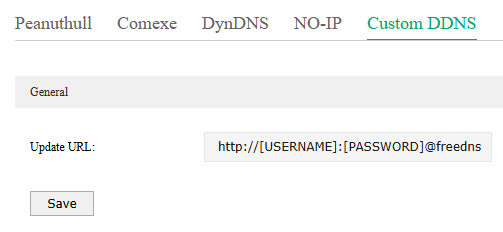
Additionally I had to add my real username, password and domain name when I added a custom DNS entry below the URL field. In the example below I have used "dummyusername" and "dummydomain" instead of my actual information.
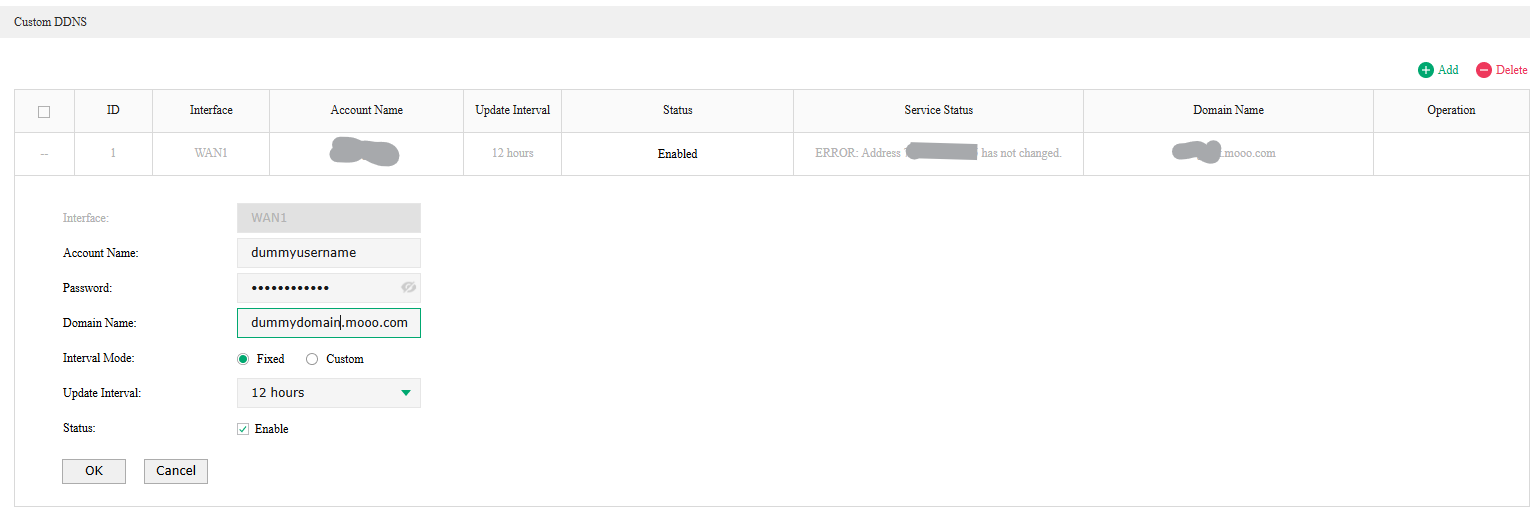
I found the solution here: https://support.omadanetworks.com/in/document/13307/
Hope it can be of use to others. If not, I just disclosed what a slow learner I am :)
- Copy Link
- Report Inappropriate Content
@CraigKLB With the help of another user, I have resolved this issue and it is working fine now.
- Copy Link
- Report Inappropriate Content
Information
Helpful: 0
Views: 1211
Replies: 10
Voters 0
No one has voted for it yet.