
ER605 - Can't set up multiple Dynamic DNS entries, interface dropdown greyed out

I am trying to set up a second Dynamic DNS entry on my ER605 using custom DNS, but the interface dropdown is completely greyed out and I am unable to select my WAN interface:
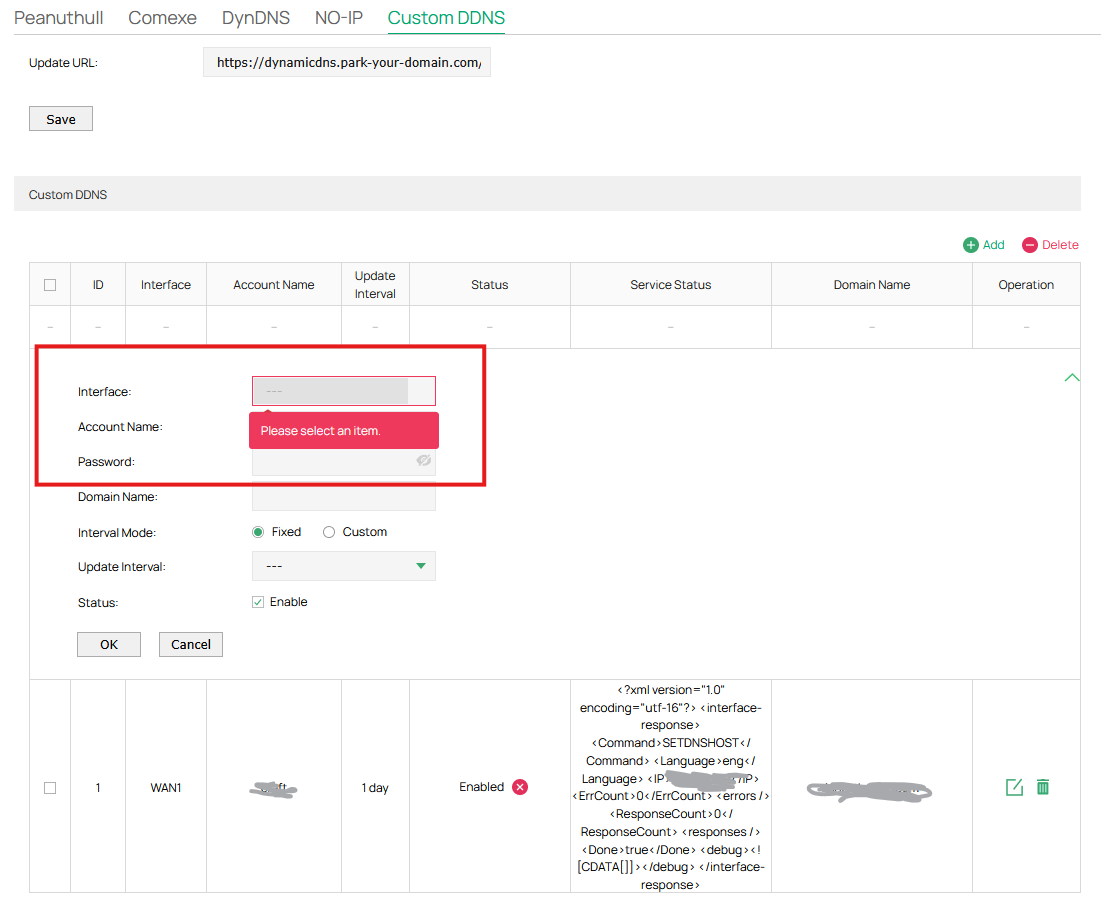
Is this a bug? I don't understand why I can't have two Dynamic DNS entries on the same WAN.
I found an older (locked) thread from a few years ago here where someone had the same issue: https://community.tp-link.com/en/business/forum/topic/513332
Thanks in advance for any help!
- Copy Link
- Subscribe
- Bookmark
- Report Inappropriate Content


Currently different DDNS providers can work on the same WAN port on Omada gateway, while the same provides cannot do this.
- Copy Link
- Report Inappropriate Content

you are right, you can only have one on each wan interface, why it is limited to only one I don't know
- Copy Link
- Report Inappropriate Content
Thank you very much for confirming!
Seems strange to me that this isn't allowed, I wonder if this is a bug or a design oversight?
I don't see why it shouldn't be possible to set up multiple DDNS for a single interface - as far as I understand it all the DDNS setup does is basically make CURL requests, so I can't see a technical reason why multiple for the same interface shouldn't be allowed?
Perhaps the developers thought nobody would want multiple domains pointing to the same IP? I am trying to run two services with two subdomains pointed at my router, so this functionality would be very useful for me... I can't imagine this is too much of an obscure usecase? Especially if you were doing something like virtual hosting for a bunch of websites.
- Copy Link
- Report Inappropriate Content
Thanks for posting in our business forum.
May I know if the second DDNS entry is from the same provider or different one?
- Copy Link
- Report Inappropriate Content
@Hank21 Hi, thanks for your reply
It's from the same provider, I'm on the Custom DDNS page where only one provider URL can be entered at the top. I don't have any other DDNS configuations on the other pages.
I have a single Custom DDNS already set up, and then when I go to create another one (from the same provider (e.g. the same URL)) I get the error in the screenshot.
- Copy Link
- Report Inappropriate Content
Currently different DDNS providers can work on the same WAN port on Omada gateway, while the same provides cannot do this.
- Copy Link
- Report Inappropriate Content
Information
Helpful: 0
Views: 638
Replies: 5
Voters 0
No one has voted for it yet.