
Three CPE710, SG2210XMP-M2 and RSTP
Three CPE710, SG2210XMP-M2 and RSTP

This is a follow on from the post below,
https://community.tp-link.com/en/business/forum/topic/854432
Hi,
I am writing to request technical assistance regarding a network issue I am experiencing with my CPE710 units after configuring RSTP on my SG2210XMP-M2 1.0 switch. All devices are currently running on the latest firmware.
My setup consists of three CPE710 units: one acting as an Access Point (CPE710 v1unit 1) and two acting as Clients. The first client (CPE710 v2 unit 2) is located 400m from the AP, and the second client (CEP710 v1 unit 3) is located 700m away.
The SG2210XMP-M2 switch is connected to the furthest client (CPE710 unit 3). The primary connection is via fiber on Port 9, while the CEP710 is connected to Port 1.
Problem: When I connect this CPE710 unit to Port 1, the other client (CPE710 unit 2) loses its internet connection. While CPE710 unit 2 remains connected to the AP (CPE710 v1unit 1) and the internal network, it and all devices behind it lose external internet access.
I have followed the configuration guide and attached my current RSTP settings for your review. Could you please let me know if there is a specific setting I may have overlooked or if there is a known conflict with this configuration?
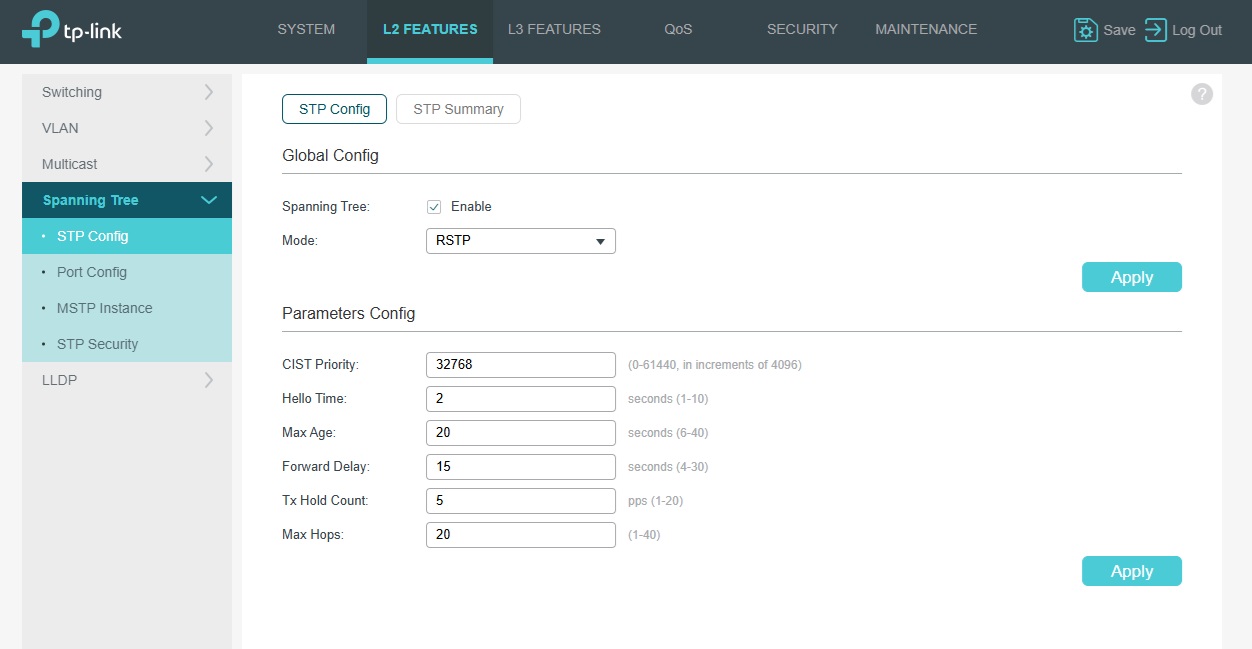
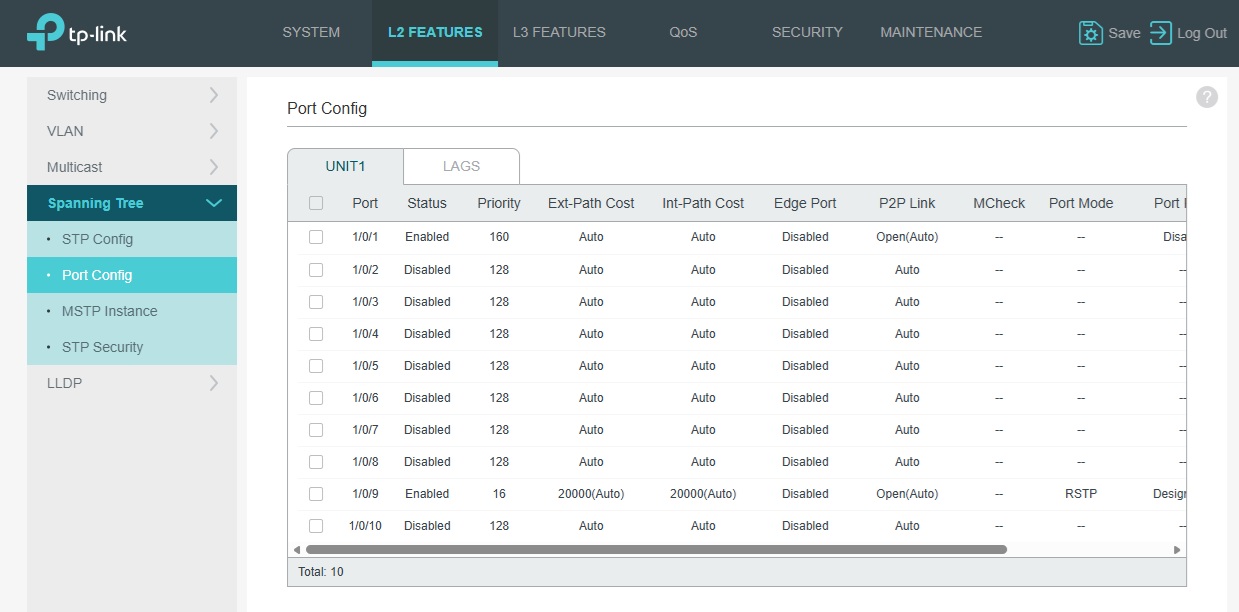
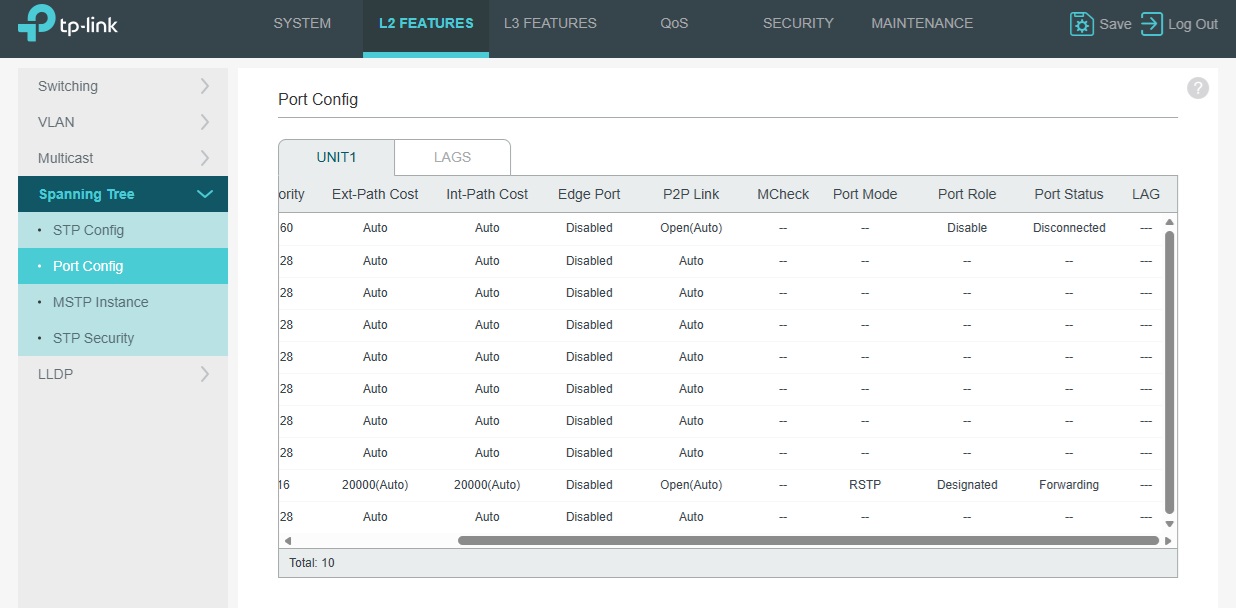
FYI - When the CPE710 is connected above on P1 it does say blocking .
Thank you for your help.
Cheers.Dave
- Copy Link
- Subscribe
- Bookmark
- Report Inappropriate Content


Hi @Nesswill
Nesswill wrote
Why two switches, and if so what two switches, currently its only the SG2210XMP-M2 on CPE3.
Why Must All Loop-Participating Switches Enable RSTP?
- Protocol Consistency: RSTP relies on the exchange of BPDUs (Bridge Protocol Data Units) between switches to negotiate the topology. If some switches run STP (e.g., legacy 802.1D) while others run RSTP, protocol incompatibility will cause:
- Slower convergence (RSTP’s fast convergence feature is lost).
- Potential temporary loops or suboptimal paths.
- Port Role Negotiation: RSTP’s Alternate/Backup ports and fast failover mechanisms require coordination among all switches. Non-RSTP devices cannot interpret these roles, potentially causing incorrect blocking of critical links.
So when the fibre is up Green
Son when the fibre is down Red
>>>>Correct
Cheers,
Dave.
- Copy Link
- Report Inappropriate Content
Hi @Nesswill
How many switches did you install? If there is only one, RSTP will not take effect. Additionally, the suggestion I provided was to establish a failover between two sites. like below:
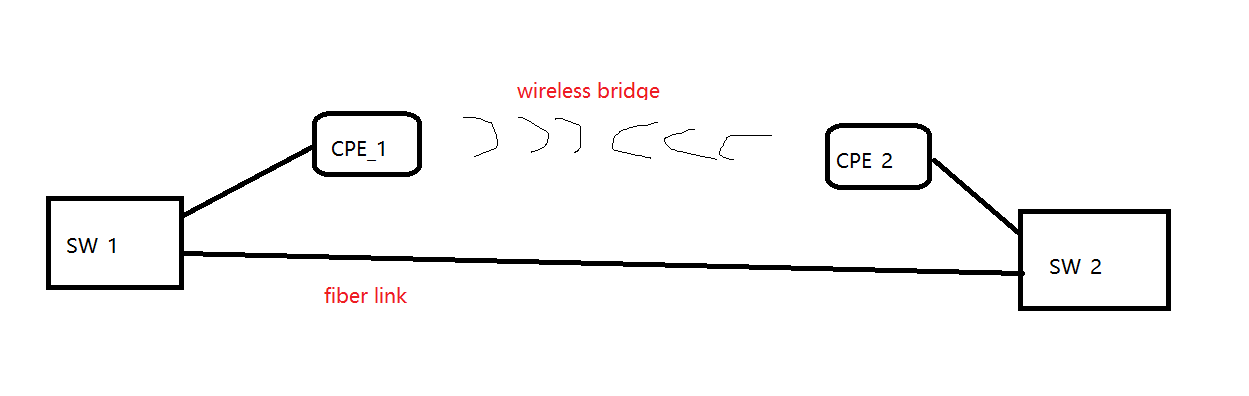
If you have three sites that require this configuration, you will need to set up two sets of wireless bridges. In the current setup, having two backup links occupying the same port on SW1 would cause issues during operation. Like below:
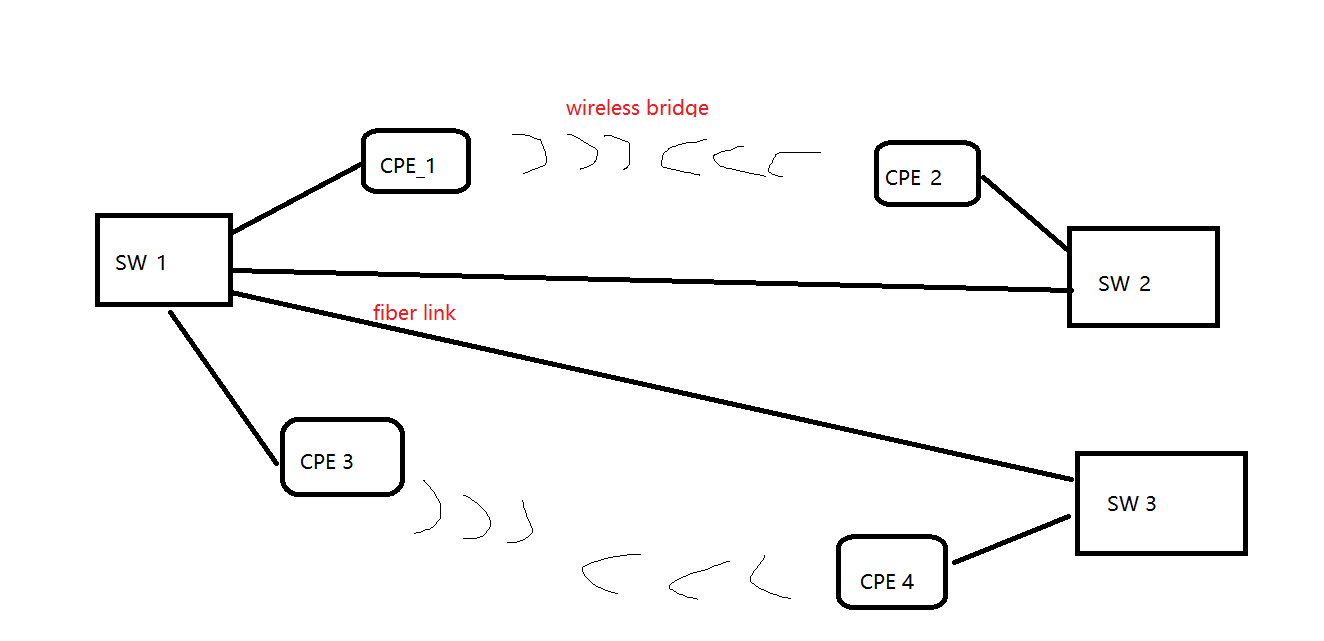
In summary, you will need: 3 switches and 4 CPE units. Let me know if you have any other confusion. Thanks.
- Copy Link
- Report Inappropriate Content
It's like you're first image see below,
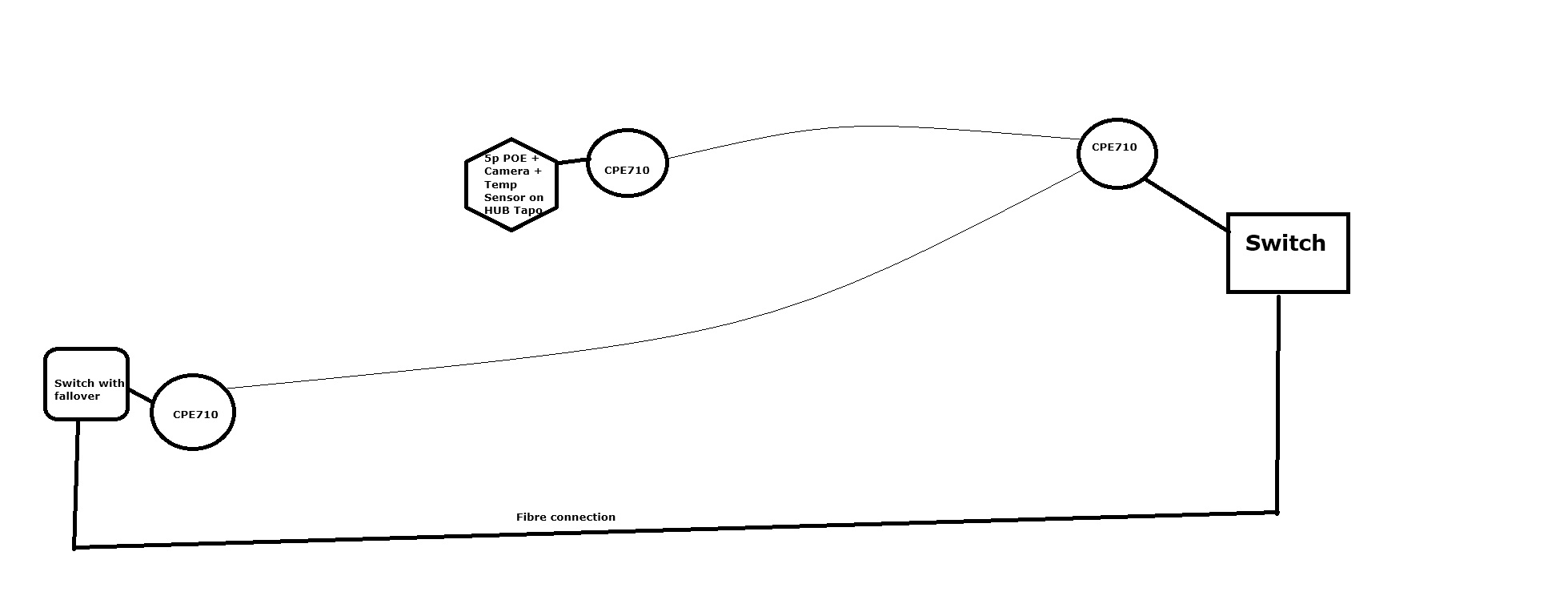
The line between the CPE710s is a transmission connection not a hard wired connection.
- Copy Link
- Report Inappropriate Content
Hi @Nesswill
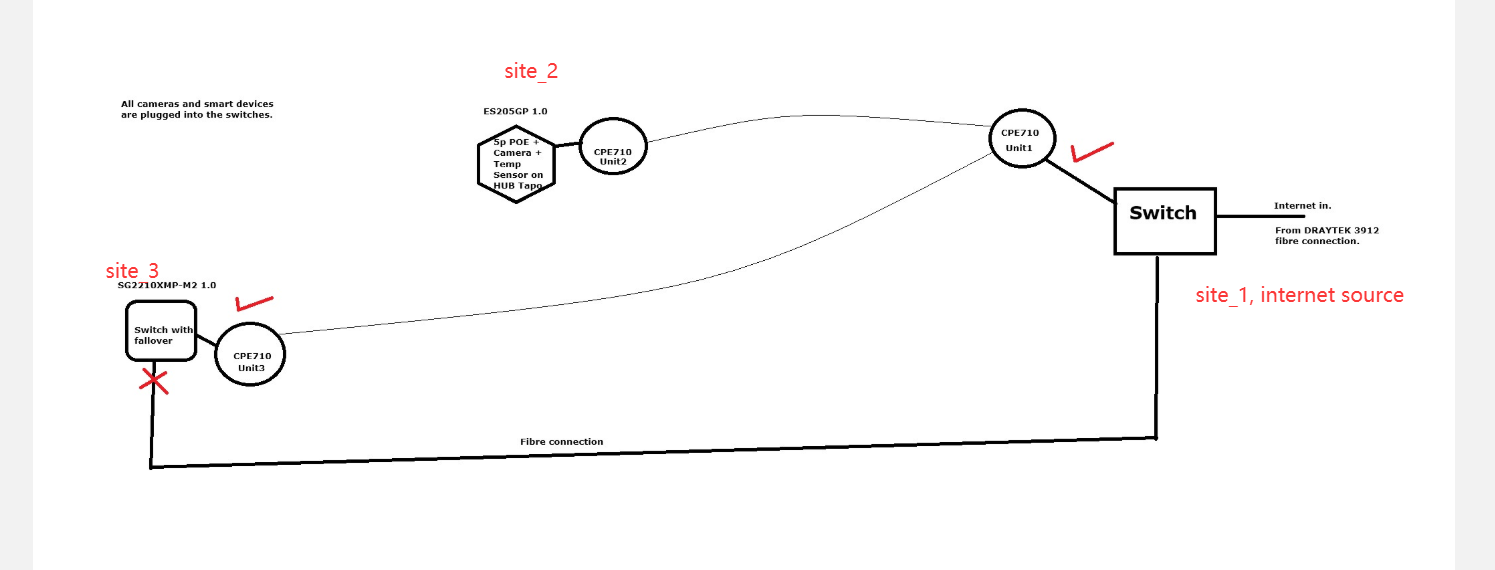
In your topology, which site is the Internet source?
Please note that when the main link (fiber connection) is operating normally, there will be no traffic on the backup link (CPE wireless bridge). In other words, you can't plug the cameras into the CPE bridges. They should be plugged into the switch.
- Copy Link
- Report Inappropriate Content
Thank you for your reply. I have attached an updated drawing for your review.
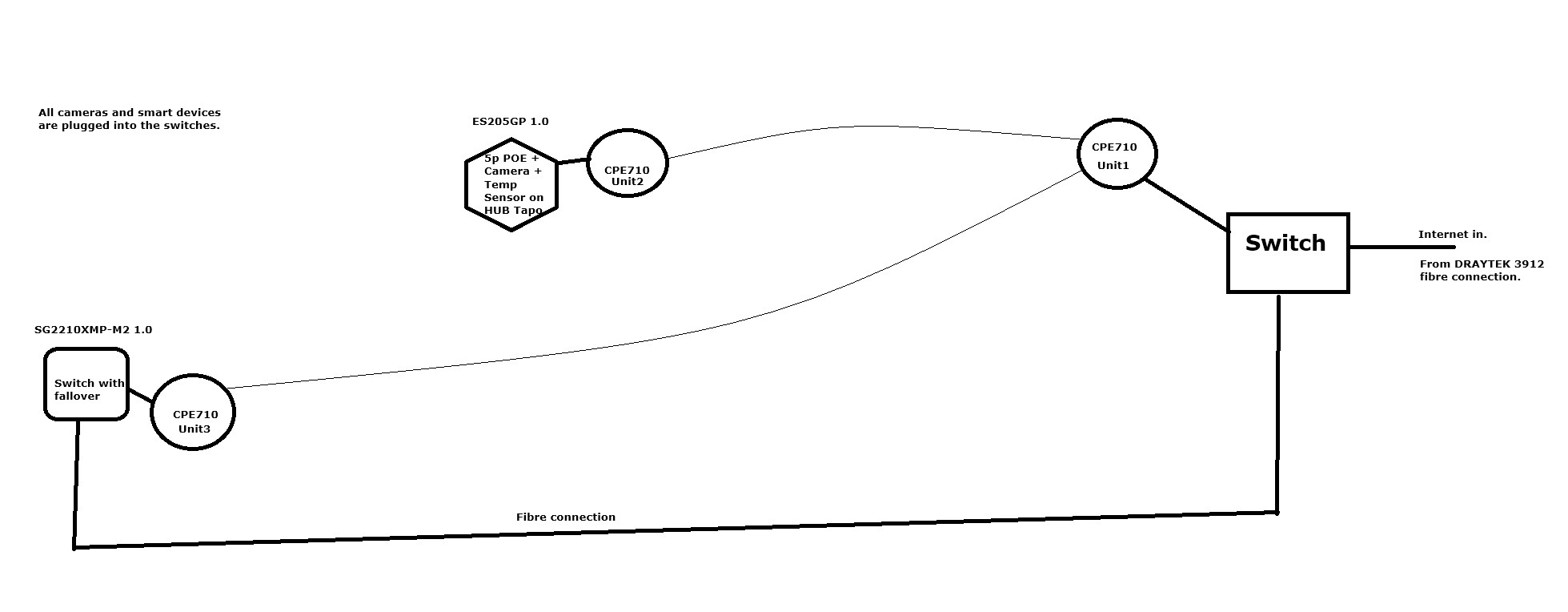
To confirm the setup, all cameras and smart devices are either connected directly to the switches or via Wi-Fi. The PoE Wi-Fi access points are also plugged directly into the switches.
Given this configuration, do you agree that the issue I described should not be occurring?
As a reminder, when I connect CPE710 unit 3 (client) to Port 1 (on the SG2210XMP-M2 1.0), the second client (CPE710 unit 2 on the ES205GP 1.0) loses its internet connection. While the second unit remains connected to the access point (CPE710 unit 1) and the internal network, it and all devices behind it lose external internet access.
I look forward to your thoughts on what might be causing this conflict.
Cheers, Dave.
- Copy Link
- Report Inappropriate Content
Hi @Nesswill
Thanks for the clarification.
Yes, it's as expected.
In this topology, once the third CPE is connected, a loop forms. The configured RSTP will take effect, blocking this link (I’ve drawn two red crosses on the blocked line.)
and, consequently, Unit 2’s external network access.
This wireless link will only come back online after the fiber is disconnected. This is what I meant by the backup link being inactive under normal operation.
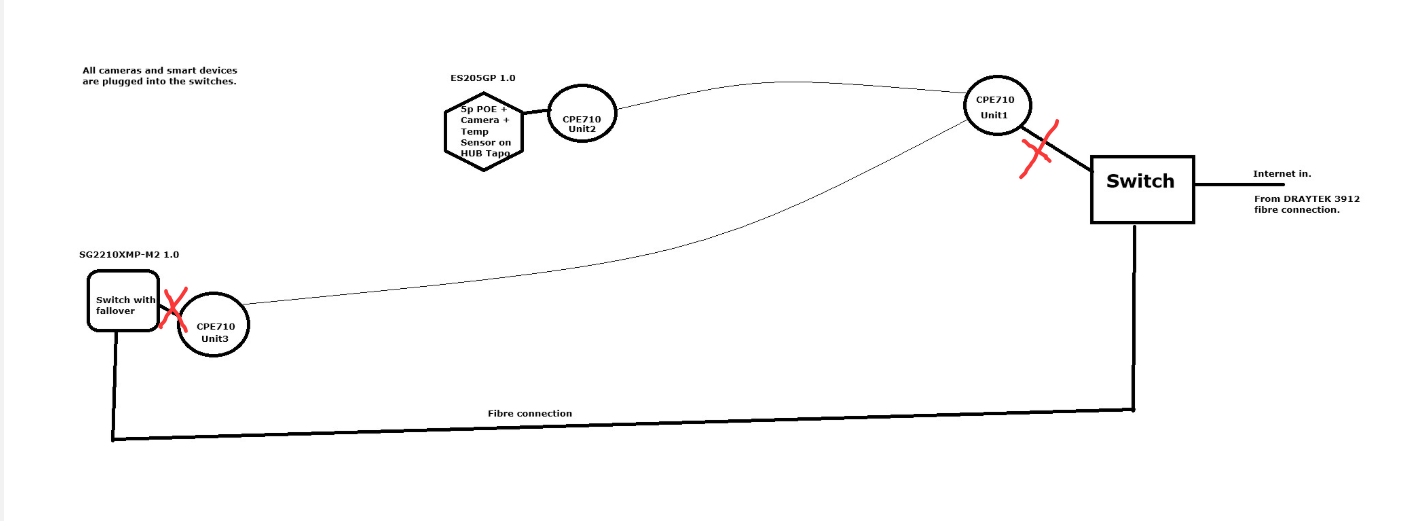
So the CPE unit2 won't work with this installation. You can configure the CPE_2 as access point mode, and plug it into another port of switch_1.
- Copy Link
- Report Inappropriate Content
Sorry maybe i misunderstand, should it not be like the drawing below when the fibre goes down? Otherwise CPE3 would not connect to CPE1 to get internet.
In this topology, once the third CPE is connected, a loop forms. Yes The configured RSTP will take effect, blocking this link (I’ve drawn two red crosses on the blocked line.) If that was the case i would have no connection to the internet, and that's not how it works.
and, consequently, Unit 2’s external network access. Why as if it did i would have no internet on CPE710 unit3 but i do.
This wireless link will only come back online after the fiber is disconnected.?? This is what I meant by the backup link being inactive under normal operation.
So the CPE unit2 won't work with this installation. Why as CPE3 does? You can configure the CPE_2 as access point mode, and plug it into another port of switch_1. No as its along way from Switch1. That's why i have the CPE710!
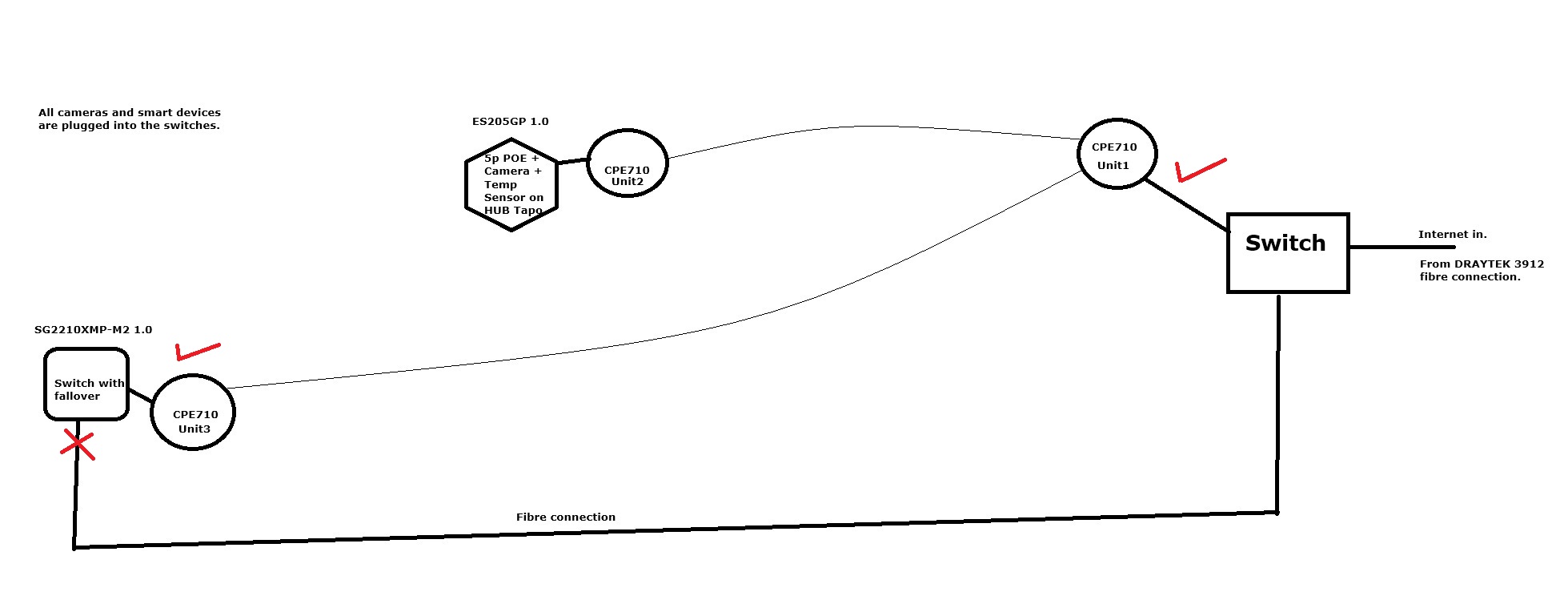
Problem: When I connect this CPE710 unit to Port 1, the other client (CPE710 unit 2) loses its internet connection but not CPE710 unit3. While CPE710 unit 2 remains connected to the AP (CPE710 v1unit 1) and the internal network, it and all devices behind it lose external internet access.
- Copy Link
- Report Inappropriate Content
Hi @Nesswill
My diagram shows the situation when the fiber link is up. Your diagram depicts the scenario when the fiber is down. Both are correct.
So, do you have three sites in total? Based on the following topology, you need to be able to continuously access the devices at Site 2 from Site 3. Therefore, when the fiber is disconnected, you hope to access those cameras via the CPE wireless bridge; is that correct?
- Copy Link
- Report Inappropriate Content
Hehehe, sorry ok here goes...
So, do you have three sites in total? Yes Based on the following topology, you need to be able to continuously access the devices at Site 2 Yes. from Site 3 No from Site One. Therefore, when the fiber is disconnected, you hope to access those cameras via the CPE wireless bridge; is that correct? Yes from Site One.
Site one (where the main internet connection comes from) needs to connect to Site two all the time on the wireless connection (CPE1 to CPE2)
Site one connects to Site three on fibre
When fibre goes down.
RSTP kicks in and...
Site one connects to site three on wireless (CPE1 to CPE3)
At the same time Site two must stay connected to Site one (CPE1 to CPE2)
Sorry for my bad explanation but is this ok?
Dave.
- Copy Link
- Report Inappropriate Content
Hi @Nesswill
Sorry for the misunderstanding before.
Let’s first ensure your installation can meet your requirements. So I want to clarify your topology and specific requirements.
If the goal is only to maintain uninterrupted communication between Site 1 and Site 2, then the fiber link ( used to connect Site 1 and Site 3) being down doesn’t seem to affect that.
What is the purpose of Site 3?
Nesswill wrote
Hehehe, sorry ok here goes...
So, do you have three sites in total? Yes Based on the following topology, you need to be able to continuously access the devices at Site 2 Yes. from Site 3 No from Site One. Therefore, when the fiber is disconnected, you hope to access those cameras via the CPE wireless bridge; is that correct? Yes from Site One.
Site one (where the main internet connection comes from) needs to connect to Site two all the time on the wireless connection (CPE1 to CPE2)
Site one connects to Site three on fibre
When fibre goes down.
RSTP kicks in and...
Site one connects to site three on wireless (CPE1 to CPE3)
At the same time Site two must stay connected to Site one (CPE1 to CPE2)
Sorry for my bad explanation but is this ok?
Dave.
- Copy Link
- Report Inappropriate Content
Site 3 has a number of cameras and smart devices connected to it, Site 3 works on fiber all the time apart from when the fiber connection fails usually due to a SFP Module failure then the RSTP kicks in and we switch to a wireless connection CPE1 to CPE3.
But if I plug in CPE3 to port1 of the switch i get my problem.
Problem: When I connect this CPE710 unit to Port 1, the other client (CPE710 unit 2) loses its internet connection. While CPE710 unit 2 remains connected to the AP (CPE710 v1unit 1) and the internal network, it and all devices behind it lose external internet access.
Dave
- Copy Link
- Report Inappropriate Content
Information
Helpful: 0
Views: 1318
Replies: 19
Voters 0
No one has voted for it yet.