
Three CPE710, SG2210XMP-M2 and RSTP
Three CPE710, SG2210XMP-M2 and RSTP

This is a follow on from the post below,
https://community.tp-link.com/en/business/forum/topic/854432
Hi,
I am writing to request technical assistance regarding a network issue I am experiencing with my CPE710 units after configuring RSTP on my SG2210XMP-M2 1.0 switch. All devices are currently running on the latest firmware.
My setup consists of three CPE710 units: one acting as an Access Point (CPE710 v1unit 1) and two acting as Clients. The first client (CPE710 v2 unit 2) is located 400m from the AP, and the second client (CEP710 v1 unit 3) is located 700m away.
The SG2210XMP-M2 switch is connected to the furthest client (CPE710 unit 3). The primary connection is via fiber on Port 9, while the CEP710 is connected to Port 1.
Problem: When I connect this CPE710 unit to Port 1, the other client (CPE710 unit 2) loses its internet connection. While CPE710 unit 2 remains connected to the AP (CPE710 v1unit 1) and the internal network, it and all devices behind it lose external internet access.
I have followed the configuration guide and attached my current RSTP settings for your review. Could you please let me know if there is a specific setting I may have overlooked or if there is a known conflict with this configuration?
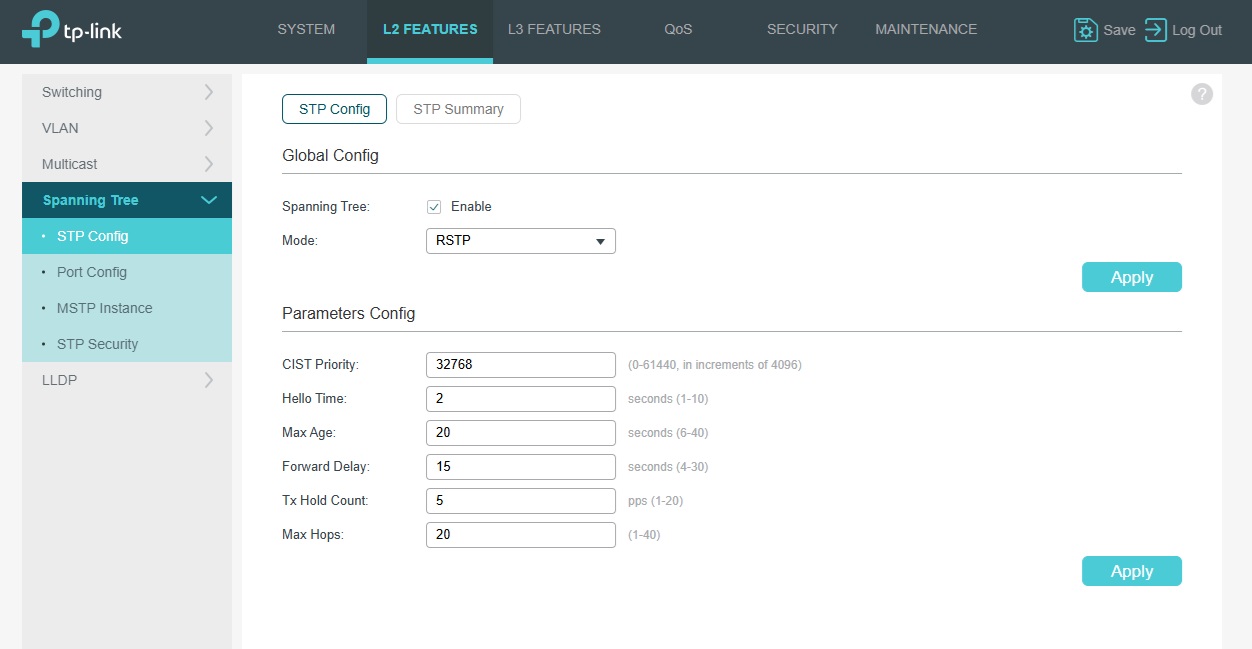
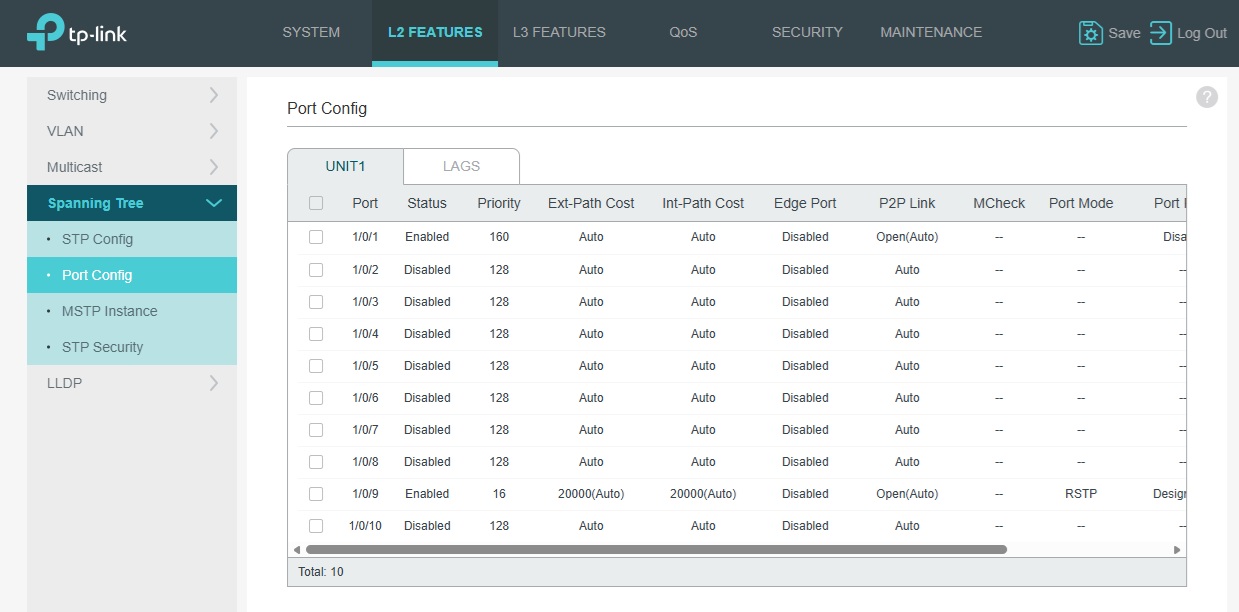
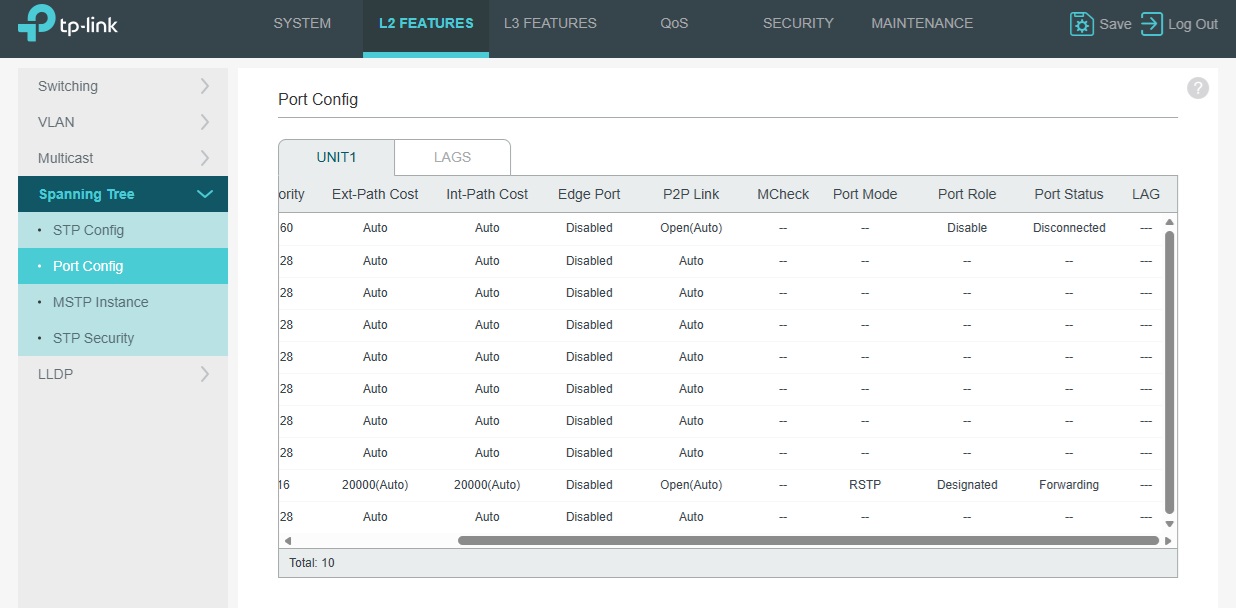
FYI - When the CPE710 is connected above on P1 it does say blocking .
Thank you for your help.
Cheers.Dave
- Copy Link
- Subscribe
- Bookmark
- Report Inappropriate Content

Hi @Nesswill
So the previous understanding was correct.
It’s just that you also need to maintain the network at Site 2.
As I mentioned earlier, the current installation will affect Site 2’s network because it uses an RSTP port on the loop (CPE_1).
The solution is to add a fourth CPE710, configure it in AP mode, connect it to another port of SW1, and form a dedicated wireless bridge with the CPE2 at Site 2.
This way, it won’t be affected by the RSTP configuration between Sites 2 and 3.
- Copy Link
- Report Inappropriate Content
As I mentioned earlier, the current installation will affect Site 2’s network because it uses an RSTP port on the loop (CPE_1).
No this is incorrect RSTP is on the switch connected to CPE3 so it should work as CPE2 is only connected on wireless to CPE1 and CPE3 only connects to CPE1 for Internet when the fibre goes down then RSTP kicks in.
I still don't have an explanation of why I loose Internet on CPE2 when I plug in CPE3 on Port one of my SG2210XMP-M2.
Also as you say.
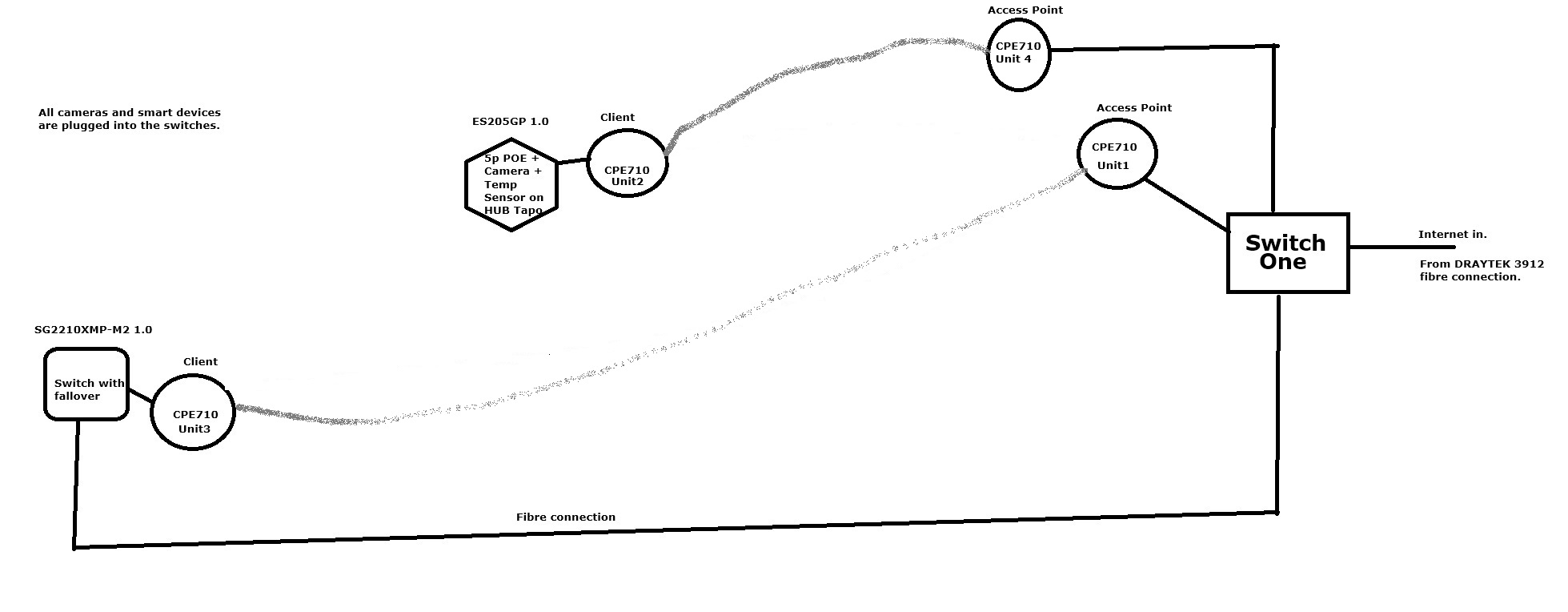
My diagram shows the situation when the fiber link is up. Your diagram depicts the scenario when the fiber is down. Both are correct.
So as it's correct why on Internet on CPE2?
- Copy Link
- Report Inappropriate Content
- Copy Link
- Report Inappropriate Content
Hi @Nesswill
Both switches need to be configured with RSTP; configuring only one end is insufficient.
Nesswill wrote
As I mentioned earlier, the current installation will affect Site 2’s network because it uses an RSTP port on the loop (CPE_1).
No this is incorrect RSTP is on the switch connected to CPE3 so it should work as CPE2 is only connected on wireless to CPE1 and CPE3 only connects to CPE1 for Internet when the fibre goes down then RSTP kicks in.
I still don't have an explanation of why I loose Internet on CPE2 when I plug in CPE3 on Port one of my SG2210XMP-M2.
Also as you say.
My diagram shows the situation when the fiber link is up. Your diagram depicts the scenario when the fiber is down. Both are correct.
So as it's correct why on Internet on CPE2?
- Copy Link
- Report Inappropriate Content


- Copy Link
- Report Inappropriate Content
Why two switches, and if so what two switches, currently its only the SG2210XMP-M2 on CPE3.
So when the fibre is up Green
So when the fibre is down Red
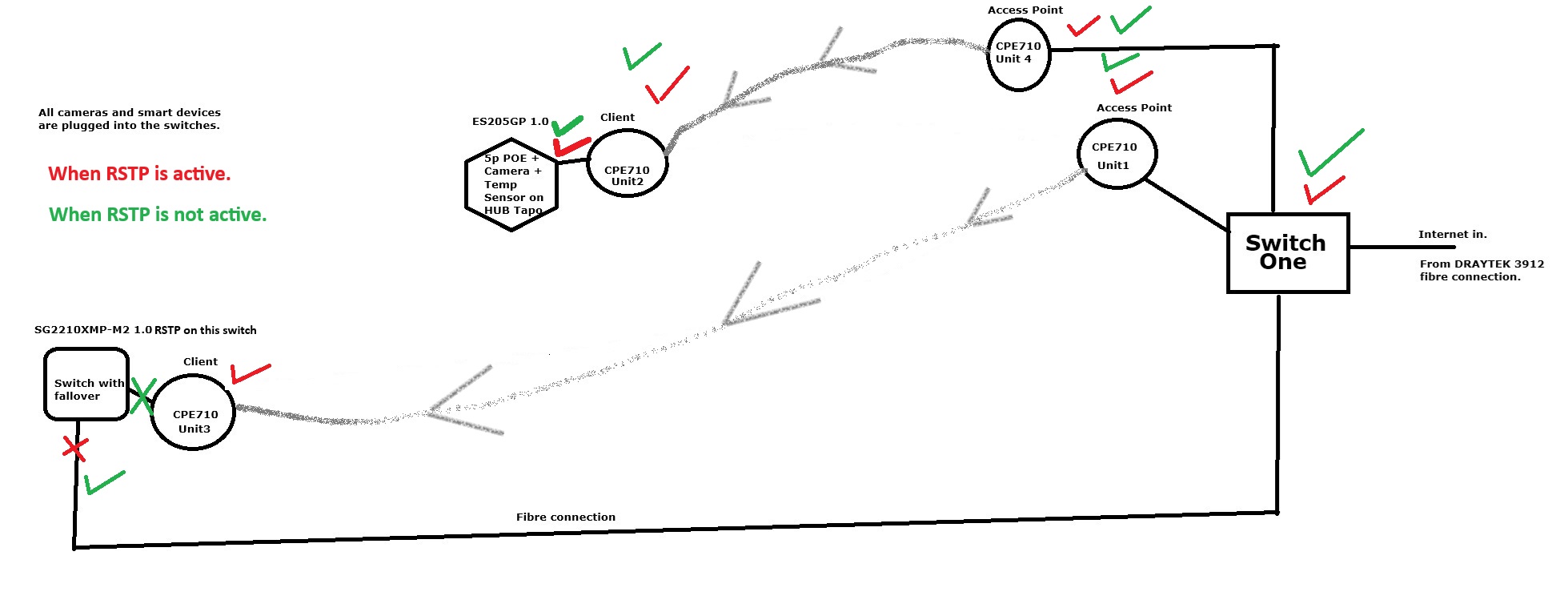
Cheers,
Dave.
- Copy Link
- Report Inappropriate Content
Hi @Nesswill
Nesswill wrote
Why two switches, and if so what two switches, currently its only the SG2210XMP-M2 on CPE3.
Why Must All Loop-Participating Switches Enable RSTP?
- Protocol Consistency: RSTP relies on the exchange of BPDUs (Bridge Protocol Data Units) between switches to negotiate the topology. If some switches run STP (e.g., legacy 802.1D) while others run RSTP, protocol incompatibility will cause:
- Slower convergence (RSTP’s fast convergence feature is lost).
- Potential temporary loops or suboptimal paths.
- Port Role Negotiation: RSTP’s Alternate/Backup ports and fast failover mechanisms require coordination among all switches. Non-RSTP devices cannot interpret these roles, potentially causing incorrect blocking of critical links.
So when the fibre is up Green
Son when the fibre is down Red
>>>>Correct
Cheers,
Dave.
- Copy Link
- Report Inappropriate Content
I wanted to say a sincere thank you for all your help and for sticking with me throughout this steep learning curve for me. As you can tell, this is my first time navigating this, and I truly appreciate your patience in answering my basic questions.
I will be sure to keep you updated on my progress as things move forward. With any luck, I should be all set now and won't need to trouble you with further introductory inquiries.
Thank you again for your support.
Cheers, Dave.
- Copy Link
- Report Inappropriate Content
You're very welcome! Happy to help anytime—don't hesitate to reach out. Wishing you all the best😊
Nesswill wrote
I wanted to say a sincere thank you for all your help and for sticking with me throughout this steep learning curve for me. As you can tell, this is my first time navigating this, and I truly appreciate your patience in answering my basic questions.
I will be sure to keep you updated on my progress as things move forward. With any luck, I should be all set now and won't need to trouble you with further introductory inquiries.
Thank you again for your support.
Cheers, Dave.
- Copy Link
- Report Inappropriate Content
Information
Helpful: 0
Views: 1317
Replies: 19
Voters 0
No one has voted for it yet.