Omada VLAN Network without Default Interface not working?

Hi to all,
recently I moved for my homelab to omada devices / management.
But I have one one crucial question.
I´ve following setup:
pfsense as Firewall Gateway
SG2210P
EAP650
Pfsense knows following VLANs (default (1), MGMT (10), TRUSTED (20), IOT (91) and GUEST (92)) - All of them exempt Default are VLANs and not Interfaces. In this is right according to the docu when a "non omada gateway is used".
So far so good. At the end I manage do change the MGMT VLAN (which is not an esy task, avoid loosing connectivity) - but thats not the issue, at least any more 
Port setup:
I´ve used only switch Profiles, like them, even if I have an easy setup.
Port config on SG2210P
Port 1 - TRUSTED (Native network: TRUSTED (20), Tagged Networks (none), Untagged Neworks: TRUSTED (20)) - Result: Works fine. Computer gets an IP from the 20er network and has connectivity.
Port 2 - IOT (Native network: IOT (91), Tagged Networks (none), Untagged Networks: IOT (91) - Result: all good
Now the strange thing starts.
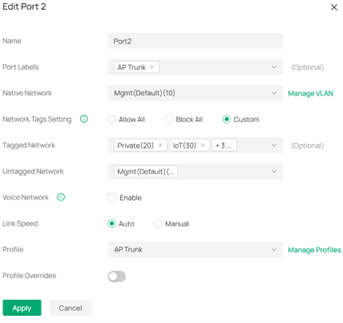
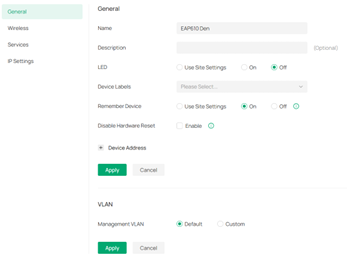
Port 3 - SWITCH (Native network: MGMT (20), Tagged Networks: TRUSTED (20), IOT (91) and GUEST (92), Untagged Networks: MGMT (20) - Result not working. To Port 3 I have attached the EAP650. EAP650 knows only VLAN, all the traffic has VLAN tags for all Wifi Networks and VLAN 20 set as MGMT. When I activate the SWITCH profile, I lose Hearbeat in omada and the EAP remains stuck in Adopting. I can fix this by changing the SWITCH profile to: (Native network: Default (1), Tagged Networks: TRUSTED (20), IOT (91), GUEST (92), MGMT (20), Untagged Networks: Default (20)
Same happens with the Trunk port (which profle is identical to SWITCH, it just has another name for better understanding).
Also the TRUNK port needs to be on default network "Default (1)" and all other VLANS needs to be Tagged.
I don´t get it. Why does it work for a "single VLAN Port" without the Default Network but not wor a Trunk port?
Thank you.