
Vigi C540 how to setup ptz

Hello, I recently bought a Vigi C540. The camera is setup and operational.
I have downloaded the quick start guide, the VIGI IPC Wired UG, and the VIGI Security Manager UG.
Sadly, none of these guides explain how to use the PTZ feature.
I searched youtube but again did not find any clear explanation.
In the settings under PTZ, I turned ON the Park but the park mode id displays to setup a preset.
From the camera preview using my browser, I have not found any explanation as to what 3d positioning, quick patrol, and quick park icons do.
I have tried setting a preset and a patrol preset using ptz but I am missing some detail about how this works.
Can someone provide a short explanation?
Thanks in advance
- Copy Link
- Subscribe
- Bookmark
- Report Inappropriate Content


Hi @xmanhattan
After setting a preset point, there is a dwell time threshold. Once the gimbal stops for the specified time, it can execute either a preset point mode or a patrol mode.
Preset point mode allows you to select a specific preset point, and the gimbal will return to that point.
Patrol mode uses multiple preset points to form a trajectory, and the gimbal will follow this trajectory for patrol control.
- Copy Link
- Report Inappropriate Content
Hi @xmanhattan
Thanks for posting in our business forum.
PTZ (Pan-Zoom) controls the relevant buttons and the motors on the camera to perform horizontal (Pan), vertical (Tilt), and lens zoom.
This is used for two aspects:firstly, to allow users to manually control and adjust the field of view; and secondly, this is also used for for simple target tracking as the C540 has tracking capabilities.
Based on PTZ, there are also developed advanced features such as 3D area control, target tracking, cruise control, and watchdog mode.
To confirm if PTZ is working, simply observe whether the image changes correctly based on your preset settings.
- Copy Link
- Report Inappropriate Content
@Hank21 Hello Hank21, Thanks for answering.
The Vigi C540 PTZ function works as I can move the camera up, down, left, and right, but I do not understand how the presets work.
Here are some images:
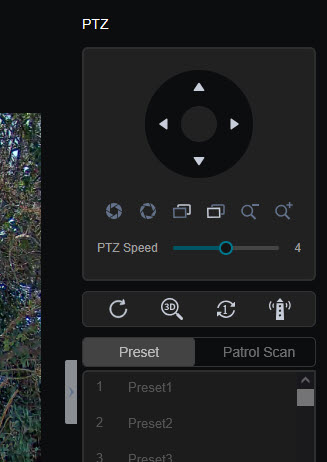
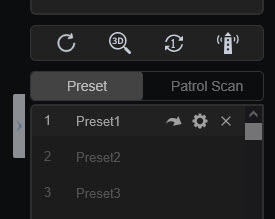
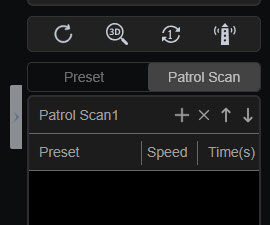
I have "played" with the various icons under PTZ speed, and clicked on Preset #1 which is shown in image #2, as well as Patrol Scan but there is no documentation.
- Copy Link
- Report Inappropriate Content
- Copy Link
- Report Inappropriate Content
Hi @xmanhattan
After setting a preset point, there is a dwell time threshold. Once the gimbal stops for the specified time, it can execute either a preset point mode or a patrol mode.
Preset point mode allows you to select a specific preset point, and the gimbal will return to that point.
Patrol mode uses multiple preset points to form a trajectory, and the gimbal will follow this trajectory for patrol control.
- Copy Link
- Report Inappropriate Content
Thank you for your answers. I will combine them with the information that I just found here:
How to Use VIGI Pan/Tilt/Zoom Function
- Copy Link
- Report Inappropriate Content
Information
Helpful: 0
Views: 685
Replies: 5
Voters 0
No one has voted for it yet.