
EAP775 AirPrint not working
EAP775 AirPrint not working

I just started using two EAP775 accesspoints. But I can't get AirPrint to work within the same vlan (which shouldn't require any configuration).
For context, I'm using a Mikrotik RB5009 as a gateway. Zyxel XMG1915EP as a switch (that also powers both accesspoints) and Mikrotik CRS310 as switch that the printer connects to
If I'm connecting my MacBook wired to the Zyxel or another switch airprint works fine. But if I connect wirelessly to the EAP775 it doesn't work. What's also interesting that wired on the EAP775 it also doesn't work.
I already tried
- Disabling IGMP and MLD snooping in the network config for that vlan
- Disabling all Multicast/broadcast settings for the wireless network
But because its also broken when connected wired to the accesspoint, I'm suspecting a bug in the EAP775
- Copy Link
- Subscribe
- Bookmark
- Report Inappropriate Content
Since updating the accesspoints to firmware 1.0.4 (released earlier this week) the issues are gone
- Copy Link
- Report Inappropriate Content


Hi @johnverkerk
Thanks for posting here.
Please refer to the following to configure Bonjour Service:
How to use Bonjour Related Functions of Omada AP on Omada Controller
The pages were captured from Omada 5.14, but the steps are the same.
Here is the config page on Omada V6:
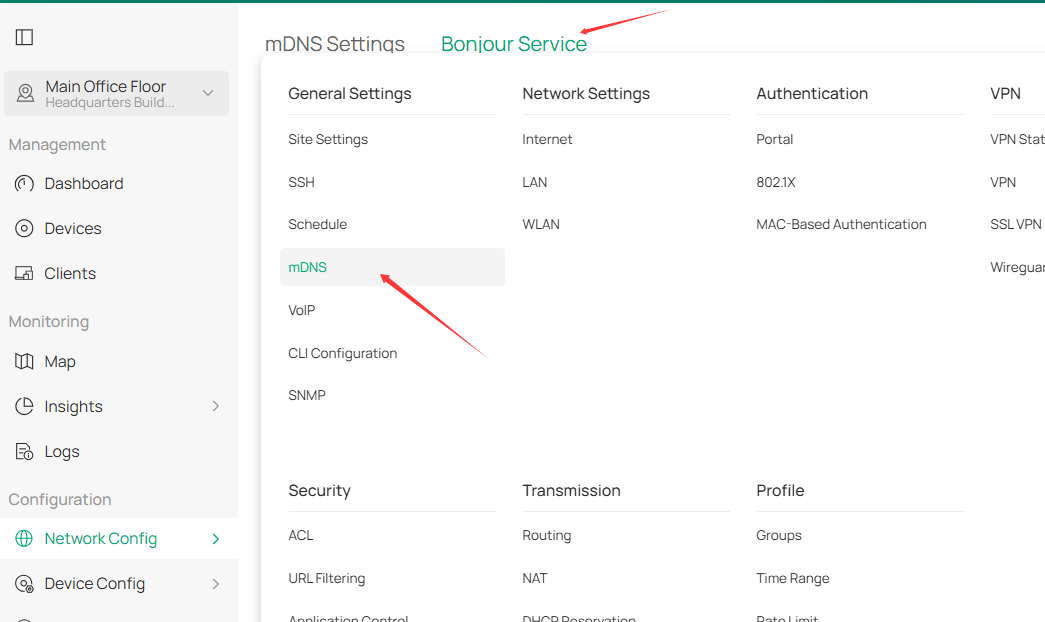
- Copy Link
- Report Inappropriate Content
@Vincent-TP Thanks for the reply.
I'm using Omada Cloud for now. I don't see those options over there.
Do I need to selfhost the controller or purchase a hardware controller in order to get Bonjour to work?
- Copy Link
- Report Inappropriate Content
Hi @johnverkerk
Are you using the Omada Cloud Essentials?
johnverkerk wrote
@Vincent-TP Thanks for the reply.
I'm using Omada Cloud for now. I don't see those options over there.
Do I need to selfhost the controller or purchase a hardware controller in order to get Bonjour to work?
- Copy Link
- Report Inappropriate Content
- Copy Link
- Report Inappropriate Content
Hi @johnverkerk
Please create a 2.4G-only SSID with the default settings, connect both the printer and the AirPrint client to it, and see if it works.
- Copy Link
- Report Inappropriate Content
@Vincent-TP The printer(Brother HL-L2370DN) has no wifi
- Copy Link
- Report Inappropriate Content
This did gave me another idea.
I just configured eth2 on one of the accesspoints to untagged vlan 10 and connected the printer (my macbook is also in that vlan on eth1).
And it works fine when I do that. When I connect the printer to another switch (still same vlan) it doesn't work anymore.
- Copy Link
- Report Inappropriate Content
Thanks for the reply.
The EAP's Internet is working well, right?
Apart from AirPrint, is there any other internal communication abnormality?
If I'm connecting my MacBook wired to the Zyxel or another switch airprint works fine.
>>>With this connection, if ping the printer's IP address on the MacBook, will it reply?
- Copy Link
- Report Inappropriate Content
@Vincent-TP All other network access (including internet) works fine. Pinging to the printer works fine as well, even when connecting with AirPrint doesn't work.
Just tried the same thing with AirPlay from iPhone and Mac to Apple TV (which is connected to eth2 of the second EAP775). And that also only works when the iPhone or Mac is connected to the same accesspoint as the Apple TV is connected to.
- Copy Link
- Report Inappropriate Content
Hi @johnverkerk
Thanks for the reply.
Please describe the topology of the EAP networks in more detail. Is it like this?
Internet---Mikrotik RB5009---Zyxel XMG1915EP------EAP755-wall
|
CRS310 SW---Printer
Do you configure VLAN for the network? If yes, please also list the VLAN settings.
- Copy Link
- Report Inappropriate Content
Information
Helpful: 0
Views: 913
Replies: 14
Voters 0
No one has voted for it yet.