EAP225 and EAP245 Firmware updates to work with ER7212

EAP225 and EAP245 Firmware updates to work with ER7212

EAP225 and EAP245 Firmware updates to work with ER7212
Sunday - last edited Tuesday
Tags: #ER7212
Model: EAP245   EAP225   ER7212PC  
Hardware Version: V3
Firmware Version: 2.5.0 Build 20190404 Rel. 57144

I am trying to configure a TP-Link Omada ER7212Pc v1.0 router and onboard my existing EAP225 and EAP245 access points.


I have just updated the firmware on the ER7212 to 1.3.2 Build 20251015, which presumably has also updated the Omada version? As a result some of my EAP225 and 245 say they are not compatible with the version on the ER7212 and must be updated first. Below are the EAP models and hardware/firmware versions
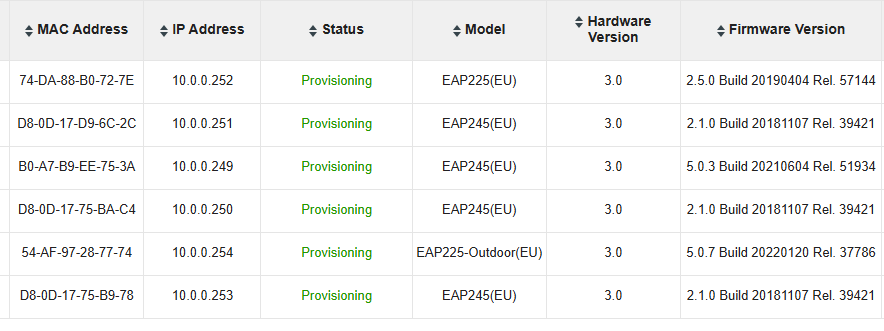


I have a software version of Omada Version: 3.1.4 which I am currently using to mange the EAP's. However I have two "chicken and egg" problems:-


1) I need to upgrade the firmware on the EAP's to work with the ER7212 after which they will no longer be compatible with 3.1.4 software controller.


2) I need to change the static IP addresses of all of these EAP devices before I can connect them to my new default Vlan (VLAN1) on the ER7212 which has a subnet 10.0.1.1/24. If I change the IP address of the EAP's first from the software controller, once changed I wont be able to access them as my current LAN subnet is 10.0.0.1/254


So my questions are:-

a) if i upgrade the firmware of the EAP's from the software controller can I adopt them into the ER7212 without changing the IP addresses first, i.e. is Omada commmunication at the IP level or some other network protocol which allows communication across subnets.


b) To adopt them do I have to release them from the old software controller first or do I have to access each EAP individually and reset them so they are adoptable?


c) As a last resort I will have to update the software controller to the same version as the ER7212. however I do not know where to find the Omada version but have googled and believe it is 5.14.34.4 is that correct please?


d) Finally where are the DHCP static reservations configurable in this Omada version please 


Many thanks

John

 

  0      
  0      
#1
Options
1 Accepted Solution
Re:EAP225 and EAP245 Firmware updates to work with ER7212-Solution
Tuesday - last edited Tuesday

Hi  @Fozzie Bear 


Thanks for posting here.

Please check the answers below:


a) if i upgrade the firmware of the EAP's from the software controller can I adopt them into the ER7212 without changing the IP addresses first, i.e. is Omada commmunication at the IP level or some other network protocol which allows communication across subnets.


>> Yes, here is a guide:

How to manage EAPs in different subnets using EAP controller (via EAP Discover Utility)


b) To adopt them do I have to release them from the old software controller first or do I have to access each EAP individually and reset them so they are adoptable?


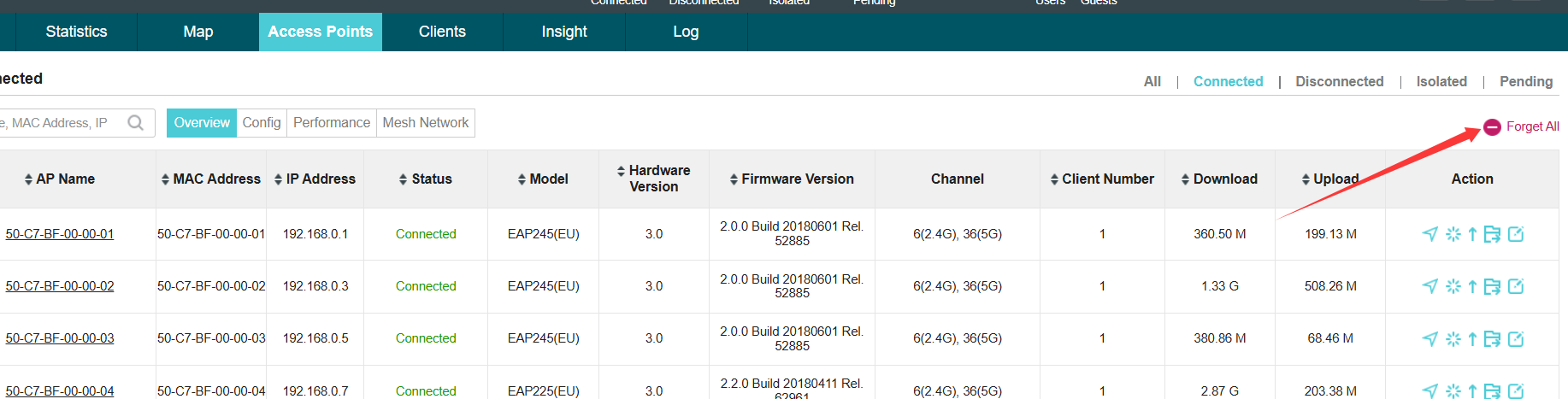
>>> Yes, you need first forget them from the old software controller, here is the option:


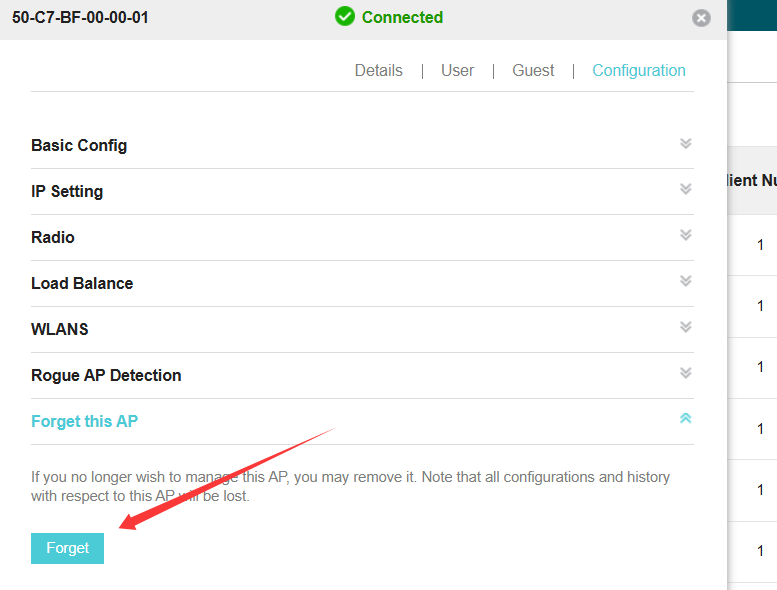
Or you can forget them one by one here:


d) Finally where are the DHCP static reservations configurable in this Omada version please 


>>>This config will only take effective when there is a DHCP server adopted on the controller. EAP is not the one, you may add an Omada gateway.

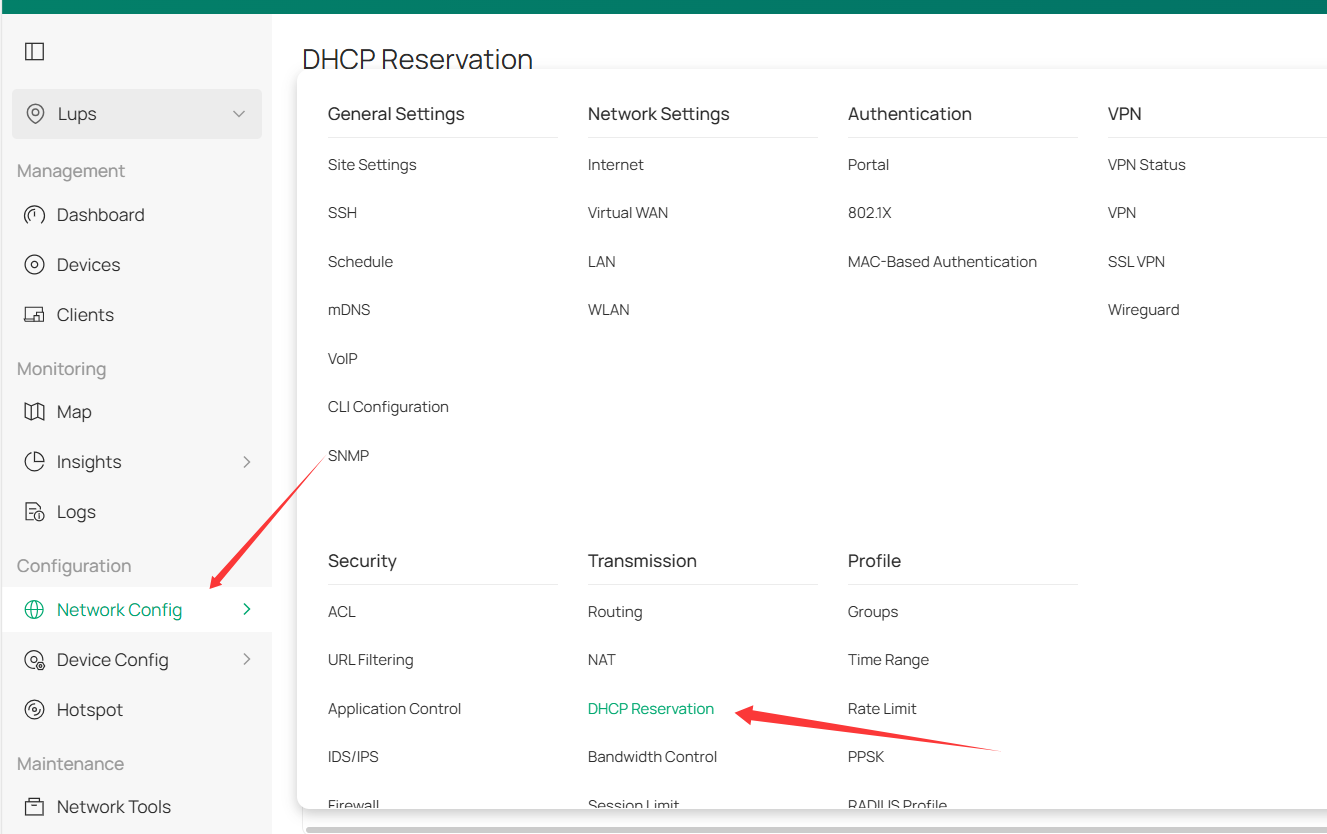
And here is the config page on Omada v6:


Recommended Solution
  0  
  0  
#2
Options
1 Reply
Re:EAP225 and EAP245 Firmware updates to work with ER7212-Solution
Tuesday - last edited Tuesday

Hi  @Fozzie Bear 


Thanks for posting here.

Please check the answers below:


a) if i upgrade the firmware of the EAP's from the software controller can I adopt them into the ER7212 without changing the IP addresses first, i.e. is Omada commmunication at the IP level or some other network protocol which allows communication across subnets.


>> Yes, here is a guide:

How to manage EAPs in different subnets using EAP controller (via EAP Discover Utility)


b) To adopt them do I have to release them from the old software controller first or do I have to access each EAP individually and reset them so they are adoptable?


>>> Yes, you need first forget them from the old software controller, here is the option:


Or you can forget them one by one here:


d) Finally where are the DHCP static reservations configurable in this Omada version please 


>>>This config will only take effective when there is a DHCP server adopted on the controller. EAP is not the one, you may add an Omada gateway.

And here is the config page on Omada v6:


Recommended Solution
  0  
  0  
#2
Options