
LAN DNS CNAME record pointing to IP record

Hello,
I want to set my LAN DNS entries to point to the Nginx Proxy Manager IP entry.
I created an IP record with the following settings:
Domain name: nginx.lan.domain
Type: IP
IP Address: 192.168.10.123
Apply To Lan: MyVLAN
It is correctly resolved by the nslookup query.
Later, I createda CNAME record with settings:
Domain name: grafana.lan.domain
Type: CNAME
CNAME: nginx.lan.domain
Apply To Lan: MyVLAN
When running nslookup grafana.lan.domain I get only "** server can't find grafana.lan.domain: NXDOMAIN"
What could be the case?
In the DHCP settings, I set up two DNS servers - 192.168.10.1 and the IP of my PiHole server.
- Copy Link
- Subscribe
- Bookmark
- Report Inappropriate Content


Hello,@Kamool
We are writing to follow up and confirm whether your previously reported issue has been resolved.
You currently have two DNS servers configured: 192.168.10.1 and a Pi-Hole instance. When clients initiate DNS queries, requests may be routed to either server. A potential cause of the issue you encountered is that the CNAME record you created may not be recognized or cached by the Pi-Hole server. If a client’s query happens to be sent to Pi-Hole, and neither Pi-Hole’s upstream DNS nor its local records contain an entry for grafana.lan.domain, Pi-Hole will return an NXDOMAIN response.
We would like to recommend the following troubleshooting steps for your reference:
Add an A record that maps grafana.lan.domain to 192.168.10.123 in Pi-Hole’s local DNS records.
Alternatively, you may temporarily set 192.168.10.1 as the sole DNS server on your client, then test whether the query nslookup grafana.lan.domain 192.168.10.1 returns a successful result.
After adjusting the configuration, please clear the DNS cache on both your Pi-Hole server and test on the client.
Thank you for your cooperation.
- Copy Link
- Report Inappropriate Content

Hi @Kamool
Thanks for posting in our business forum.
May I ask what is your network topology as well as the configuration screenshots?
If possible, may I check the error page as well when you use the Type as CNAME?
- Copy Link
- Report Inappropriate Content
@Hank21
When it comes to my network topology:
Provider fiber -> ONT -> ER706W <-wireless-> EAP670 <-LAN-- (Home server with hosted Omada controller)
This is the configuration for Nginx:
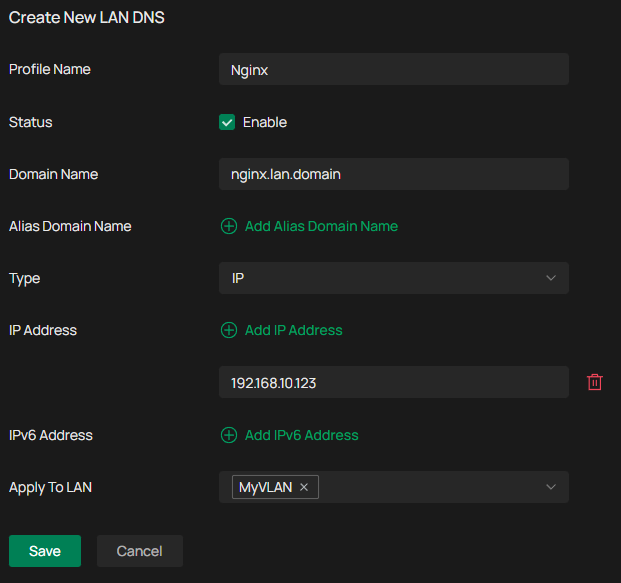
Configuration for Grafana CNAME:
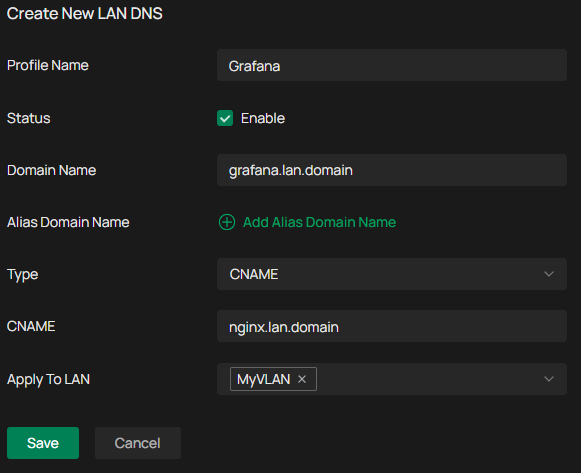
What errors are you looking for? I'm not getting any.
- Copy Link
- Report Inappropriate Content
- Copy Link
- Report Inappropriate Content
Hello,@Kamool
We are writing to follow up and confirm whether your previously reported issue has been resolved.
You currently have two DNS servers configured: 192.168.10.1 and a Pi-Hole instance. When clients initiate DNS queries, requests may be routed to either server. A potential cause of the issue you encountered is that the CNAME record you created may not be recognized or cached by the Pi-Hole server. If a client’s query happens to be sent to Pi-Hole, and neither Pi-Hole’s upstream DNS nor its local records contain an entry for grafana.lan.domain, Pi-Hole will return an NXDOMAIN response.
We would like to recommend the following troubleshooting steps for your reference:
Add an A record that maps grafana.lan.domain to 192.168.10.123 in Pi-Hole’s local DNS records.
Alternatively, you may temporarily set 192.168.10.1 as the sole DNS server on your client, then test whether the query nslookup grafana.lan.domain 192.168.10.1 returns a successful result.
After adjusting the configuration, please clear the DNS cache on both your Pi-Hole server and test on the client.
Thank you for your cooperation.
- Copy Link
- Report Inappropriate Content
Information
Helpful: 0
Views: 315
Replies: 4
Voters 0
No one has voted for it yet.