VIGI App Playback Stream Selection & LAN Priority (Firmware 1.4.3)

VIGI App Playback Stream Selection & LAN Priority (Firmware 1.4.3)

VIGI App Playback Stream Selection & LAN Priority (Firmware 1.4.3)
2 weeks ago
Model: VIGI NVR1008H  
Hardware Version: V2
Firmware Version: 1.4.3

Hello everyone,


I am using a VIGI NVR1008H (Firmware: 1.4.3 Build 251121) with VIGI C330 cameras in a location with limited bandwidth (0.8 Mbps Upload). I would like to report three significant issues and ask if anyone has found a workaround:


1. Playback Stream Selection Bug: Even though Dual-Stream recording is enabled (Main and Substream), the VIGI Android App forces the Mainstream during Event Playback without the option to select which stream to view. Because of this, I am forced to drastically lower my 3MP recording quality just to make remote playback possible, which makes the high-definition hardware practically useless.

2. LAN vs. Cloud Priority: The VIGI app is extremely slow even when my phone is on the same Local Network (LAN) as the NVR. Third-party ONVIF apps on the same network play the footage instantly. This indicates that the VIGI app routes traffic through the cloud instead of prioritizing a direct local connection, which is a major flaw for connections with slow upload speeds.

3. NVR Pre-record Limit: The current firmware locks the Pre-record buffer at a 5-second minimum. Ι need the flexibility to reduce this limit further (e.g., 1-2 seconds) for better resource management and specific event triggers.


Has anyone else faced these issues with the current firmware? Any advice would be appreciated.


Best regards, George K.

  1      
  1      
#1
Options
3 Reply
Re:VIGI App Playback Stream Selection & LAN Priority (Firmware 1.4.3)
2 weeks ago

Hi  @gkar 

Thanks for the valuable feedback.

May I ask what is your network topology?

Can you provide the configuration screenshots of the issue you mentioned and the VIGI APP version of your phone?

Best Regards! >> Omada EAP Firmware Trial Available Here << >> Get the Latest Omada SDN Controller Releases Here << *Try filtering posts on each forum by Label of [Early Access]*
  0  
  0  
#2
Options
Re:VIGI App Playback Stream Selection & LAN Priority (Firmware 1.4.3)
a week ago

Hello @Hank21,


Thank you for your reply. Here is the requested information:


1. Network Topology: 
- ISP Router -> Mercusys MS110P Switch (10-Port Unmanaged L2 PoE+)
- 8x VIGI C330 cameras are connected directly to the PoE ports of the switch.
- The VIGI NVR1008H is connected to one of the uplink ports of the switch.
- The ISP Router is connected to the other uplink port of the switch.
- I have tested the VIGI app on both Android and iPhone (iOS) devices. Both were connected to the ISP Router's Wi-Fi. It is a standard home network (AP Isolation is disabled), so LAN routing is fully open and devices can communicate freely.


2. VIGI App Versions: 
- Android: 2.7.89
- iOS: 2.7.92


Dual-Stream settings:


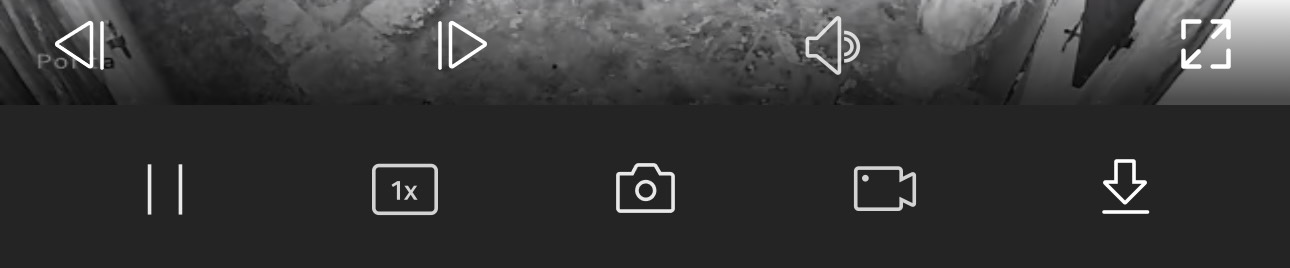
Lack of stream selection during Playback in the app (you can see the quality selection button missing):

1. Live streaming:


2. Playback streaming:


5-second Pre-record limit:


Best regards, 
George K.

  0  
  0  
#3
Options
Re:VIGI App Playback Stream Selection & LAN Priority (Firmware 1.4.3)
11 hours ago

Hi  @gkar 


Thanks for the reply.


1. Currently, we do not support selecting the video stream during playback. Whether the mainstream or the substream is played is determined by the NVR. Your network bandwidth is too low, so the cloud playback experience will inevitably be affected.


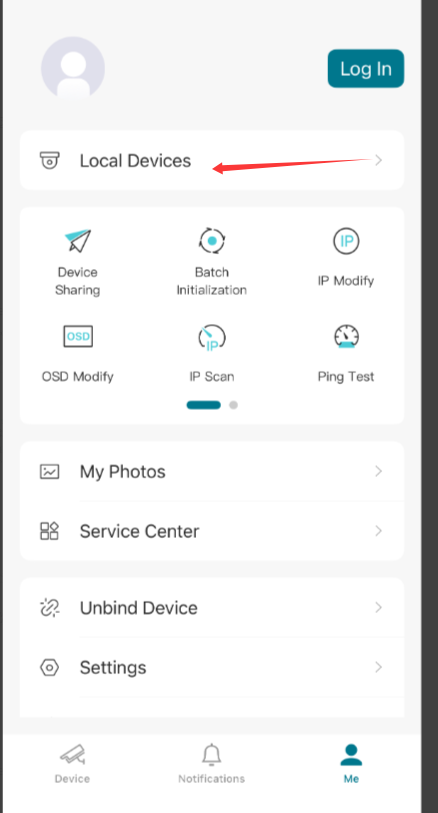
2. Please try to view the videos via Local Devices and see if the situation persists:


3. Thank you for your feedback. I have forward this suggestion to the relevant department, and they will evaluate this requirement.

  0  
  0  
#4
Options