
DHCP Option 66 not functional

- Copy Link
- Subscribe
- Bookmark
- Report Inappropriate Content


Hi, @CharredChar
DHCP Option 66 / 67 has indeed been a long-standing issue in the Omada Solution.
In fact, we have already made some optimizations in version 2.3.3 for the ER605 V2. You may try configuring both the Next Server and DHCP Option 66 as the address of the PXE (TFTP) server, and set DHCP Option 67 as the boot file name.
- Copy Link
- Report Inappropriate Content

Hi @CharredChar
May I ask the configuration screenshot of your DHCP option 66 and 67?
It is noticed that your ER605 has available firmware update, please try to update it as well.
- Copy Link
- Report Inappropriate Content

@CharredChar I had issues with the Option 66 and 67. I needed to set the DHCP Next Server option to my TFTP server IP under Advanced Setting in the DHCP configuration.
- Copy Link
- Report Inappropriate Content
@Hank21 Thanks for noting that. I upgraded that day to ensure it wasn't an issue with older firmware so I did not expect there to be another one available. It took a little time but I saw it come up. I updated it again (it is now on 2.3.2 Build 20251029 Rel.12727) but the issue persists.
- Copy Link
- Report Inappropriate Content
@GamerMine Yes, I understand. Option 66 is supposed to be the address to the PXE (TFTP) server and Option 67 the file to load.
Unfortunately the Omada controllers seem to have a long standing issue where even if you enter anything into Option 66 it will continue to only send the IP address of the router itself during the request. Which, honestly, I wouldn't even care of being an issue if I could make it act as the server anyway.
The only exception is putting the ER605 controller into stand-alone mode, removing it from the Omada Controller, and configuring it directly on the router. I am not willing to do this as the whole point is to have a single location for management using the Omada Controller. If this simple feature is not available (with over 3 years of the issue being known) even though it is advertised as capable I'd consider that an unacceptable failure which alone is enough to question ever using TP-Link hardware at a new site I build or manage. This might sound like strong wording but every response in the past has been, "I'll be done soon." And the original poster is satisfied enough to drop it. This has cause there to be a half-dozen threads that end up with no actual answers to the problem and it's been ignored.
- Copy Link
- Report Inappropriate Content
@CharredChar I completely agree with you. It should work as advertised. My solution is more like a workaround to this issue but not the fix to it. Option 66 should be fixed by the TP-Link team to work as intended without any workaround. This is strange that it hasn't been fixed already because it does not seems complicated, that's a DHCP option like the others.
I think that TP-Link firmware are Open Source because these are based on OpenWRT so I might take a look at the sources to see what's going on.
By the way here is the equipment I use:
Model: ER605
Hardware Version: v2.20
Firmware Version: 2.3.3 Build 20251029 Rel.18054
I confirm having the same problem.
- Copy Link
- Report Inappropriate Content
Hi @CharredChar
We would like to help you follow this up via ticket ID TKID260347729, and please feel free to get back to us with requested information.
- Copy Link
- Report Inappropriate Content
@Hank21 I apologize, I missed the request for the screenshot.
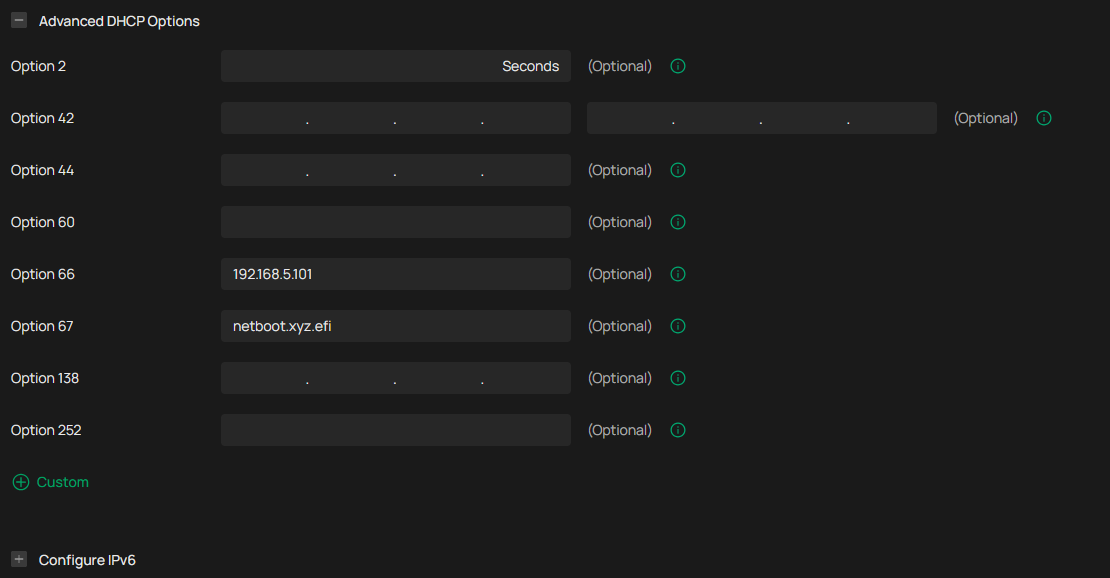
I have tried a few different methods, including entering the full tftp address instead.
The issue is for Option 66 it only ever sends the DHCP server's IP address, this has been commented on multiple times on these forums.
And while that workaround might function for some, a lot of devices don't expect that kind of response and won't function with it.
I've been using a Hyper-V vm and a Powershell script for testing. The VM never sees the response and the following is the Powershell output:
Starting DHCP Message at 04/02/2026 13:08:09
Retrieved DhcpMessageType from server: 192.168.5.1 with operation code: BootResponse after 269 ms
FileName : (filename cut due to the forum flagging it as 'sensitive language'  it matches option 67 above)
Server (Siaddr) : 192.168.5.1
SName :
Packet : System.Object
MessageType : DhcpMessageType (DHCPOFFER)
Relay : 0.0.0.0
DHCP Server : DhcpServerIdentifier (192.168.5.1)
IPAddress : 192.168.5.245
Operation : BootResponse
- Copy Link
- Report Inappropriate Content
Hi, @CharredChar
DHCP Option 66 / 67 has indeed been a long-standing issue in the Omada Solution.
In fact, we have already made some optimizations in version 2.3.3 for the ER605 V2. You may try configuring both the Next Server and DHCP Option 66 as the address of the PXE (TFTP) server, and set DHCP Option 67 as the boot file name.
- Copy Link
- Report Inappropriate Content
Information
Helpful: 0
Views: 846
Replies: 8
Voters 0
No one has voted for it yet.