
EAP PPSK Incompatible Feature Issue
EAP PPSK Incompatible Feature Issue

In reviewing the incompatible features of my EAP610 (v3.0) and EAP650-Desktop (v1.0) devices, the PPSK feature states in the capability description the following:
The device does not support Rate Limit and expiration settings
The device supports 1024 (or 128) items
When expanding the feature with the + icon, under Name, I am seeing some SSIDs being duplicated and other SSIDs that no longer exist in the network. For example, in the screenshot below the WiFi_4880 SSID is listed twice and the WiFi_2880_5G SSID no longer exists.
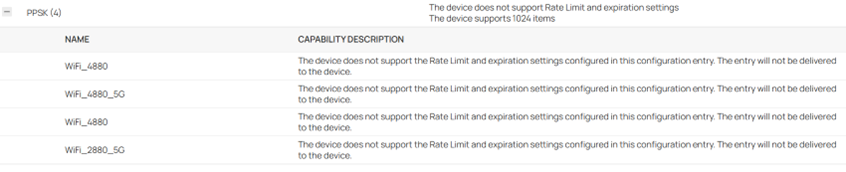
After doing a Force Provision, reboot, and power cycle, the EAP continues to show the same results. I also have rebooted the OC300 controller. Can someone confirm that this is a firmware compatibility issue with the controller’s v6.2 firmware?
On a related matter, the expanded description states “The device does not support the Rate Limit and expiration settings configured in this configuration entry. The entry will not be delivered to the device.” Does this mean that only these two settings are not sent to the device or does it mean the entire configuration entry is not delivered? If it is only the two settings that are affected, then the wording should be changed to “These settings will not be delivered to the device.”
Update: I managed to clear out the bogus descriptions by forgetting each device and re-adopting. The PPSK feature no longer appears in the list of incompatible features for the EAP650-Desktop devices. It still appears for the EAP610 but no longer has the + icon with the erroneous entries.
- Copy Link
- Subscribe
- Bookmark
- Report Inappropriate Content

Hi @jra11500
Thanks for posting here.
We would like to test this in our local lab to ensure we are using the same devices as yours. Please share a screenshot of the device page so we can know their firmware version.
Also, what's the firmware version of the controller are you using?
- Copy Link
- Report Inappropriate Content
Vincent-TP wrote
Hi @jra11500
Thanks for posting here.
We would like to test this in our local lab to ensure we are using the same devices as yours. Please share a screenshot of the device page so we can know their firmware version.
Also, what's the firmware version of the controller are you using?
Attached is a screenshot of the devices page. The firmware version of the OC300 controller is 1.33.7 Build 20260310 Rel.74267. Until yesterday, none of the devices have been readopted in quite a long time and all have undergone several firmware upgrades since they were new. From my perspective, it appears that upgrades, reboots, power cycles, and force provisions don't always clear out old data.

- Copy Link
- Report Inappropriate Content

- Copy Link
- Report Inappropriate Content
With the latest firmware, I have not noticed any incorrect SSIDs. Selecting the EAP610 or one of the EAP650-Desktop devices on the Configuration Result page always shows PPSK (x) in the Feature column. Presently, with PPSK I am only using two SSIDs (one on each band). The odd thing now is that one of the three EAP650-Desktop devices is only showing PPSK (1) with the 2.4 GHz SSID and not the 5 GHz SSID. The rest of the devices are displaying PPSK (2) as expected.
Update: Doing a Force Provision of the affected EAP650-Desktop corrected the issue.
FYI, the expanded description still states “The device does not support the Rate Limit and expiration settings configured in this configuration entry. The entry will not be delivered to the device.” Obviously, the configuration entry is delivered or the clients would not be able to authenticate. To be more clear and concise, I still recommend the wording be changed to “These settings will not be delivered to the device.” instead of "The entry ...".
- Copy Link
- Report Inappropriate Content
Hi @jra11500
Thanks for sharing the solution.
FYI, the expanded description still states “The device does not support the Rate Limit and expiration settings configured in this configuration entry. The entry will not be delivered to the device.” Obviously, the configuration entry is delivered or the clients would not be able to authenticate. To be more clear and concise, I still recommend the wording be changed to “These settings will not be delivered to the device.” instead of "The entry ...".
>>>I will forward your feedback to the relavant team. Thank you so much for your suggestion.
- Copy Link
- Report Inappropriate Content
Last evening the OC300 was upgraded to 1.33.9 Build 20260401 Rel.45256. This morning I noticed that one of the three EAP650.Desktop devices is again displaying a duplicate SSID as shown in the attached screenshot. I have rebooted, power cycled, forgotten and readopted the AP several times but the issue remains. Also rebooting the controller did not clear the duplicate SSID. The other EAP650-Desktop devices are OK.
- Copy Link
- Report Inappropriate Content
Hi @jra11500
Did you try to force provisioning the EAP650-desktop?
In addition, please try clearing the web browser cache and using private mode.
jra11500 wrote
Last evening the OC300 was upgraded to 1.33.9 Build 20260401 Rel.45256. This morning I noticed that one of the three EAP650.Desktop devices is again displaying a duplicate SSID as shown in the attached screenshot. I have rebooted, power cycled, forgotten and readopted the AP several times but the issue remains. Also rebooting the controller did not clear the duplicate SSID. The other EAP650-Desktop devices are OK.
- Copy Link
- Report Inappropriate Content
Force provisioning the EAP and clearing the browser cache / private mode does not solve the problem. It is odd that two of my three EAP650-Desktop devices are OK but the third one continues to have the problem.
- Copy Link
- Report Inappropriate Content

I am encountering the same issue. Some APs resolved by re-applying configuration, some APs resolved by Forget+Adopt. But I still have 1 AP that cannot be resolved.
- Copy Link
- Report Inappropriate Content
I still have 1 AP with the issue but the AP is otherwise functioning OK. I still am not sure if the duplicate SSID info is being stored in the AP's configuration or in the controller's config. As the APs have not had a firmware update recently (which is expected soon), I am waiting to see if the issue persists once the APs are upgraded.
- Copy Link
- Report Inappropriate Content
Information
Helpful: 0
Views: 1175
Replies: 17
Voters 0
No one has voted for it yet.