
EAP PPSK Incompatible Feature Issue
EAP PPSK Incompatible Feature Issue

In reviewing the incompatible features of my EAP610 (v3.0) and EAP650-Desktop (v1.0) devices, the PPSK feature states in the capability description the following:
The device does not support Rate Limit and expiration settings
The device supports 1024 (or 128) items
When expanding the feature with the + icon, under Name, I am seeing some SSIDs being duplicated and other SSIDs that no longer exist in the network. For example, in the screenshot below the WiFi_4880 SSID is listed twice and the WiFi_2880_5G SSID no longer exists.
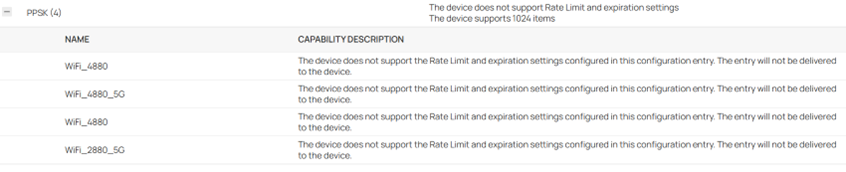
After doing a Force Provision, reboot, and power cycle, the EAP continues to show the same results. I also have rebooted the OC300 controller. Can someone confirm that this is a firmware compatibility issue with the controller’s v6.2 firmware?
On a related matter, the expanded description states “The device does not support the Rate Limit and expiration settings configured in this configuration entry. The entry will not be delivered to the device.” Does this mean that only these two settings are not sent to the device or does it mean the entire configuration entry is not delivered? If it is only the two settings that are affected, then the wording should be changed to “These settings will not be delivered to the device.”
Update: I managed to clear out the bogus descriptions by forgetting each device and re-adopting. The PPSK feature no longer appears in the list of incompatible features for the EAP650-Desktop devices. It still appears for the EAP610 but no longer has the + icon with the erroneous entries.
- Copy Link
- Subscribe
- Bookmark
- Report Inappropriate Content

I have the same on all 8 of my EAP650 v1 units on two sites since the 1.3.6 / 1.3.7 updates (i think, didnt really check this before)
Whats the concensus here? Forget and readopt?
To be honest they seem to be working perfectly fine with my PPSKs
- Copy Link
- Report Inappropriate Content
- Copy Link
- Report Inappropriate Content
I took a more careful look at the incompatible entries themselves and i think i have a conclusion
I think whats causing them is too many things are lumped into one check, and if any fail, the entry appears.
For example, in my case the entry lists MLO amongst other things, and even though the device supports other stuff mentioned, because this is included in a check, and the device doesnt support it, it flags the whole entry

- Copy Link
- Report Inappropriate Content
Since several days ago, I now have the issue again with my EAP610 V3 access point. When I made the switch from multiple SSIDs to a single SSID (on each band), I renamed the initial PPSK groups to "Indoor" for the 2.4 GHz SSID and "Indoor_5G" for the 5 GHz SSID. I also created two PPSK groups for the outdoor EAP ("Outdoor" and "Outdoor_5G"). Several days ago, I decided to create a default group (named "Default") that would include all my VLANs that have wireless access. Since then, the PPSK multiple entries issue started again with the EAP610.
If I go to Devices, Configuration Result, Incompatible, and then select the AP, the Feature column has an entry "PPSK" with a number 5 in parenthesis. Expanding the PPSK entry, I see three entries of my 2.4 GHz SSID and two entries of my 5 GHz SSID. The WLAN-2.4 GHZ and WLAN-5 GHz entries each have a 1 in parenthesis, which is correct as each band only has one SSID. It is only the PPSK feature that has multiple bogus entries.
I have done everything possible to clear these bogus entries, such as forget, readopt, power-cycle, etc. but nothing has helped. The controller also has had two updates recently and been reset several times. Not knowing exactly where these configuration entries are stored, I can not determine what may be the fix. On a positive note, the PPSK functions are working OK and I have no problems with client access.
- Copy Link
- Report Inappropriate Content


Hi @jra11500
Thanks for the feedback.
To confirm, do the entries behave the same as you reported before?

- Copy Link
- Report Inappropriate Content
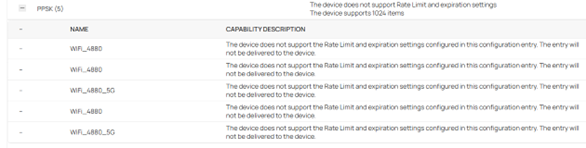
Yes, exactly the same. Currently only one of the EAP650-Desktop devices is showing the incorrect number of entries (3 instead of 2) and the EAP610 is displaying 5 entries as shown below:
- Copy Link
- Report Inappropriate Content
This issue has taken a strange turn. I just finished upgrading my four SG2008 switches to the latest firmware. Now under the Configuration Result, two of the three EAP650-Desktop devices display PPSK in the Feature column with no number shown in parenthesis and simply states "The device does not support Rate Limit and expiration settings" and "The device supports 128 items". I believe that this is totally correct and the way it should be without listing SSIDs.
The third EAP650-Desktop is now showing 3 of the same SSIDs (it used to be only 2). The EAP610 is also showing 3 of the same 2,4 GHz SSID and 2 of the same 5 GHz SSID. I have rebooted, and force provisioned the two devices with no success in clearing the entries. Now the strange part... Both devices are downstream after 2 switches (core + distro) whereas the 2 EAP650-Desktop devices with the correct display are only connected to the core switch. Personally, I don't see how that could make any difference but it does seem related to the issue.
- Copy Link
- Report Inappropriate Content
Information
Helpful: 0
Views: 724
Replies: 17
Voters 0
No one has voted for it yet.