
72% of my router's DNS traffic is for "omada" from an EAP773 AP

The previous thread on this topic appears to have been locked and purged because mods do not seem to want open discussions about TP link products. However, this is bordering on actually insane:
$ sudo grep omada /var/log/dnsmasq | wc -l
219080
$ sudo grep query /var/log/dnsmasq | wc -l
304080
$ awk "BEGIN { print "219080/304080" } "
0.720468
Literally an unwanted DNS request every 10 seconds. How do I turn this unwanted traffic OFF permanently?
- Copy Link
- Subscribe
- Bookmark
- Report Inappropriate Content


Hi @JanGold
Thanks for posting here.
This DNS request is normal behavior for SDN devices, which actively probe for available Omada controllers within the local network when a controller has not been deployed. Its design purpose is to automatically discover available Omada Controllers for centralized network management. This will not occupy much traffic:
- This request is only periodic probing within the local area network and is not transmitted to the wide area network.
- A single DNS request involves minimal data volume and does not consume network bandwidth or affect device performance.
- Its design purpose is to automatically discover available Omada Controllers for centralized network management. It is not intended to promote products or be embedded with harmful intent.
In the latest pre-release firmware upgrade, we have added a feature, Remote Adoption, to avoid these DNS queries. First, please update your EAP to the following version:
https://community.tp-link.com/en/business/forum/topic/854656
And you will see the option on the system page:
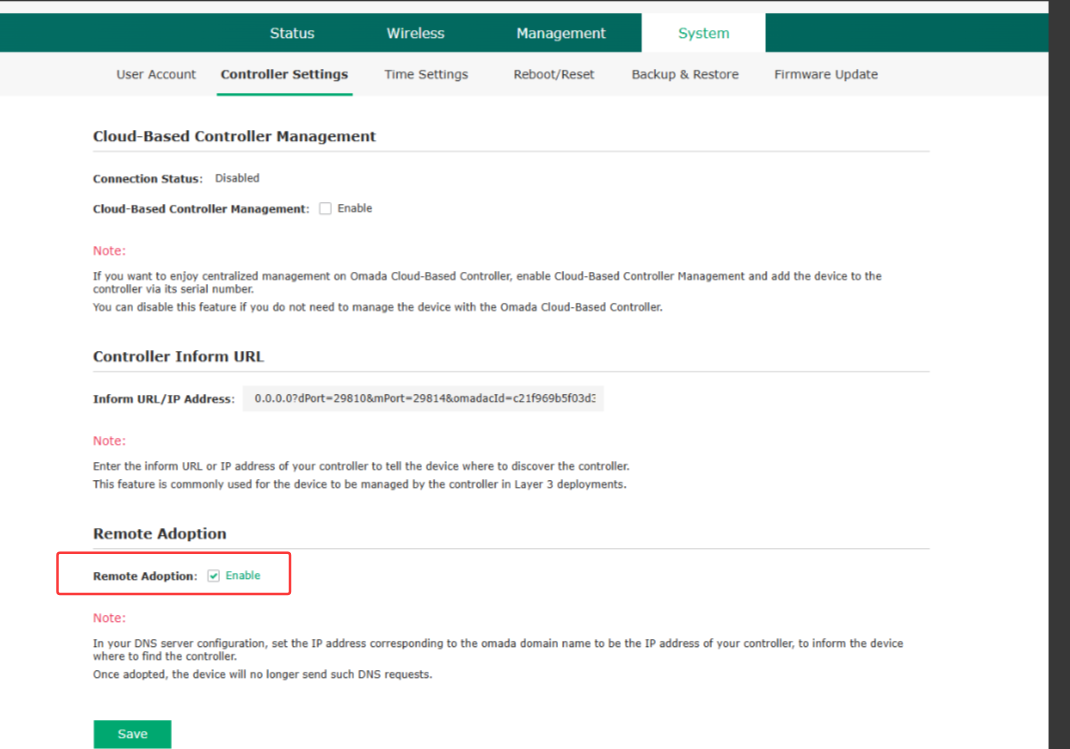
Uncheck it, and the EAP won't send the DNS request anymore.
- Copy Link
- Report Inappropriate Content
Hi @JanGold
Thanks for posting here.
This DNS request is normal behavior for SDN devices, which actively probe for available Omada controllers within the local network when a controller has not been deployed. Its design purpose is to automatically discover available Omada Controllers for centralized network management. This will not occupy much traffic:
- This request is only periodic probing within the local area network and is not transmitted to the wide area network.
- A single DNS request involves minimal data volume and does not consume network bandwidth or affect device performance.
- Its design purpose is to automatically discover available Omada Controllers for centralized network management. It is not intended to promote products or be embedded with harmful intent.
In the latest pre-release firmware upgrade, we have added a feature, Remote Adoption, to avoid these DNS queries. First, please update your EAP to the following version:
https://community.tp-link.com/en/business/forum/topic/854656
And you will see the option on the system page:
Uncheck it, and the EAP won't send the DNS request anymore.
- Copy Link
- Report Inappropriate Content

@Vincent-TP why is it then not possible to do remote adoption pointing the omada A DNS entry to the controllers IP? I only was successful using the Option 82 method, the dns method never worked. However, the DNS method always worked with my unifi controllers (pointing unifi A entry to the controllers IP).
- Copy Link
- Report Inappropriate Content
Hi @dadaniel_at
For business use of Omada products, multiple devices are typically managed simultaneously, so our products are designed to send these Controller discovery packets by default. Adding manual configuration for discovery would go against the original intent of ease of management.
However, as I mentioned earlier, these packets consume minimal bandwidth and are only transmitted within the LAN.
Thank you for your understanding.
- Copy Link
- Report Inappropriate Content
- Copy Link
- Report Inappropriate Content
- Copy Link
- Report Inappropriate Content

@JanGold Beta firmware does not automatically send the info; it is collected and stored into config files, but the devices do not automatically send the info to TP-Link. It still needs to be manually downloaded and sent by the users.
If downloading the beta firmware is still a concern, you can wait until the fix is implemented in a release firmware. As for when that will be officially released, unfortunately, we don't have any news on that, but it is currently under development and slated for a future release.
JanGold wrote
So in order to fix this unwanted and annoying spam, I need to "acknowledge that TP-Link will be collecting, using, storing, processing, and analyzing diagnostic, technical, error reports, crash dumps, usage, and other related data from your devices" (from https://community.tp-link.com/en/business/forum/topic/275514) - and you find this to be an acceptable solution? Absolutely ridiculous.
- Copy Link
- Report Inappropriate Content

DNS traffic is extremely small, even thousands of lookups wont effect traffic, and since there is no contorller there wont be any response to them anyway.
- Copy Link
- Report Inappropriate Content
GRL wrote
DNS traffic is extremely small, even thousands of lookups wont effect traffic, and since there is no contorller there wont be any response to them anyway.
You are entirely missing the point: this unwanted log spam has other practical implications for diagnosing and fixing networking related issues. Just in the last two weeks, these messages grew the dnsmasq log file size by nearly 100 megabytes. You may be humbled to learn some systems operate under resource constraints where this actually matters.
- Copy Link
- Report Inappropriate Content
Information
Helpful: 5
Views: 403
Replies: 8
Voters 1