
Slow network every 30-45 seconds

Slow network every 30-45 seconds

Slow network every 30-45 seconds
2 weeks ago - last edited a week ago
Model: ER707-M2   TL-SG3452  
Hardware Version: V1
Firmware Version: 1.31

My network infrastructure is all TP-Link Omada. Discovered a problem a couple months ago that I've been trying to troubleshoot with zero luck. Seems like almost every day now I get these 1 second 'blips' of slow connectivity. When I notice some lag I start pinging the firewall/gateway and also pinging google and in both places I'm seeing normal pings and then random pings averaging about 2 seconds. I'm pretty sure its not my internet connectivity as this happens when pinging my internal firewall interface from my PC.


This is not a wireless issue as my PC is hardwired into a SG3452 v1.20 (firmware 1.20.19)


If I reboot the firewall/gateway then the problem seems to go away for about a day. I've tried changing cables which I thought fixed the problem for a few days.


I also saw a lot of traffic for torrents (sharing out Linux ISOs of course!) so I shut down my torrent client but again the problem started up after about a day or two.


Stuck trying to figure out where and how to best troubleshoot this issue. Any suggestions?


(There is one aruba switch in the diagram below which is where my server machines are behind)
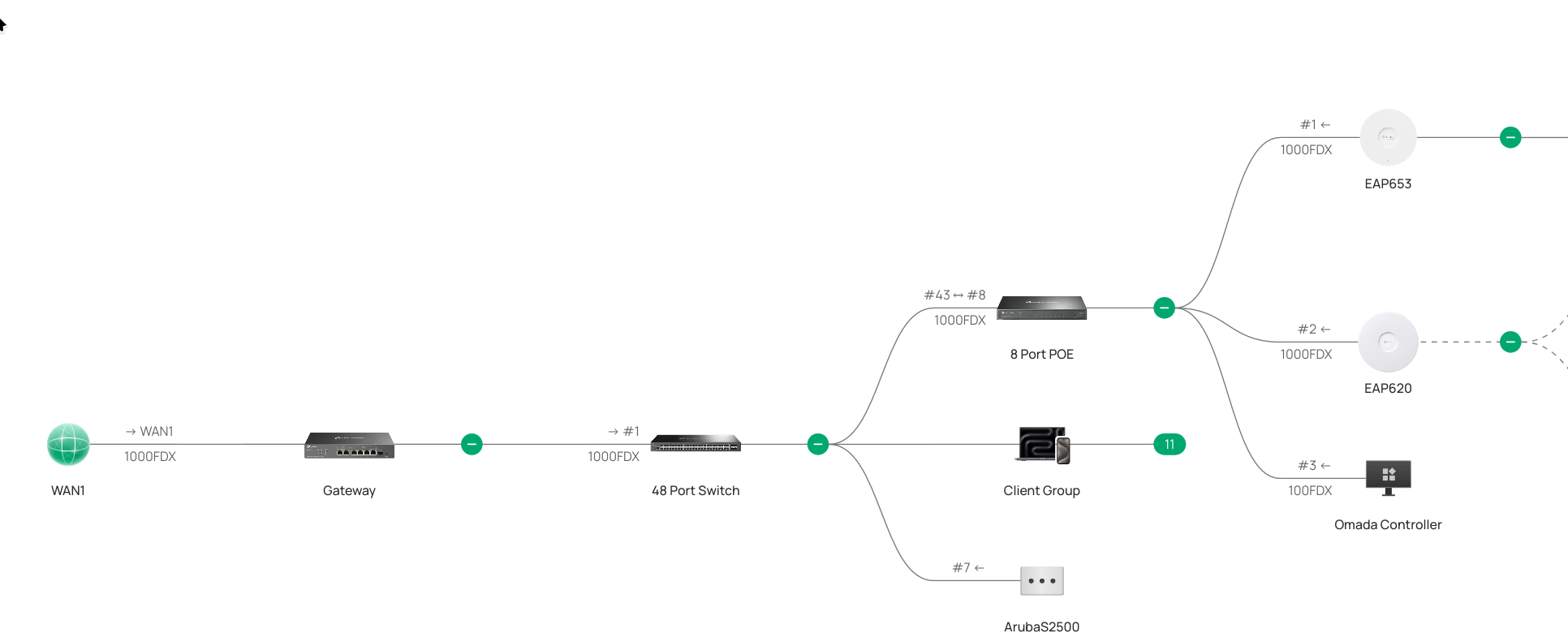
 

  0      
  0      
#1
Options
1 Accepted Solution
Re:Slow network every 30-45 seconds-Solution
2 weeks ago - last edited a week ago

Hi,  @mrclark 
Thank you for posting on our business forum.
 

Please kindly find the troubleshooting recommendations below for your reference:

1.We have noted that the firmware version of your ER707-M2 is not the latest official release. Please upgrade it to the newest stable firmware, and check whether the issue still persists after the update.
2.We suggest performing a step-by-step check at the physical layer to locate the problematic device. You may first connect your PC directly to the ER707-M2, run a continuous ping test and check for abnormal latency or packet loss. Then you can repeat the same test when connecting through the TL-SG3452 and further downstream devices one by one, to pinpoint which device the issue originates from for subsequent troubleshooting. For your reference: if the problem still occurs when your PC is connected directly to the ER707-M2, the issue is very likely related to the gateway itself; if no abnormality is found in the direct connection test, you can continue to narrow down the problem among your downstream devices.
3.Once you have narrowed down the scope of the issue, you may use Wireshark for packet capture analysis. We recommend running a long-duration capture to check if there is any abnormal traffic exactly when the latency blips occur.

We would greatly appreciate it if you could share your relevant test results with us for further analysis.


Recommended Solution
  0  
  0  
#2
Options
3 Reply
Re:Slow network every 30-45 seconds-Solution
2 weeks ago - last edited a week ago

Hi,  @mrclark 
Thank you for posting on our business forum.
 

Please kindly find the troubleshooting recommendations below for your reference:

1.We have noted that the firmware version of your ER707-M2 is not the latest official release. Please upgrade it to the newest stable firmware, and check whether the issue still persists after the update.
2.We suggest performing a step-by-step check at the physical layer to locate the problematic device. You may first connect your PC directly to the ER707-M2, run a continuous ping test and check for abnormal latency or packet loss. Then you can repeat the same test when connecting through the TL-SG3452 and further downstream devices one by one, to pinpoint which device the issue originates from for subsequent troubleshooting. For your reference: if the problem still occurs when your PC is connected directly to the ER707-M2, the issue is very likely related to the gateway itself; if no abnormality is found in the direct connection test, you can continue to narrow down the problem among your downstream devices.
3.Once you have narrowed down the scope of the issue, you may use Wireshark for packet capture analysis. We recommend running a long-duration capture to check if there is any abnormal traffic exactly when the latency blips occur.

We would greatly appreciate it if you could share your relevant test results with us for further analysis.


Recommended Solution
  0  
  0  
#2
Options
Re:Slow network every 30-45 seconds
2 weeks ago - last edited 2 weeks ago

  @Jeremy_12 Why wouldn't the controller tell me the firmware is out of date on my gateway?


I've manually applied the update and will see if it solves any problems.


  0  
  0  
#3
Options
Re:Slow network every 30-45 seconds
Thursday

Hi  @mrclark 


Does the new firmware fix the issue?

mrclark wrote

  @Jeremy_12 Why wouldn't the controller tell me the firmware is out of date on my gateway?


I've manually applied the update and will see if it solves any problems.


  0  
  0  
#4
Options
