OC200 despues de un reset no hereda credenciales

OC200 despues de un reset no hereda credenciales

OC200 despues de un reset no hereda credenciales
a week ago - last edited Friday
Model: OC200  
Hardware Version: V1
Firmware Version: 6.2.10.11

Buenas tardes debido a que la adaptador de corriente de mi controlador OC200 dejo de funcionar tuve que reiniciarlo de fabrica lo cual perdí el acceso a los dispositivos de la red.Realice todo el proceso cuatro pasos (no tenia copia de seguridad) y si bien los veo ahora no los puedo gestionar!!!! me dice dispositivos "GESTIONADOS POR OTROS" cuando intento adoptarlo me pide usuario y contraseña le coloco las credenciales para ingresar a la plataforma y me responde invalidas me pueden ayudar por favor! Muchas Gracias!!!

  0      
  0      
#1
Options
1 Accepted Solution
Re:OC200 despues de un reset no hereda credenciales-Solution
Tuesday - last edited Friday

Hi  @GuilleBone 


Thanks for posting here.

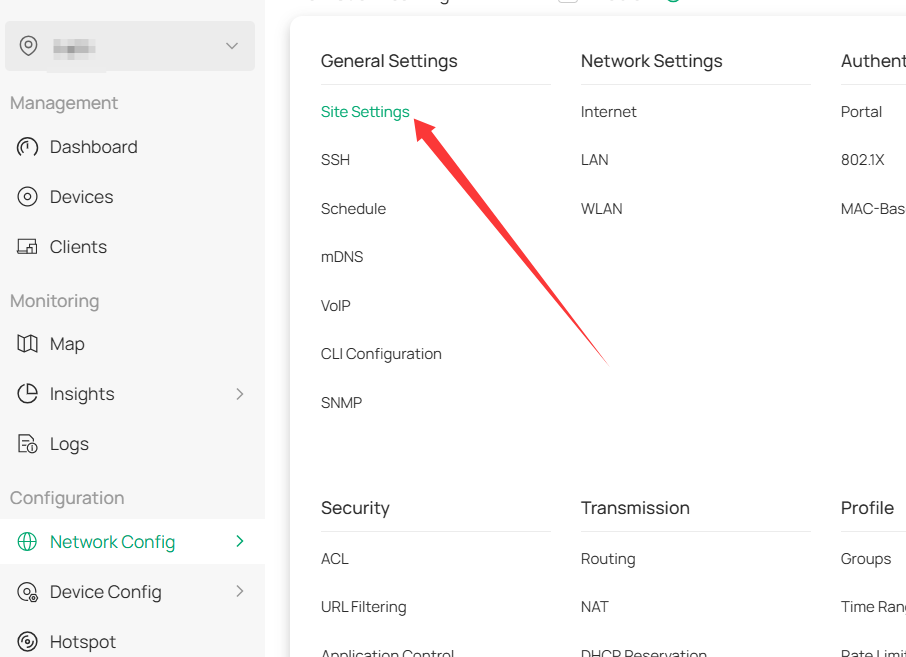
Before resetting all the Omada devices, please try to recall the device account you configured on this page:

Site View > Network Config > General Settings > Site Settings.


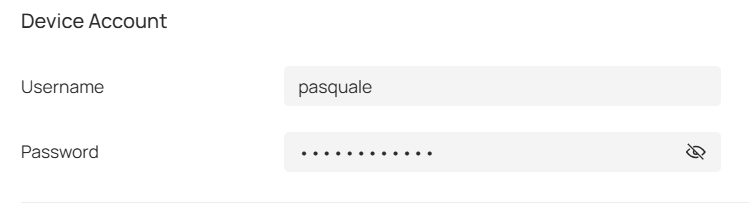
scroll down, you will see the device account:


This is the account you need to input when adopting the devices.

If you can't recall this account, the only way is to perform a factory reset on all devices and re-adopt them.


Recommended Solution
  0  
  0  
#3
Options
2 Reply
Re:OC200 despues de un reset no hereda credenciales
Monday - last edited Monday

  @GuilleBone 


Si has reiniciado el controlador a valores de fábrica, probablemente tendrás que reiniciar los dispositivos a valores de fábrica también para que pierdan la vinculación con un controlador. Yo haría una prueba con un solo dispositivo para ver si eso soluciona el problema.  Si funciona, tendrás que hacer lo mismo con todos.


1x ER7406 1x OC300 4x SG2008 1x EAP610 3x EAP650-Desktop 1x EAP772-Outdoor
  1  
  1  
#2
Options
Re:OC200 despues de un reset no hereda credenciales-Solution
Tuesday - last edited Friday

Hi  @GuilleBone 


Thanks for posting here.

Before resetting all the Omada devices, please try to recall the device account you configured on this page:

Site View > Network Config > General Settings > Site Settings.


scroll down, you will see the device account:


This is the account you need to input when adopting the devices.

If you can't recall this account, the only way is to perform a factory reset on all devices and re-adopt them.


Recommended Solution
  0  
  0  
#3
Options