
Voice VLAN vs Auto VoIP

Voice VLAN vs Auto VoIP

Voice VLAN vs Auto VoIP
2 weeks ago - last edited a week ago
Model: TL-SG3452P  
Hardware Version: V3
Firmware Version: 3.30.13

I've read through the documentation and KB articles I could find on this subject, but still have some questions.


I'm trying to do a setup, like this:
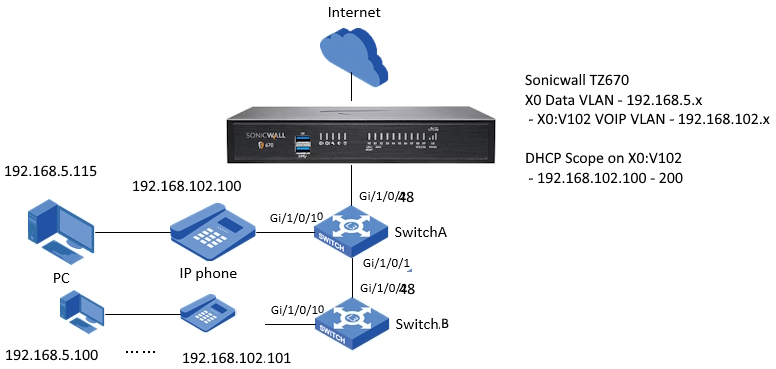
 

From this article (https://support.omadanetworks.com/en/document/13011/), it appears like I should be using Auto VoIP for this setup. I am NOT using a controller. The phones are SNOM D815 - and are VLAN aware.


I tried this setup using the Voice VLAN config on the switches, but ran into problems. The phones were getting a 192.168.102.x address as desired, and the PCs were getting 192.168.5.x - so no issues there. The phones would drop off the network and not be visible to the VOIP host. When you tried to call out you would get a Network Disconnected error. If you tried to call out again immediately, the call would go through. After some time of being idle, the same error would appear. After digging into the documentation a little more, I believe I had the Voice VLAN settings misconfigured, but now am wondering if I should just be using Auto VoIP.


I am confused over whether it is even a one or the other scenario as the article seems to suggest? Is it?


In other words, if I opt to use Auto VoIP, would that mean I don't configure any settings in the QoS -> Voice VLAN menu (Global and/or Port Config)?


Again, this FAQ (https://www.tp-link.com/uk/support/faq/4016/) seems to suggest you choose either Voice VLAN settings, or Auto VoIP. Is my understanding correct?


If true, then can someone help determine if these steps would be correct:


1) QoS menu -> Auto VoIP

     - Global Config: Auto VoIP Enable needs to be checked


    - QoS -> Voice VLAN -> Global Config - Voice VLAN would remain unchecked or disabled (I'm assuming)

    - QoS -> Voice VLAN -> Port Config - Voice VLAN would remain disabled for all ports (I'm assuming)


2) QoS menu -> Auto VoIP

   - Port Config Interface Mode


Would I need to set any port with a phone: Interface Mode VLAN ID, give it a value of 102, anything for CoS Override?, anything for DSCP Value?


3) L2 Features -> VLAN -> 802.1Q VLAN

     - Add VLAN ID 102

     - For any ports that will have a phone/pc, add that port to the VLAN 102 as "tagged". The same port should be "untagged" in the System/Data VLAN 1.


3a) I'm unsure what to do with Switch A Port 48 (uplink port to Sonicwall). Does the tagging remain the same? ie Port 48 System/Data VLAN 1 should be untagged, and Port 48 VOIP VLAN 102 tagged?


3b) Similarly I'm unsure what to do with Switch A Port 1 - which will be connected to Switch B's port 48 as its uplink. Anything different for the tagging there?


4) Looks like LLDP and LLDP-MED need to be configured, so:


L2 Features -> LLDP -> LLDP Config

    - LLDP: check Enabled


L2 Features -> LLDP -> LLDP-Med Config

   - Click Port config tab

   - Enable LLDP-Med for all ports


Does this look right? 


Thank you!

0
0
#1
1 Accepted Solution
Re:Voice VLAN vs Auto VoIP - update-Solution
a week ago - last edited a week ago

  @solveit 


I was able to resolve the issue.


My TP-Link config using the Auto VoIP feature was correct.


My firewall was handling the DHCP scopes, and was handing out invalid DNS servers to any Zone/VLAN other than my default LAN.

Recommended Solution
0
0
#5
5 Reply
Re:Voice VLAN vs Auto VoIP - update
2 weeks ago

The Auto VoIP config as described in the initial thread is not quite working.


Phones are getting a 192.168.102.x IP, and the connected PCs are getting 192.168.5.x as desired.


However, while the phone boots normally, and is able to get out to the NTP server for the correct time etc, the phone is not registering at the Host. 


For QoS menu -> Auto VoIP

   - Port Config Interface Mode


I set any port with a phone: Interface Mode VLAN ID, gave it a value of 102, Nothing for CoS override, and a value of 46 for DSCP.


When I plug the same phone into my regular 192.168.5.x network, it does get registered properly and functions normally.


I feel like I'm close here. Can anyone offer any advice?

0
0
#2
Re:Voice VLAN vs Auto VoIP
a week ago

Hi @solveit 


Thank you so much for taking the time to post the issue on the TP-Link community!

To better assist you, I've created a support ticket via your registered email address and escalated it to our support engineer to look into the issue. The ticket ID is #99587, please check your email box and ensure the support email is well received. Thanks!

Once the issue is addressed or resolved, welcome to update this topic thread with your solution to help others who may encounter the same issue as you did.

Many thanks for your great cooperation and patience!

0
0
#3
Re:Voice VLAN vs Auto VoIP
a week ago - last edited a week ago

I haven't received an email regarding the ticket, and when I log into the Omada portal (https://ticket.omadanetworks.com/hc/en-ca/requests), I don't see any open tickets.

0
0
#4
Re:Voice VLAN vs Auto VoIP - update-Solution
a week ago - last edited a week ago

  @solveit 


I was able to resolve the issue.


My TP-Link config using the Auto VoIP feature was correct.


My firewall was handling the DHCP scopes, and was handing out invalid DNS servers to any Zone/VLAN other than my default LAN.

Recommended Solution
0
0
#5
Re:Voice VLAN vs Auto VoIP
a week ago

Hi @solveit 


We noticed that you have now fixed the issue, which is caused by the invalid DNS address by the firewall.

We will keep focus on the similar feedback. Should you have any further concerns, please feel free to contact us again!

0
0
#6