
New hard disk fails in NVR

I've now had 2x new WD purple HDs fail in my NVR unit.
Each time the NVR is working perfectly and then it fails to 'see' the HD.
There's nothing I can do to solve this via the app or desktop interfaces.
After rebooting the system the NVR beeped slowly and then began to beep very fast.
Testing the HDs via Kitfox produes a fail.
Erasing and doing a full overwrite does not solve the problem - the HDs are both dead.
To lose 1x new HD is a surprise.
To loose 2x new HD is likely NOT a coincidence.
What could be causing this / has anybody else had anything like this?
thanks
robert
- Copy Link
- Subscribe
- Bookmark
- Report Inappropriate Content


Hi @robmo
Thanks for reaching out to TP-Link Business Forums.
May I know what's the model of the HDD you have tried? What's the capacity of the HDD?
Here's the article to tell how to choose suitable HDD for VIGI NVR: How to choose a suitable HDD for VIGI NVR | TP-Link
And what's the hardware and firmware version of your NVR?
Also, did you mean the NVR cannot detect the HDD completely?
As you said that the HDD can work perfectly with the NVR for a while, may I confirm how long would it take before it stops working? A week, a month or just several days?
Did you try connecting it to a PC to confirm if it can work?
If the NVR can still detect the HDD, can you please connect it to a monitor screen and then navigate to Settings > Storage > Hard Drive Management > Bad Sector Detection & SMART Detection. Please run both the two detections. Detection results usually contain 3–4 pages, so please provide screenshots of all S.M.A.R.T. Detection result pages.
Thanks for your understanding.
- Copy Link
- Report Inappropriate Content
Hi there,
Thanks for taking the time to reply....
Ok...
The 1st HD was a WD Purple 4tb
The 2nd HD is a WD Purple 8tb
I chose them both having emailed TPLINK and with their approval.
I upgraded to a 8tb as the 4tb was out of stock when i needed to replace it. I checked with TPlink and they said that the version of my NVR / firmware was appropriate - it had received the upgrade to ensure that it could take the 8tb.
The s/n is 224c646000891 Ver 1.0
In BOTH cases, the NVR detected the HD and in both cases they worked fine for a while - the system was perfect.
The 1st HD lasted perhaps a month.
The 2nd HD lasted about 2.5 months.
Having spoken with WD support, I downloaded Kitfox and ran tests on the drives:
- both failed their tests
- I performed the maximum reformat of the drives
- retested them
- they both failed again.
- the 1st drive was returned and replaced by the 2nd... now I'm about to return the 2nd to get a 3rd!
At the time i removed the HDs from the NVR, the NVR could not detect the HDs, but i can get the SMART results from Kitfox.... (attached)
For info, the 8tb drive failed the self-tests with code 7.
Hope that helps?

- Copy Link
- Report Inappropriate Content
Hi @robmo
May I confirm if your NVR is running on firmware 1.2.3 Build 251119?
Can you provide the exact model number of the two HDDs or can you please take a photo of them so that we could check it for you?
If you did not return the second HDD yet, please install the CrystalDiskInfo on your PC to scan the drive and read the full SMART information.
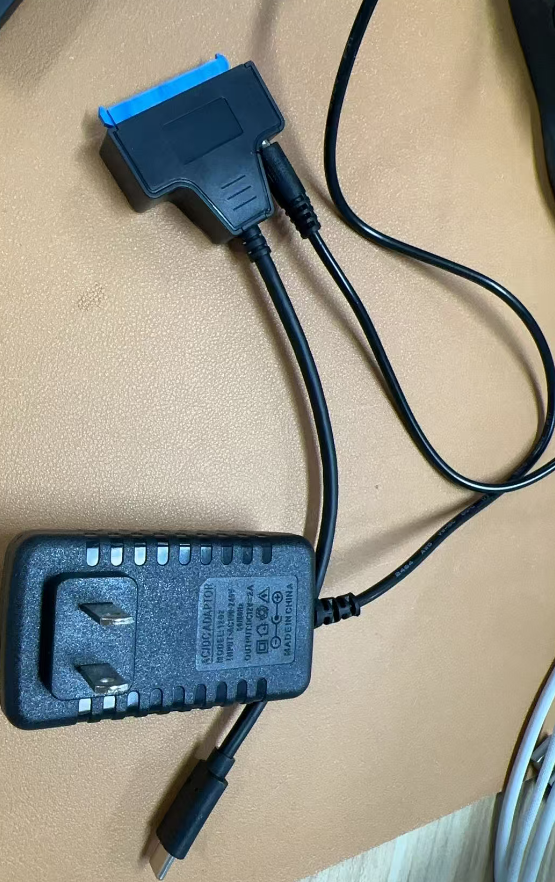
Please note that if you are connecting the drive via a SATA to USB or Type-C adapter, make sure the adapter has a 12V power port, as the power supply from the PC's USB or Type-C port is only 5V.
- Copy Link
- Report Inappropriate Content
Hi there,
You are right about the firmware number, but i can add: rel 7032ln at the end of what you mentioned.
I can't access the NVR now, as there's no drive in it, but the above info comes from the VIGI desktop app.
The WD drive is WD85PURZ - 85C4WYO, s/n 1f00k4EU
The first one was returned ages ago and i won't have this 2nd one for much longer - it must be returned and replaced.
I can confirm that i am powering the HD using a benfei mains adaptor lead.
thanks so much for your time on this
robert
- Copy Link
- Report Inappropriate Content
Information
Helpful: 0
Views: 154
Replies: 4
Voters 0
No one has voted for it yet.