Local VMS server ports to forward for Vigi android app

Local VMS server ports to forward for Vigi android app

Local VMS server ports to forward for Vigi android app
a week ago - last edited Saturday
Model: VIGI NVR2016H  
Hardware Version: V2
Firmware Version: 1.5.1 Build 260311 Rel.17211n

Good day

I have set up my cameras and NVR and is using local VMS to manage it all. I do not want cloud at all.

The Vigi app works on my local wifi with my firewall configured to have DNAT and loop back rules for ports 8081, 8082, 8091, 10556, 10123.

The app does not work when it is on external networks. I get nottifications but live video does not work with error "error code: 1003102".

What do I need to do in order for the vigi android app to work with my local VMS to view live view or recodings over the internet?


0
0
#1
1 Accepted Solution
Re:Local VMS server ports to forward for Vigi android app-Solution
a week ago - last edited Saturday

Hi @overdrive2max 


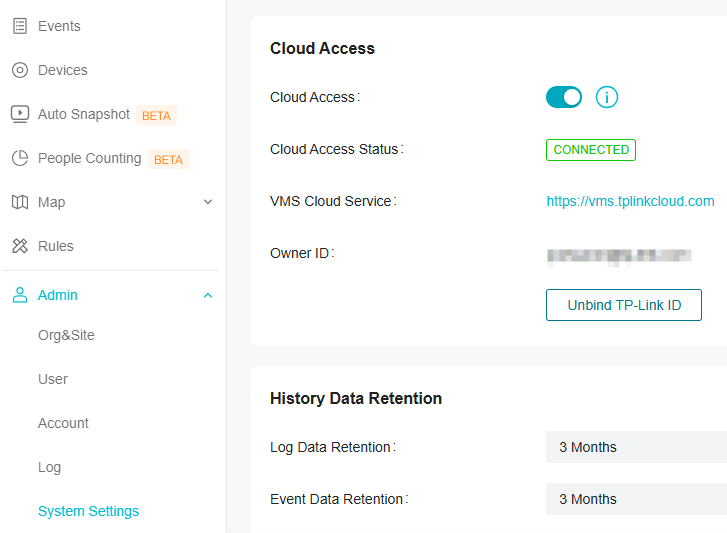
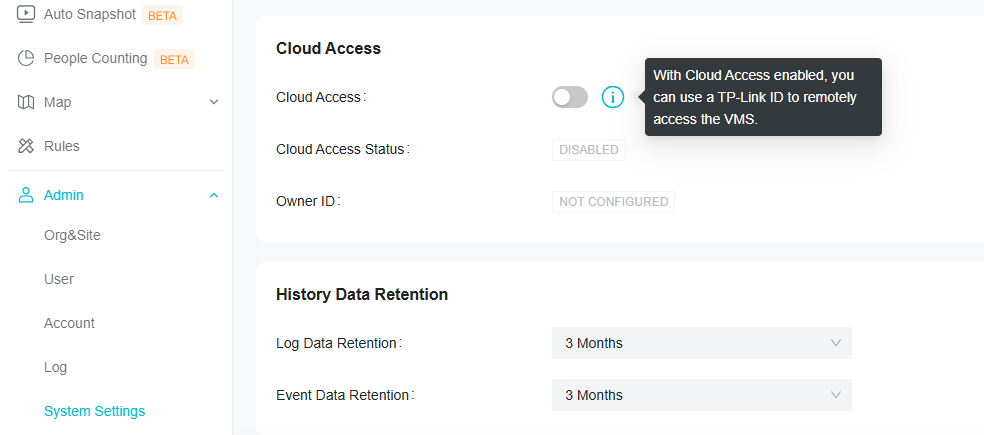
This option should not be greyed out as this is an important remote access method of the VIGI VMS.

Can you please help upload some screenshots here to show why it is greyout out?

I tried enabling it and I can connect to the Cloud server successfully. 


If you still cannot enable the cloud service, you can consider setting up a VPN tunnel so that you can view the live feeds.

Recommended Solution
0
0
#4
3 Reply
Re:Local VMS server ports to forward for Vigi android app
a week ago

Hi @overdrive2max 

Thanks for reaching out to TP-Link Business Forums.


May I confirm if you have enabled Cloud Access on your Local VMS?

0
0
#2
Re:Local VMS server ports to forward for Vigi android app
a week ago

  @Gabriel-TP 


Hi

That option is greyed out so i can not enable it.

Can the Vigi android app connect to a local VMS server from a public network?

0
0
#3
Re:Local VMS server ports to forward for Vigi android app-Solution
a week ago - last edited Saturday

Hi @overdrive2max 


This option should not be greyed out as this is an important remote access method of the VIGI VMS.

Can you please help upload some screenshots here to show why it is greyout out?

I tried enabling it and I can connect to the Cloud server successfully. 


If you still cannot enable the cloud service, you can consider setting up a VPN tunnel so that you can view the live feeds.

Recommended Solution
0
0
#4