
Odd log message - [Cloud Service]Legal device notification issued by the cloud

Hi,
Anyone know what this means?
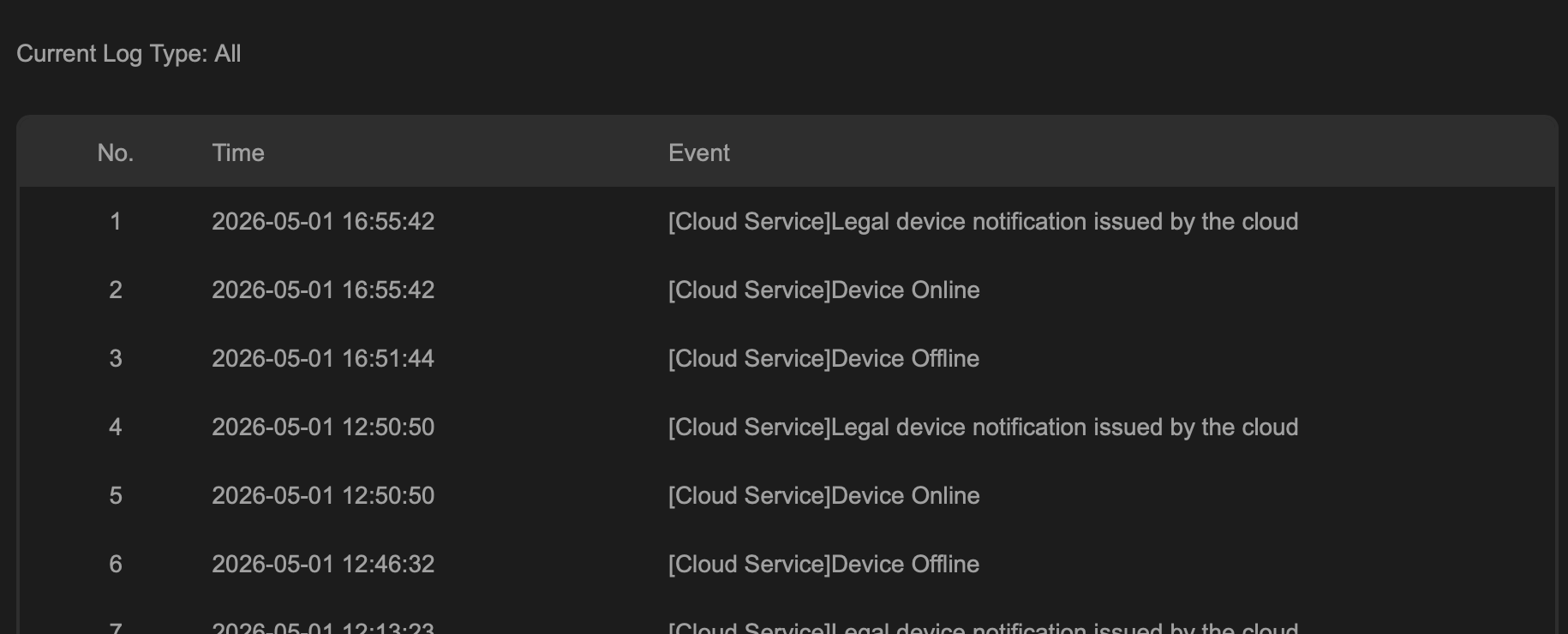
As to why the connection drops multiple times per day, might be an issue with my internet connection but still have to diagnose.
Is the part about legal notification to do with the push notification I get from the mobile app when the device disconnects/reconnects?
The way it's worded makes it sound like there's something that needs to be read and acknowledged in terms of using the cloud services, but upon every reconnection and not just during setup.
Thanks
- Copy Link
- Subscribe
- Bookmark
- Report Inappropriate Content


Hi @green_tea
The following is the complete explanation containing the offline/online detection process logic:
After detecting an Ethernet connection, the NVR will attempt to resolve domain names such as google.com and tp-link.com. If this fails, it will be judged as having no network connection (offline log). If the domain name query returns normal results, the NVR will attempt to connect to the cloud server. The cloud server will verify the device information. After verification passes, the cloud server will allow the device to access. At this time, logs for “online” and “Legal device notification issued by cloud” are recorded. “Legal device notification issued by cloud” corresponds to the result of device verification, meaning the device is deemed valid and legal by the cloud server.
Subsequently, the cloud service and the device continue to perform heartbeat detection. If there is an anomaly in the NVR’s front-end network that prevents it from connecting to the internet, heartbeat packets will time out, and the connection will be lost. The NVR will then show offline logs and attempt to reconnect to the cloud server after a period of time.
The RTSP client you mentioned can continue pulling streams from the NVR during the disconnection period, which is unrelated to the offline/online status discussed here, as it is local streaming. The offline/online status here refers specifically to the device’s connection to the cloud.
- Copy Link
- Report Inappropriate Content
Hi @green_tea
Thanks for posting here.
Where did you capture the logs? Is it from the NVR's web page? Or from the controller?
If from a controller, please also let us know its type and the firmware version.
Were your devices disconnected when the logs were generated?
- Copy Link
- Report Inappropriate Content
Hi @Vincent-TP,
The logs shown above came from the NVR's web interface (Information -> System Logs).
No devices were disconnected. This is something that just happens from time to time - the VIGI VMS app periodically sends notifications about 1 or 2 cams/channels disconnecting and then a 2nd one shortly afterwards stating they are back online.
Because I have a RTSP client set up on my TV to view NVR channels over the LAN, and don't notice any of the feeds dropping at all when this happens, I therefore assume these push notifications about cams disconnecting aren't triggered by an actual loss of connectivity, at least not locally - suspect the cloud service polling just fails from time to time due to a brief blip/hiccup with international routing on my ISPs side or something like that.
Thanks
- Copy Link
- Report Inappropriate Content
Hi @green_tea
The following is the complete explanation containing the offline/online detection process logic:
After detecting an Ethernet connection, the NVR will attempt to resolve domain names such as google.com and tp-link.com. If this fails, it will be judged as having no network connection (offline log). If the domain name query returns normal results, the NVR will attempt to connect to the cloud server. The cloud server will verify the device information. After verification passes, the cloud server will allow the device to access. At this time, logs for “online” and “Legal device notification issued by cloud” are recorded. “Legal device notification issued by cloud” corresponds to the result of device verification, meaning the device is deemed valid and legal by the cloud server.
Subsequently, the cloud service and the device continue to perform heartbeat detection. If there is an anomaly in the NVR’s front-end network that prevents it from connecting to the internet, heartbeat packets will time out, and the connection will be lost. The NVR will then show offline logs and attempt to reconnect to the cloud server after a period of time.
The RTSP client you mentioned can continue pulling streams from the NVR during the disconnection period, which is unrelated to the offline/online status discussed here, as it is local streaming. The offline/online status here refers specifically to the device’s connection to the cloud.
- Copy Link
- Report Inappropriate Content
Information
Helpful: 0
Views: 113
Replies: 3
Voters 0
No one has voted for it yet.