
EAP 787 too hot to touch
EAP 787 too hot to touch
So I ever use access points usually used mesh routers and got tired of speed drops so I bought the EAP787 and installed it. I'm kinda confused and upset cause I touched it 3 days later and it was so hot it burn me . That was with a poe++ Injector so I plugged in a 12v DC adapter and got the same results. I contacted tp-link and they told me it's not supposed to burn me when I touch it and they are warranty it. So I bought a eap650 from Amazonite to temporarily use while tp-link is doing there thing with the warranty. The eap650 gets so hot I barely can touch it. It's not as bad but I'm kinda disappointed in tp-link cause they are not telling customers if these access points run hot or not. What's the normal ranges . Is it going to catch on fire and kill my 6 children? Come on tp-link! I need some specifications
- Copy Link
- Subscribe
- Bookmark
- Report Inappropriate Content


@Brian93505 Sorry to hear about your experience. May I ask how you have the devices set up? Also, are you using a third party injector/dc adapter?
- Copy Link
- Report Inappropriate Content
@NeilR_M I have them set up with stand alone, no controller. The EAP787 is powered by the TPLink poe++ (poe380S) injector. The EAP650 I'm using while I'm getting my eap787 warranty is plugged in with the 12v power adapter it came with. It's about as hot as I can withstand. It's almost to hot to touch. TP-link needs to let us know what's the normal as far as heat goes. I'm surprised there is nothing on this topic.. This information should be in the manuals
- Copy Link
- Report Inappropriate Content
@Brian93505 when I got home from work the replacement EAP787 arrived so I removed the EAP650 and checked the temperature and the EAP650 was at 123deg. Does that seem a little hot? I hooked up the new EAP787 and checked the temperature about 15 min later. It has a hot spot that's 107deg. I still have my hopes up that it's not going to get too hot. But this is tp-links last chance with me. Support is not helpful and they have no information on this over heating issue.. I spent a lot of money on TPlink but I'm about to take it as a loss and start fresh with another company. My apologies TP-link ...
- Copy Link
- Report Inappropriate Content

Hi @Brian93505
The outer casing of EAP products is primarily made of engineering plastic, with a typical heat deflection temperature ranging from 85°C to 100°C. If you have not observed any softening or deformation of the EAP casing (such cases generally do not occur), it is highly unlikely that the temperature could reach 107°C or 123°C.
May I ask how you measured the temperature and which specific part was measured?
While internal chip temperatures may indeed run higher, EAP devices incorporate stringent thermal protection mechanisms:
As enterprise-grade equipment, the EAP650 features comprehensive temperature sensors and overheating protection circuits for its main control chip and Wi-Fi RF chip.
When the detected internal core temperature reaches a predefined safety threshold, the device will automatically initiate measures such as frequency throttling, reducing transmission power, or even shutting down to prevent damage.
Additionally, the product should be installed in a well-ventilated area to dissipate heat. If it remains in an enclosed space for an extended period, the temperature may be slightly higher. To help us understand the cause of the issue, could you please take some photos of the product’s installation environment for us to analyze? It would be best if the photos include the installation location, power sockets, surrounding areas, and so on.
- Copy Link
- Report Inappropriate Content
- Copy Link
- Report Inappropriate Content
@Brian93505 I'm sorry to hear that you've been experiencing this. Where are the devices being mounted? We have several of those models here in office and in normal operating conditions it should not get anywhere near that hot.
- Copy Link
- Report Inappropriate Content
@NeilR_M it's in my hallway near my ac return unit. The bottom of the units is warm, where the light is but the top where it is mounted aginst the ceiling is where it's hot. The hole situation sucks cause I mounted on my celling, I can't remove it . There is Ethernet cable in my celling. So it's now permanent decoration on why I'll never buy TP-link equipment again. Endless support can fix the overheating issues then I take it back and I'll continue to build with TP-LINK. But I'm looking in to swapping my acess point with a unify access point. I believe that will address this issue.
- Copy Link
- Report Inappropriate Content
- Copy Link
- Report Inappropriate Content
@Brian93505 Here is a pic of where I have it installed that light is led and puts out no heat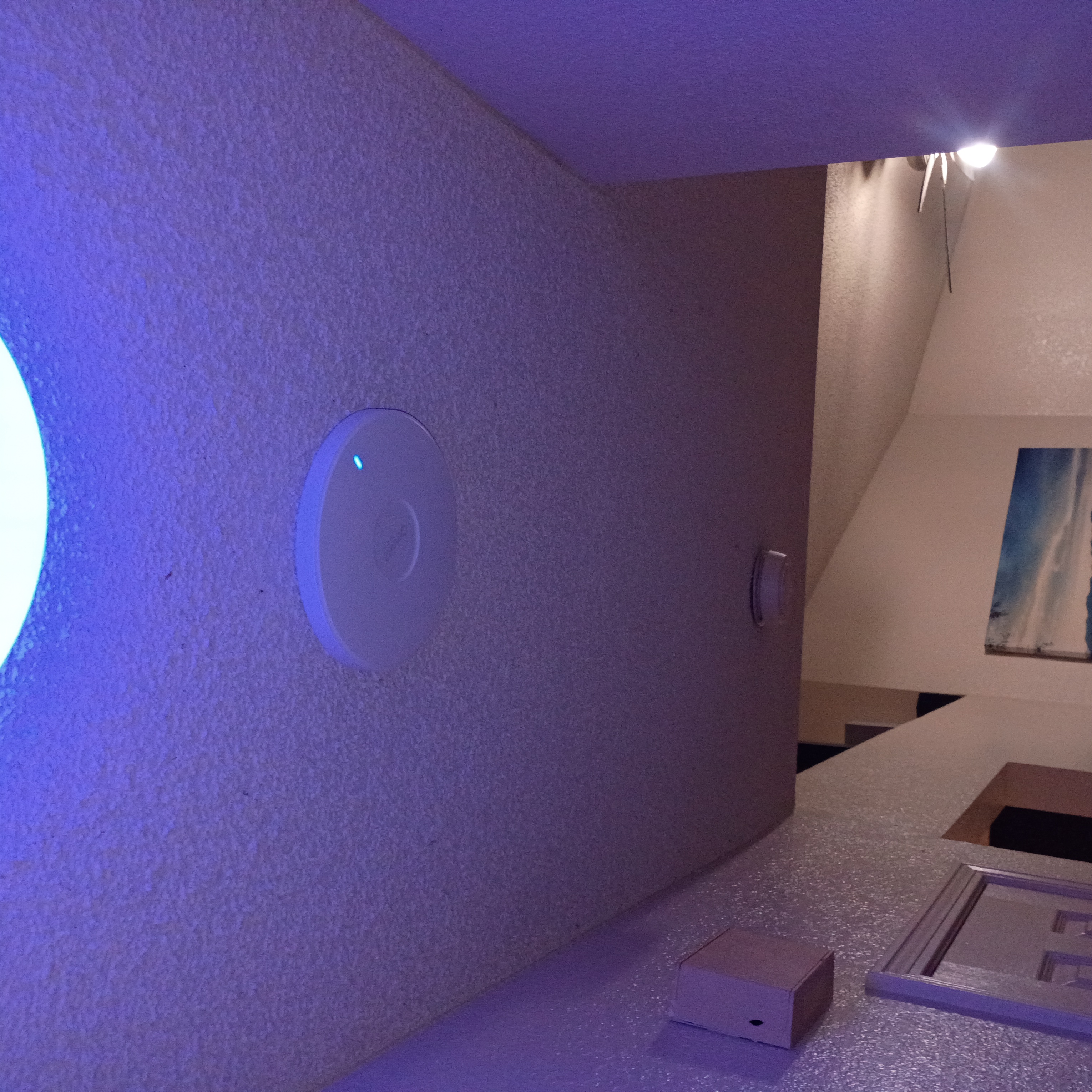
- Copy Link
- Report Inappropriate Content
@Brian93505 Thanks for the image, support's got your ticket and is investigating at the moment. I also had a talk with my engineers here about the issue, and based on your setup, despite being outside of the normal operating range of the AP, it shouldn't be starting any fires. If you can check from the Omada app or from the web UI of the device what it is displaying for internal temps, that would be very helpful.
- Copy Link
- Report Inappropriate Content
Information
Helpful: 1
Views: 184
Replies: 11
Voters 1
