
Why can't I get emails working?

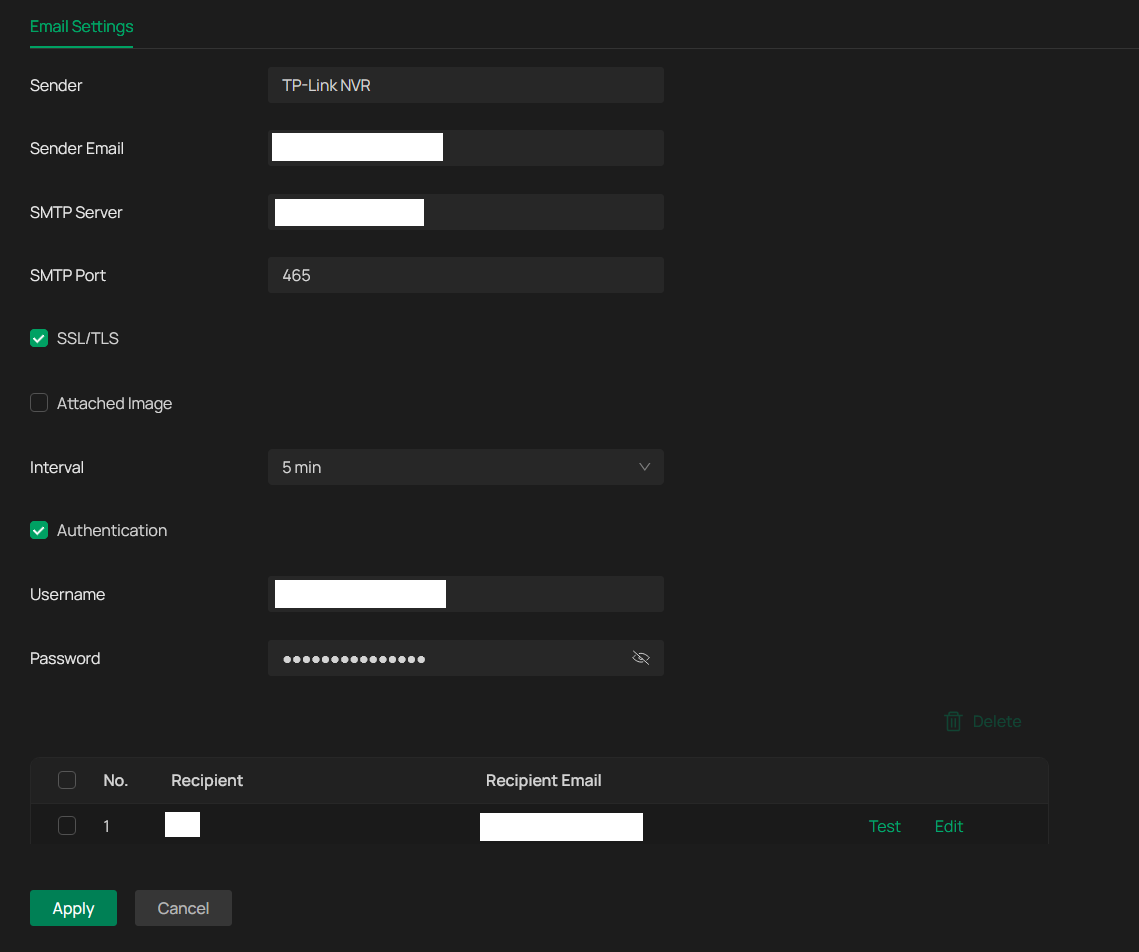
Network>Email
The emailing function does not work.
Sender email: My email address.
SMTP server: My email provider SMTP server address.
Username: My email address.
Recipient email: My email address.
Test>"Failed to connect to SMTP server".
However SMTP server is up and running perfectly normal.
What am I doing wrong?
- Copy Link
- Subscribe
- Bookmark
- Report Inappropriate Content


Hi @DCCXVIII
Thanks for reaching out to TP-Link Business Forums.
Please refer to this article to learn how to enable SMTP server: How to Configure SMTP Server on VIGI IPC to Send Event Notification E-mails | TP-Link
Please note that the server port is 25 by default. If your Email server requires a different port, please enter the correct port.
Also, the authentication username & password is not your email username & password.
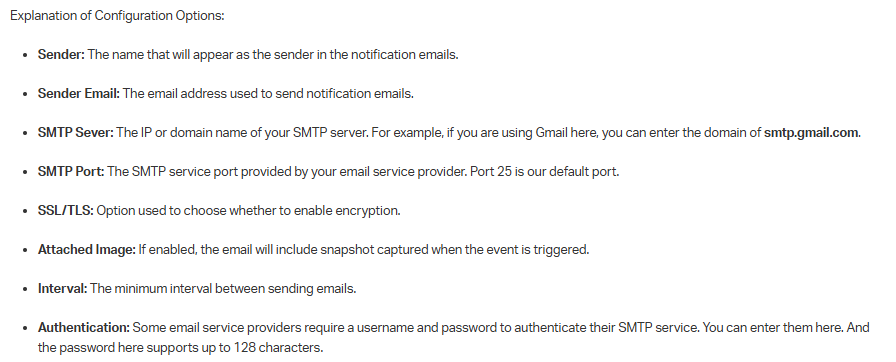
You may check the explanation below:
- Copy Link
- Report Inappropriate Content

Hello @DCCXVIII , FWIW, here, I've been banging my head against the wall. My credentials were the same I was using in my email client. I double checked them a hundred times. The NVRs and cameras here wouldn't send any test mail. The three email providers, that I tested, all ask to use port 465 to connect to their mail servers, and this is the port I successfully use with my email client. However, for some reason, this port doesn't work with the VIGI NVRs and cameras here. Instead, I tried port 587, and for some reason this worked right away. Give it a try...
PS: To TP-Link representatives, I think this is a flaw of the TP-Link equipment. Cameras and NVRs should work with the SMTP port that is advertised by the ISP on their web site, i.e. with the same configuration that is used in an email client, same port.
- Copy Link
- Report Inappropriate Content
Hi @DCCXVIII
Thanks for reaching out to TP-Link Business Forums.
Please refer to this article to learn how to enable SMTP server: How to Configure SMTP Server on VIGI IPC to Send Event Notification E-mails | TP-Link
Please note that the server port is 25 by default. If your Email server requires a different port, please enter the correct port.
Also, the authentication username & password is not your email username & password.
You may check the explanation below:
- Copy Link
- Report Inappropriate Content
Thanks for the response. However your instructions conflict with the documentation you quoted.
"Also, the authentication username & password is not your email username & password."
This is incorrect. According to the documentation you provided, this IS in fact, the email username and password field. Please refer to this link for proof: https://www.vigi.com/au/support/faq/4803/
If you think about it, you will understand why I am correct. As otherwise the NVR has no way of knowing my email username and password to pass the SSL/TLS challenge.
Therefore, as far as I can see, all my details are correct. But the NVR still cannot send emails. It is unknown why.
- Copy Link
- Report Inappropriate Content

- Copy Link
- Report Inappropriate Content
I didn't mention it originally, but I was already aware of that and had already setup a individual "connected apps" password specifically for the NVR. Not my regular email password. I have followed all instructions.
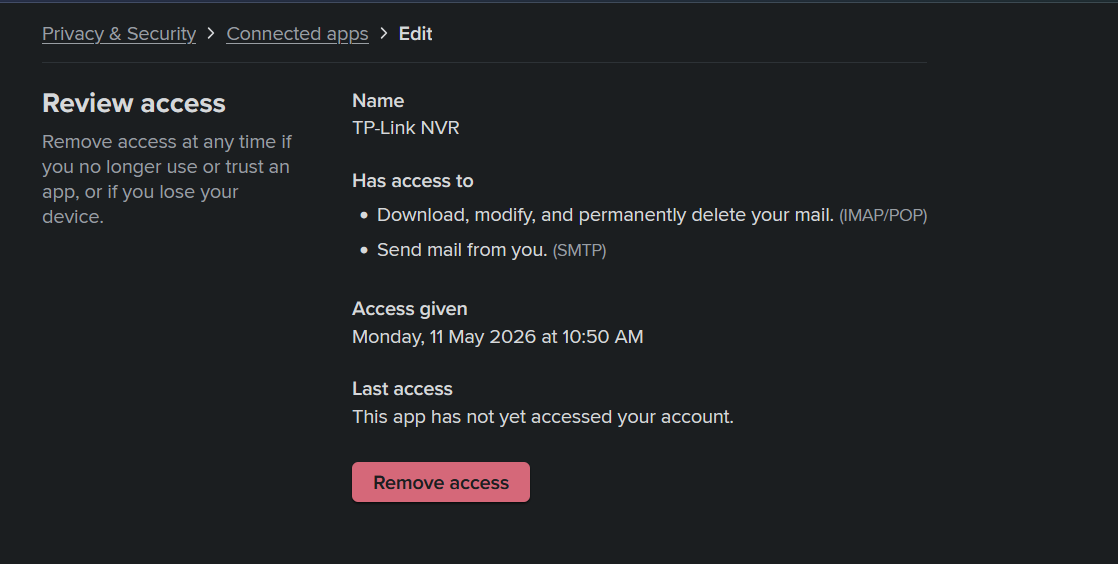
I use Fastmail btw. Not Gmail.
- Copy Link
- Report Inappropriate Content
You may use this SMTP test tool to check if your SMTP is working properly: SMTP Test Tool - Free Online SMTP Server Tester
Also, our SMTP Server port is 25 by default, You may try it.
If you already setup the APP password, you need to enter it in the Authentication username and password field.
- Copy Link
- Report Inappropriate Content
Hello @DCCXVIII , FWIW, here, I've been banging my head against the wall. My credentials were the same I was using in my email client. I double checked them a hundred times. The NVRs and cameras here wouldn't send any test mail. The three email providers, that I tested, all ask to use port 465 to connect to their mail servers, and this is the port I successfully use with my email client. However, for some reason, this port doesn't work with the VIGI NVRs and cameras here. Instead, I tried port 587, and for some reason this worked right away. Give it a try...
PS: To TP-Link representatives, I think this is a flaw of the TP-Link equipment. Cameras and NVRs should work with the SMTP port that is advertised by the ISP on their web site, i.e. with the same configuration that is used in an email client, same port.
- Copy Link
- Report Inappropriate Content
@calande OMG Thank you so much! This was the answer! Nothing else that was suggested in this thread worked.
It turns out once again there is another bug in the Vigi firmware. In this case, TP-Link NVR's cannot use port 465 for some unknown reason. This is an issue with TP-link. Not my email provider.
Thanks again!
- Copy Link
- Report Inappropriate Content
- Copy Link
- Report Inappropriate Content
@calande Indeed. This is actually not the first bug in the vigi firmware I've had to report on these forums (I reported 2 others before). I think the first bug I exposed was to do with their network isolation feature and the second was their incompatibility with Firefox. To their credit, they did eventually fix it. But I was the one who had to report it and show the replicatable steps so they could understand what I was saying.
The fact that I was recomended to use port 25 as the default port is atrocious. Absolutely nobody should ever be using port 25 in regular use as that exposes you data and credentials with no security whatsover. The only acceptable ports are 465 and apparently 587 (which I didn't know about before). This is basic security 101 stuff and I'm very suprised by how lackadaisical they seem to be around here re security.
- Copy Link
- Report Inappropriate Content
Information
Helpful: 0
Views: 425
Replies: 9
Voters 0
No one has voted for it yet.