Vigi App not showing people or vehicle clips under camera, Only general motion

Vigi App not showing people or vehicle clips under camera, Only general motion

Vigi App not showing people or vehicle clips under camera, Only general motion
a week ago
Model: VIGI NVR2008H-8MP  
Hardware Version:
Firmware Version: 1.0.2

Vigi App only shows general moton clips under camera. 


I have turned on under motion to set vehicles and people, doesnt work.


I also have turned off motion and turned on vehicles and people, doesnt work


Then I turned motion with vehicle and people selected as well as turning on the seperate vehicle and people, doesnt work.


Support was clueless. Whats the trick? 

0
0
#1
3 Reply
Re:Vigi App not showing people or vehicle clips under camera, Only general motion
Friday

Hi @Advancetec 

Thanks for reaching out to TP-Link Business Forums.


May I know what's the hardware version of your VIGI NVR?

It seems that your device is still running in a lower version. Please refer to this article to upgrade it to the latest firmware: How to upgrade the firmware of VIGI NVR | TP-Link

Do you mean you can only see motion detection when you navigate to VIGI APP > Device > Camera > Filter?

0
0
#2
Re:Vigi App not showing people or vehicle clips under camera, Only general motion
Yesterday - last edited 23 hours ago

  @Gabriel-TP 


firmware 1.0.2 build 240308


NVR 2008H-8mp UN 1.0


If I go to filters in the app the only option is motion detection 


Under each camera every clip is general motion with the general motion icon even when it's a car passing by 


0
0
#3
Re:Vigi App not showing people or vehicle clips under camera, Only general motion
15 hours ago

 Hi @Advancetec 


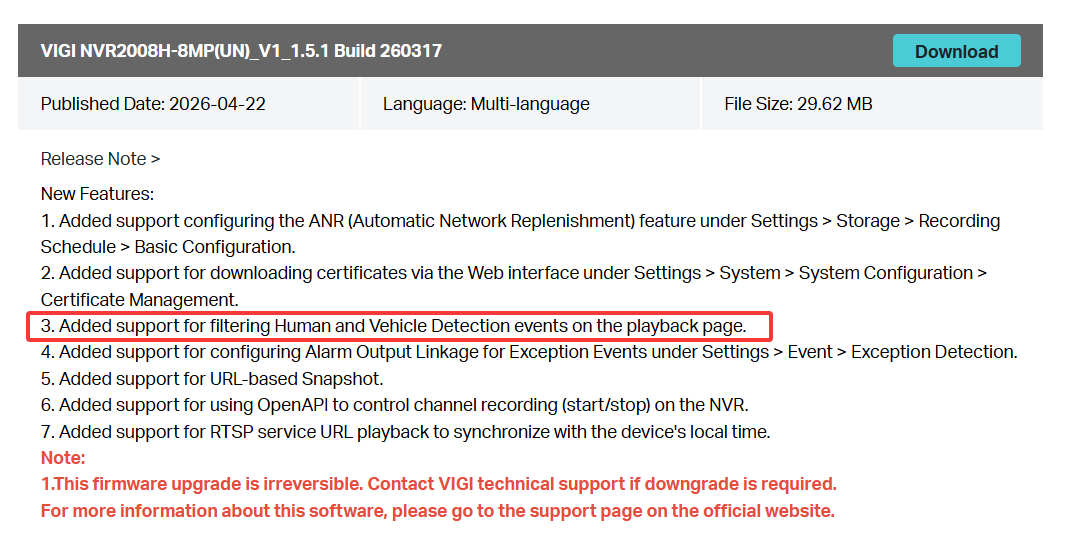
You may try to upgrade the NVR to the latest firmware. This feature has been added to it.

Firmware link: Download for VIGI NVR2008H-8MP | TP-Link

How to upgrade NVR's firmware: How to upgrade the firmware of VIGI NVR | TP-Link

0
0
#5