
TL-SG2428P V2 Firmware Upgrade Path

I am looking for the upgrade path to the latest firmware version from version 2.0.0 Build 20210607 Rel.64761 on the TL-2428P V2 switches.
- Copy Link
- Subscribe
- Bookmark
- Report Inappropriate Content


Hi @NP115SFX2
Thanks for reaching out to TP-Link Business Forums.
You may refer to this link to download the firmware file on your PC first: TL-SG2428P | Omada Network Support
Then, if you are managing the switch in Standalone mode, you may naviagte to System > System Tools > Firmware Upgrade.
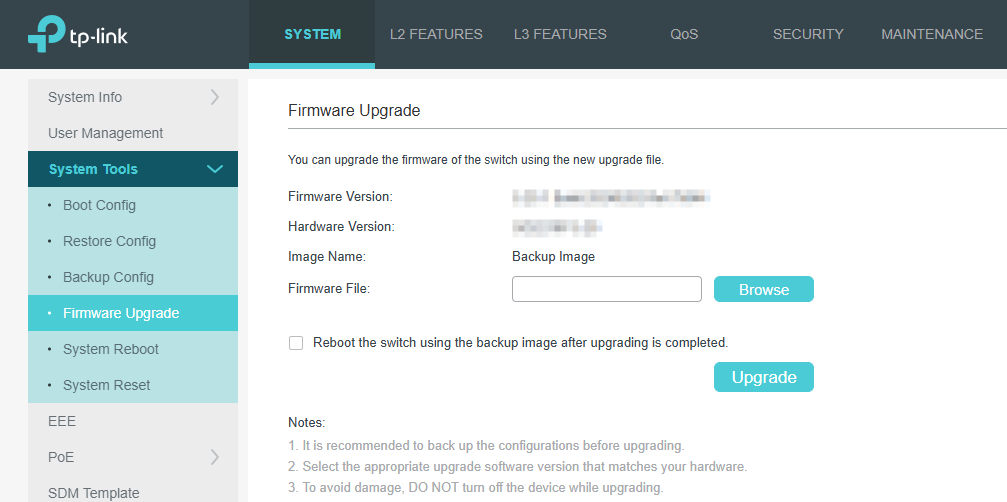
If you are managing it in Controller mode, you can navigate to Site View > Device > TL-SG2428P > Custom Upgrade.

For devices managed by the controller, you can also click on the Check for Upgrade in green arrow to check if there's any latest firmware version.
- Copy Link
- Report Inappropriate Content
Hi @NP115SFX2
Thanks for reaching out to TP-Link Business Forums.
You may refer to this link to download the firmware file on your PC first: TL-SG2428P | Omada Network Support
Then, if you are managing the switch in Standalone mode, you may naviagte to System > System Tools > Firmware Upgrade.
If you are managing it in Controller mode, you can navigate to Site View > Device > TL-SG2428P > Custom Upgrade.
For devices managed by the controller, you can also click on the Check for Upgrade in green arrow to check if there's any latest firmware version.
- Copy Link
- Report Inappropriate Content
Information
Helpful: 0
Views: 127
Replies: 1
Voters 0
No one has voted for it yet.