Not abel to add HIK Vision Camera - Status "NOT CERTIFIED"

Not abel to add HIK Vision Camera - Status "NOT CERTIFIED"

Not abel to add HIK Vision Camera - Status "NOT CERTIFIED"
a week ago - last edited Friday
Model: VIGI NVR1008H  
Hardware Version: V2
Firmware Version: 1.5.1 Build 260317 Rel.24908n

Hi, 


I just installed a new VIGI NVR. I already have a working HIK Vision IP camera DS-2CD1041G0-I. I am trying to add this camera to VIGI. However, it says Status "Not Certified".


PLEASE NOTE: I can see the Live View of the Same camera from HIK Connect App. So the camera is working, user and password is correct. 


Also, please note if I got to VIGI "INFORMATION" > Chanell Information, I can see the Camera is connected. (myIP/#/main/information/system-message/channel-information)


Please help resolve this issue. 


Cheers,

Pavan.

  0      
0
#1
Options
1 Accepted Solution
Re:Not abel to add HIK Vision Camera - Status "NOT CERTIFIED"-Solution
a week ago - last edited Friday

Hi  @Pavan08 


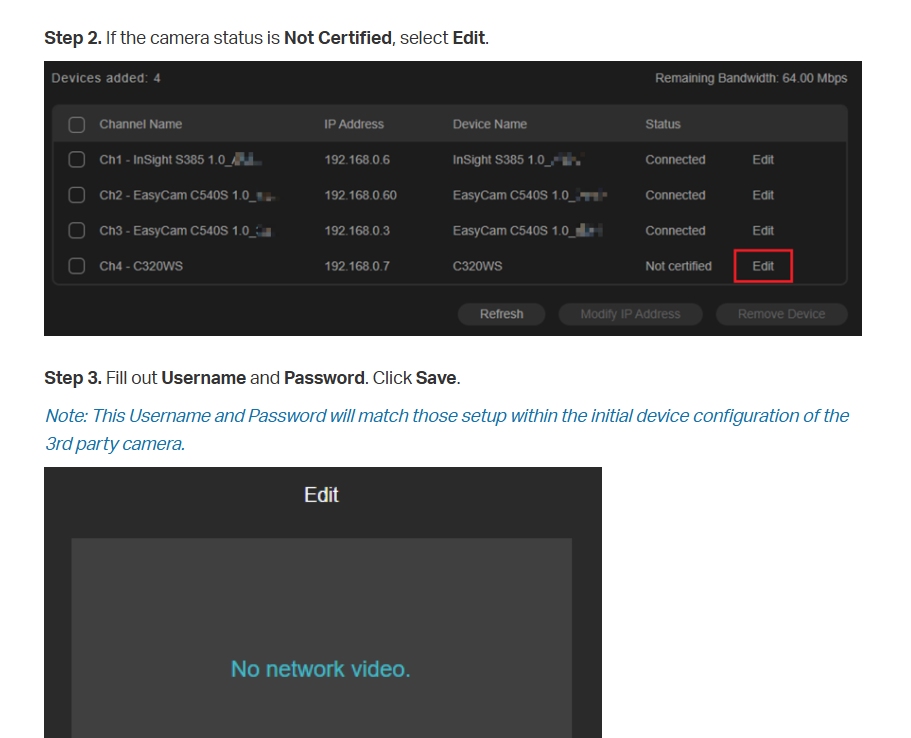
The error message indicates that you need to input the cert on the VIGI page.

Detailed steps, please refer to the following guide:
How to add third-party cameras to VIGI NVR via ONVIF


Recommended Solution
  0  
0
#2
Options
1 Reply
Re:Not abel to add HIK Vision Camera - Status "NOT CERTIFIED"-Solution
a week ago - last edited Friday

Hi  @Pavan08 


The error message indicates that you need to input the cert on the VIGI page.

Detailed steps, please refer to the following guide:
How to add third-party cameras to VIGI NVR via ONVIF


Recommended Solution
  0  
0
#2
Options