IP-Port Groups on OC200 Hardware Controller: Create-Only, Unmanageable, and Dangerous in Switch ACLs

IP-Port Groups on OC200 Hardware Controller: Create-Only, Unmanageable, and Dangerous in Switch ACLs
Model: OC200 (V2) Controller Version: v6.1.0.19 Firmware Version: 1.38.10 Build 20260117 Rel.60495 Gateway: ER7206 v2.0 / Firmware 2.2.3 Build 20250723 Switch: SG2428P v5.20 Access Points: EAP610 v3.0 / Firmware 1.6.0 Build 20250507 iOS App: Tested alongside controller v6.1.0.19
Summary
IP-Port Groups on the OC200 hardware controller are create-only objects with no management lifecycle. Once created, they cannot be viewed, edited, or deleted from any available interface — the OC200 web UI, the Omada iOS app, or the Omada Android app. Additionally, using IP-Port Groups as destinations in Switch ACLs causes a critical traffic disruption bug on the SG2428P that requires a full controller config restore to recover from. These issues combine to create a serious usability and reliability problem for anyone using ACLs on OC200 hardware controllers.
Issue 1: IP-Port Groups Cannot Be Managed After Creation
The Problem
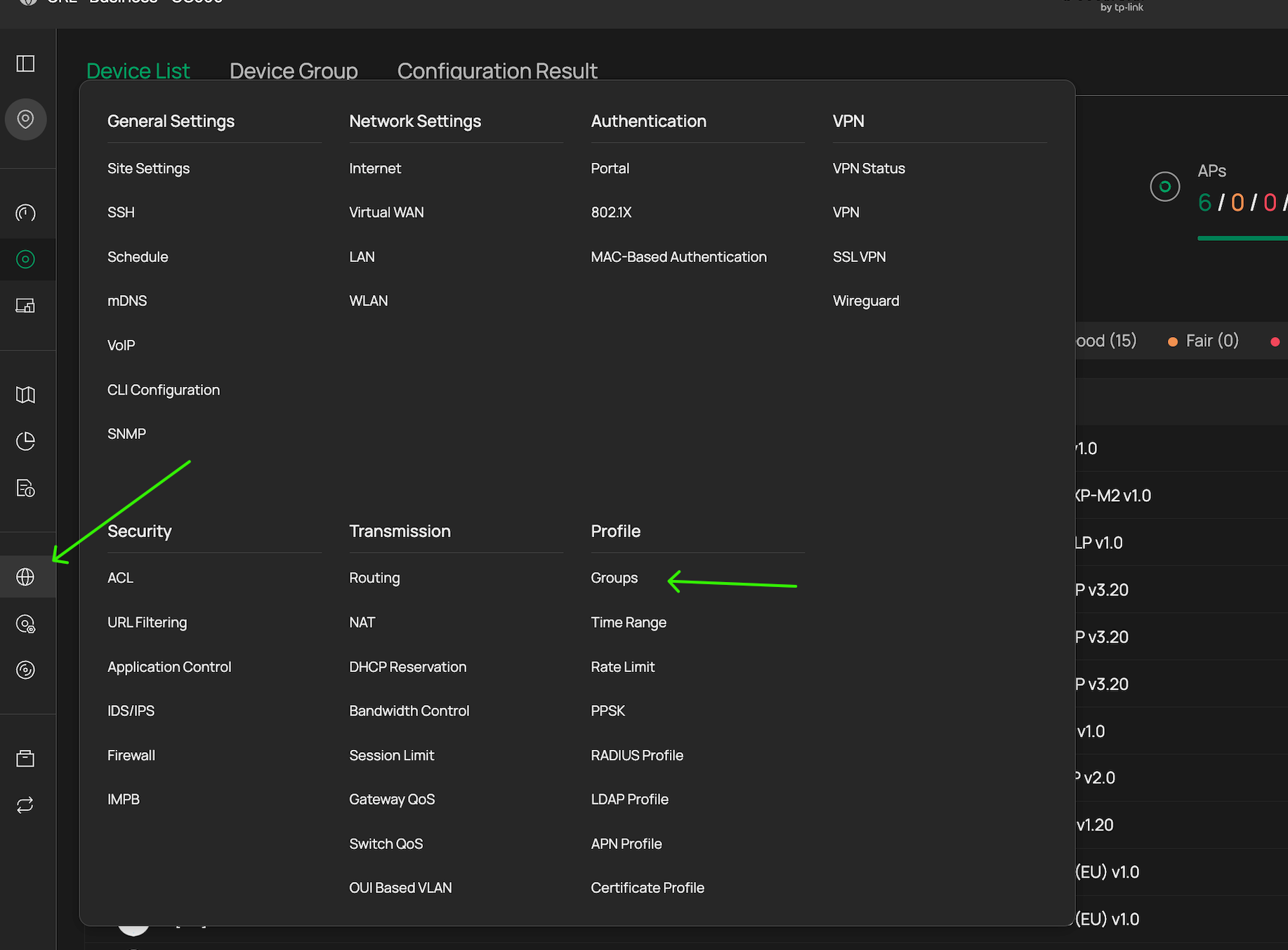
On the Omada Software Controller, IP-Port Groups are managed through Settings → Profiles → Groups, where administrators can create, view, edit, and delete groups of any type (IP Group, IP-Port Group, IPv6 Group, etc.). TP-Link's official documentation — including the ACL Configuration Guide, the Policy Routing FAQ, and the EAP ACL setup guide — all reference this page when explaining how to work with IP-Port Groups.
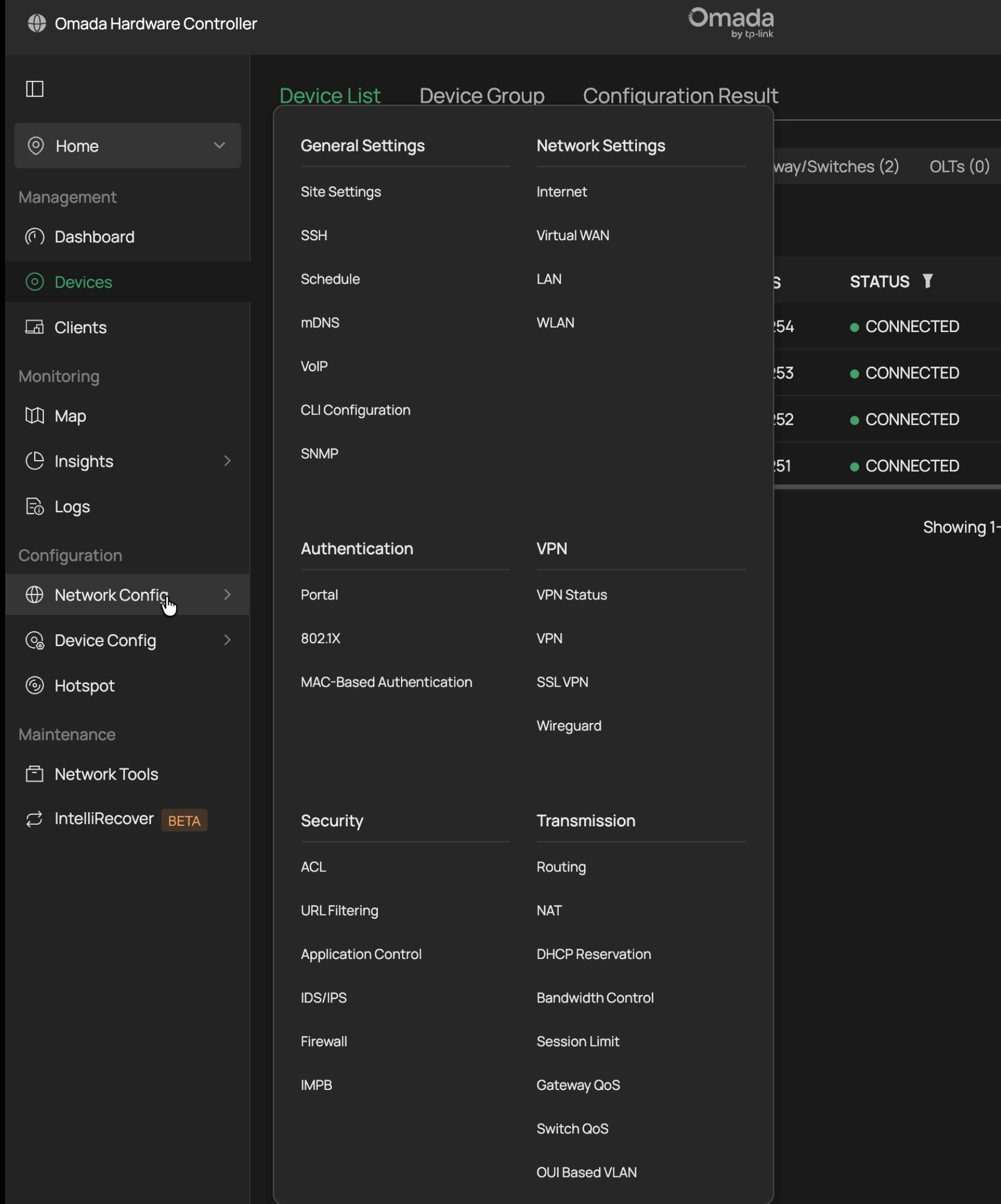
This page does not exist on the OC200 hardware controller.
On the OC200, IP-Port Groups can only be created inline during ACL rule creation (EAP ACL, Switch ACL, or Gateway ACL). When you select "IP-Port Group" as a source or destination type and click "Create New Group," you can define a new group with IP subnets and port numbers. Once created, the group appears in dropdown menus within ACL rule dialogs and can be selected for use. But that is the end of its management lifecycle.
There is:
- No standalone page to list existing IP-Port Groups
- No way to view what IPs and ports are in a previously created group
- No way to edit a group to add, remove, or change IPs or ports
- No way to delete a group, even if it is no longer referenced by any ACL rule
What I Checked
-
OC200 Web UI — Examined every menu under Settings. There is no "Profiles" or "Groups" section. The Settings menu contains: LAN Settings, Wireless Networks, VPN, Network Security, Transmission, Authentication, Dynamic DNS, Site Settings, Log, and Audit Log. IP-Port Groups do not appear anywhere outside of ACL rule creation dialogs.
-
Omada iOS App — The app does have a Settings → Profiles page, which contains three items: IP Group, MAC Group, and APN Profile. IP-Port Group is not listed. Tapping into "IP Group" shows only the default "IPGroup_Any" entry (0.0.0.0) — none of the IP-Port Groups created during ACL rule setup appear here. IP-Port Groups are a distinct object type from IP Groups, and the app has no interface for them whatsoever.
-
ACL Rule Dialogs — When editing an existing ACL rule, previously created IP-Port Groups appear in the dropdown for selection, but there is no edit or delete option next to them. You can only select or deselect them.
Consequences
-
Mistakes are permanent. If you create an IP-Port Group with a typo in an IP address or a wrong port number, you cannot fix it. You must create a new group with a different name and the correct values. The incorrect group remains in your controller forever.
-
Orphaned groups accumulate. Over time, unused or incorrectly configured groups pile up in the dropdown menus with no way to clean them up. This creates confusion about which groups are active and correct.
-
No auditing capability. You cannot verify what IPs and ports are contained in an existing IP-Port Group. If you created a group weeks or months ago, you have no way to confirm its contents without recreating it from memory or documentation.
-
The only cleanup path is a full controller config restore to a backup taken before the groups were created, which rolls back all configuration changes made since that backup.
Issue 2: Switch ACLs with IP-Port Group Destinations Break Traffic on SG2428P
The Problem
Creating a Switch ACL rule that uses an IP-Port Group as the destination causes widespread, unintended traffic disruption on the SG2428P (v5.20). The rule over-matches: instead of blocking only traffic to the specific IP addresses and ports defined in the group, it blocks all HTTP and HTTPS traffic across the affected switch ports, regardless of destination.
What I Tested
I created a Switch ACL Deny rule with the following configuration:
- Source: Network (IoT VLAN)
- Destination: IP-Port Group containing a single gateway IP (192.168.30.254/32) on ports 80 and 443
- Binding: All ports
Expected behavior: Only HTTP/HTTPS traffic to 192.168.30.254 should be blocked. All other traffic — including HTTP/HTTPS to internet destinations and other local IPs — should be unaffected.
Actual behavior: All HTTP and HTTPS traffic from IoT devices was blocked, including traffic to the internet, cloud services, and app servers. IoT devices that rely on HTTP/HTTPS for cloud connectivity (eufy cameras, Meross smart home devices, PiAware ADS-B feeder) all lost functionality.
Recovery
- Disabling the Switch ACL rule did not restore connectivity. Traffic remained broken after the rule was disabled through the controller UI.
- Deleting the Switch ACL rule did not restore connectivity. Even after full removal, the traffic disruption persisted.
- A full controller config restore was required to return the switch to normal operation. I restored from a backup taken immediately before creating the ACL rule.
Contrast: EAP ACLs Work Correctly
After the Switch ACL failure, I tested the same logical rule using an EAP ACL instead:
- Source: SSID (HOMENET-IoT and HOMENET-GUEST)
- Destination: IP-Port Groups containing per-VLAN gateway IPs on ports 80 and 443
The EAP ACL worked exactly as expected: gateway web UI access was blocked from the specified SSIDs, while all other traffic — including IoT device cloud connectivity and guest internet access — continued to function normally. This confirms that the IP-Port Group definitions themselves are correct, and the problem is specifically with how the SG2428P processes IP-Port Group destinations in Switch ACL rules.
Feature Requests
Based on these findings, I would like to request the following:
-
Add a Profiles → Groups management page to the OC200 hardware controller web UI, matching the functionality available on the Omada Software Controller. This should support creating, viewing, editing, and deleting IP Groups, IP-Port Groups, and all other group types.
-
Add IP-Port Group management to the Omada iOS and Android apps. The iOS app currently exposes IP Group, MAC Group, and APN Profile under Profiles, but not IP-Port Groups. These should be added for feature parity.
-
Investigate and fix the Switch ACL over-matching behavior when IP-Port Group destinations are used on the SG2428P (and potentially other switch models). The current behavior — where a deny rule targeting a specific IP and port blocks all HTTP/HTTPS traffic — is a critical bug that can cause significant network disruption.
-
Ensure Switch ACL rules can be cleanly disabled and deleted without requiring a config restore. The fact that disabling or deleting a problematic Switch ACL does not restore normal traffic flow suggests the rule is not being properly removed from the switch hardware.
Environment Details
| Device | Model | Hardware | Firmware |
|---|---|---|---|
| Controller | OC200 | V2 | v6.1.0.19 / 1.38.10 Build 20260117 |
| Gateway | ER7206 | V2.0 | 2.2.3 Build 20250723 |
| Switch | SG2428P | V5.20 | (managed via controller) |
| Access Point | EAP610 | V3.0 | 1.6.0 Build 20250507 |
All devices are running stable release firmware. No beta firmware was used during testing.
Workaround for Other Users
Until these issues are resolved, the practical workaround for blocking gateway web UI access from restricted VLANs is:
-
Use EAP ACLs instead of Switch ACLs to block gateway management access from WiFi clients. EAP ACLs correctly process IP-Port Group destinations without over-matching.
-
Create per-VLAN IP-Port Groups (e.g., one group for 192.168.30.254 ports 80/443, another for 192.168.50.254 ports 80/443) rather than one large group with multiple gateway IPs. This is more precise and avoids potential matching issues.
-
Always export your controller configuration backup before creating any ACL rules. If a Switch ACL causes traffic disruption, config restore may be the only recovery path.
-
Double-check all IP addresses and port numbers before creating an IP-Port Group, because you will not be able to edit or delete it afterward on the OC200.
-
Accept the limitation that wired-only clients on restricted VLANs cannot currently have their gateway web UI access blocked without Switch ACLs, which are unsafe for this purpose. EAP ACLs only cover WiFi clients.