'AI by NVR' feature not working with Vigi NVR1008H

'AI by NVR' feature not working with Vigi NVR1008H

'AI by NVR' feature not working with Vigi NVR1008H
a week ago - last edited Wednesday
Model: VIGI NVR1008H  
Hardware Version:
Firmware Version:

Hello, 

          I have a Vigi NVR1008H Which is connected to two CPPlus cameras. The basic setup is working fine and simple motion detection is also working.


I am trying to set up the 'AI by NVR' feature in my Vigi NVR1008H following the guide at https://www.tp-link.com/in/support/faq/4809/ 


Step 3 says that we need to toggle the 'AI by NVR' feature on the camera setting in the NVR (Motion Detection: Navigate to Settings > Event > Basic Event > Motion Detection and enable the AI by NVR switch). However, in the motion detection page for the camera, I am not seeing any option called  'AI by NVR'.
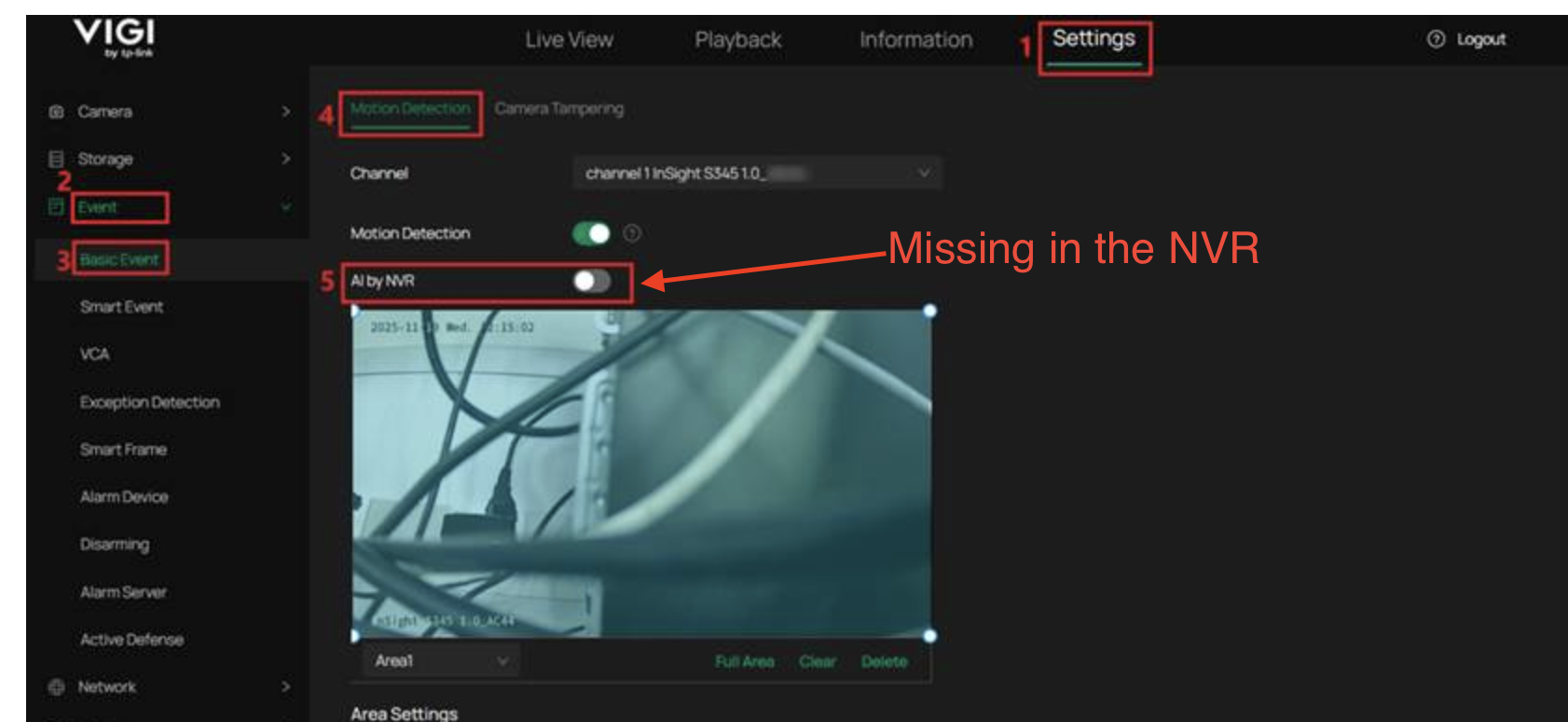


Does anybody know why that AI by NVR switch would be missing? According to the guide, this feature should work with any compatible ONVIF IP camera, However, for whatever reason, I'm not seeing that option.


Has anyone run into something similar in the past? Any help here would be greatly appreciated.

0
0
#1
1 Accepted Solution
Re:'AI by NVR' feature not working with Vigi NVR1008H-Solution
a week ago - last edited Wednesday


Hi,@khriss 
Thank you for posting on our business forum.

Currently, no official firmware compatible with the AI By NVR functionality has been released for the VIGI NVR1008H yet. We kindly recommend that you stay tuned for official firmware update notifications on our official website.

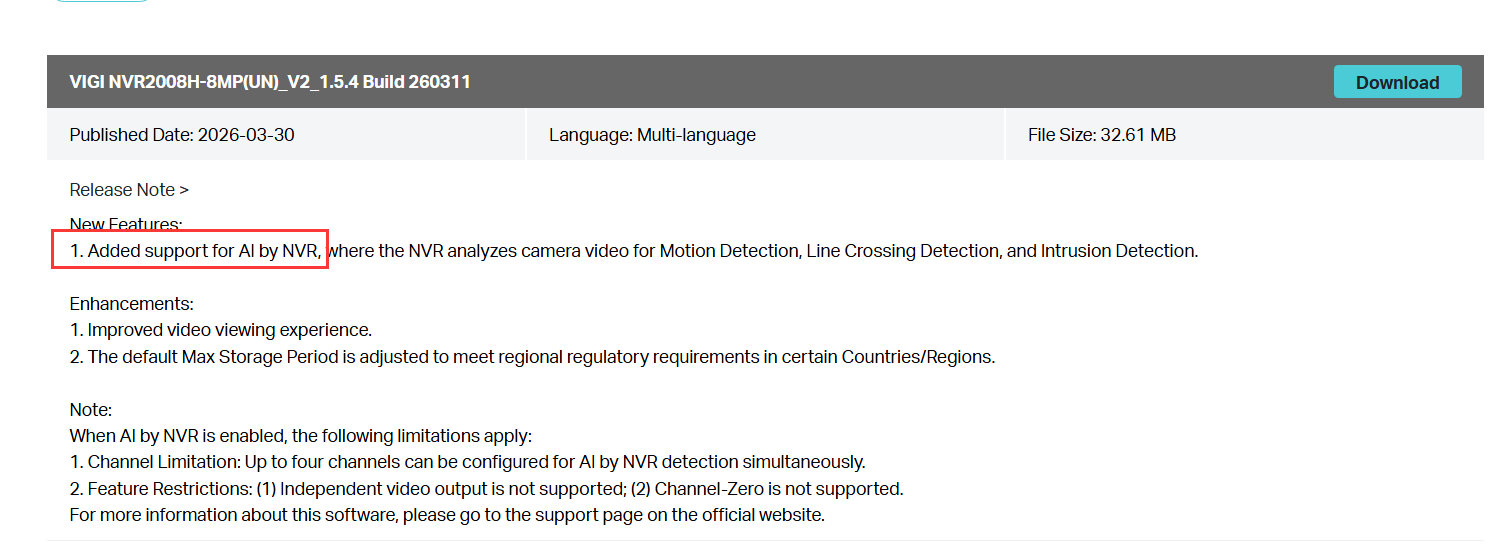
You may check the firmware release note to confirm whether the AI By NVR functionality is supported. For your reference, taking the NVR2008H-8MP as an example: on the firmware release page of our official website, you can find that the latest firmware for this model has added the AI By NVR functionality:Download for VIGI NVR2008H-8MP | TP-Link


Should you have any further questions, please feel free to post your inquiry here at any time.


Recommended Solution
0
0
#2
3 Reply
Re:'AI by NVR' feature not working with Vigi NVR1008H-Solution
a week ago - last edited Wednesday


Hi,@khriss 
Thank you for posting on our business forum.

Currently, no official firmware compatible with the AI By NVR functionality has been released for the VIGI NVR1008H yet. We kindly recommend that you stay tuned for official firmware update notifications on our official website.

You may check the firmware release note to confirm whether the AI By NVR functionality is supported. For your reference, taking the NVR2008H-8MP as an example: on the firmware release page of our official website, you can find that the latest firmware for this model has added the AI By NVR functionality:Download for VIGI NVR2008H-8MP | TP-Link


Should you have any further questions, please feel free to post your inquiry here at any time.


Recommended Solution
0
0
#2
Re:'AI by NVR' feature not working with Vigi NVR1008H
a week ago

  @Jeremy_12 Does this mean that there is no easy way to know which VIGI NVRs support the 'AI by NVR' feature? A customer will need to download and review the notes for each and every firmware version to figure out the actual capabilities of a given NVR model. 


I must say this is very surprising behaviour by TP Link and honestly, pretty consumer hostile.

0
0
#3
Re:'AI by NVR' feature not working with Vigi NVR1008H
Wednesday

 Hi,@khriss 
Thank you for your reply.

Generally, for common functions and product specifications, you may visit the product Spec page of your specific device model on our official website to check the official specification sheet.

As AI by NVR is a newly launched feature, we enable NVR devices to support this function through firmware updates. Therefore, to confirm whether your NVR model supports this feature, please navigate to the device support section on our official website, enter the firmware download page, and check the firmware release notes for the corresponding model.

Your valuable feedback will be submitted to the relevant department for further evaluation. Thank you for your understanding.


0
0
#4

Information

Helpful: 0

Views: 152

Replies: 3