ER605W Connection Issues

ER605W Connection Issues

ER605W Connection Issues
2026-01-25 11:14:23

Hi all,

Recently got an ER605W and am having some unusual connection issues.
It has been set it up with a fairly basic out of the box configuration, identical 2.4G and 5G wireless networks, one LAN with no VLAN. I’ve also got a Linux server running PiHole and a couple of other services at a static IP out of the DHCP pool. The DNS on the ER605W is set to one one one one, with devices using PiHole set on the individual devices.
There is an intermittent issue being experienced by wireless clients (multiple iPhones, iPad, Windows devices; mix of both using standard DNS and PiHole) where web pages will not load. On iPhone the progress bar will load about 15% then stop. If an iPhone is disconnected from wifi and a 4g connection is used to load a web page, then wifi is turned back on, the page will then reload normally on wifi, however other pages will still not load.
This points to a DNS issue, however affected devices cannot load pages when an IP is used instead of a domain, and they also cannot connect to the internal Linux server by IP, nor ping it. They can however connect to the ER605W, which can ping both the internet and the Linux server from the diagnostics menu. I have not noticed any of the issues on a hardwired Windows PC.

The issue seems to fix itself after a random amount of time (minutes, hours) so I am baffled about what it could be - would love to hear any suggestions. Thanks!

  0      
  0      
#1
Options
4 Reply
Re:ER605W Connection Issues
2026-01-26 10:03:07

Hi  @pitmasterjim 

Thanks for posting in our business forum.

May I ask the simple description of your network topology?

It seems that only the wireless clients has the DNS issue, right? May I confirm the hardware and firmware version of your ER605W?

Is the same issue both happening on clients using the DNS of gateway and Pi-Hole?

Is it possible to provide us the configuration screenshots of the DNS?

Best Regards! >> Omada EAP Firmware Trial Available Here << >> Get the Latest Omada SDN Controller Releases Here << *Try filtering posts on each forum by Label of [Early Access]*
  0  
  0  
#2
Options
Re:ER605W Connection Issues
2026-01-28 07:43:48

  @Hank21 hi Hank, thanks for your response. ER605W has my ISP connection plugged into the WAN port, and a Windows PC and a Linux PC plugged into the LAN ports. Hardware version is ER605W v2.0 and firmware is 2.0.3. 
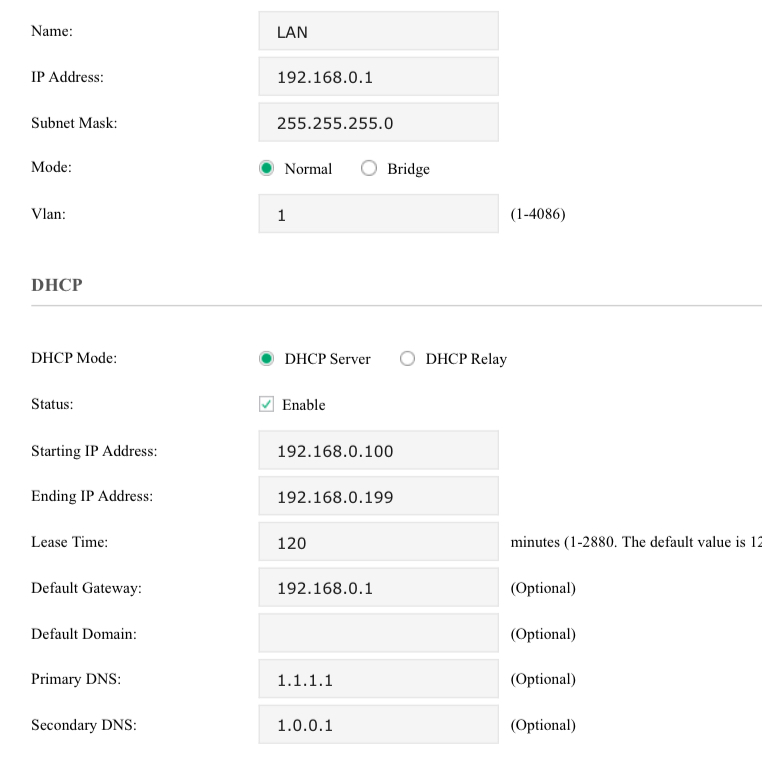
Correct, issue is occurring for devices using both the gateway provided DNS options and when manually configuring to use the PiHole. I have attached a screenshot of the LAN configuration showing the DNS setup. 
Please let me know should you require anything further. 

  0  
  0  
#3
Options
Re:ER605W Connection Issues
2026-01-29 00:10:16

After some further testing I believe the issue being observed is primarily that devices connected to the wifi network are unable to connect to internal resources direct via IP.
For example when attempting to navigate directly to the Linux server's static IP, which is unique and outside the DHCP pool range, the connection will stall and fail. This is observed when attempting to connect to two separate web services on the device, as well as an SSH connection, all of which can easily be accessed when using another router.
This issue is occurring both when using the router defined DNS and when attempting to use PiHole (which can't be accessed, as it is on the Linux server to which connection fails). 

I have set up MAC binding and a static route to the Linux device, neither of which have helped. 

  0  
  0  
#4
Options
Re:ER605W Connection Issues
3 weeks ago

Hi  @pitmasterjim 

Thank you so much for taking the time to post the issue on the TP-Link community!


To better assist you, I've created a support ticket via your registered email address and escalated it to our support engineer to look into the issue. The ticket ID is TKID260159478 please check your email box and ensure the support email is well received. Thanks!


Once the issue is addressed or resolved, welcome to update this topic thread with your solution to help others who may encounter the same issue as you did.


Many thanks for your great cooperation and patience!

Best Regards! >> Omada EAP Firmware Trial Available Here << >> Get the Latest Omada SDN Controller Releases Here << *Try filtering posts on each forum by Label of [Early Access]*
  0  
  0  
#5
Options