
Alerts and Notifications

Hi there, I am trying to configure alerts using Omada Cloud. This is for WAN failover. I can't find any settings for this. When I googled this, it said I was because I am on the free version, and that I could install the free Omada Software Controller on my Windows PC to get these features.
I have bought licenses for my gateway and switch, this might not be the proble.
Can you advise.
Thanks
- Copy Link
- Subscribe
- Bookmark
- Report Inappropriate Content


Hi,@Edd53
Thank you for posting on our business forum.
The Controller supports mail server configuration, which allows you to push log alerts to your designated email address. The WAN failover alert feature you mentioned is also supported via this setup. Below please find the step-by-step configuration instructions:
1.First, you need to configure the mail server on the Controller. Please navigate to Global View > Settings > Server Settings and enable the SMTP Server option.
Please complete the configuration following the SMTP Server configuration section of our reference documentation, and fill in the specific parameters per the requirements of your email service provider.
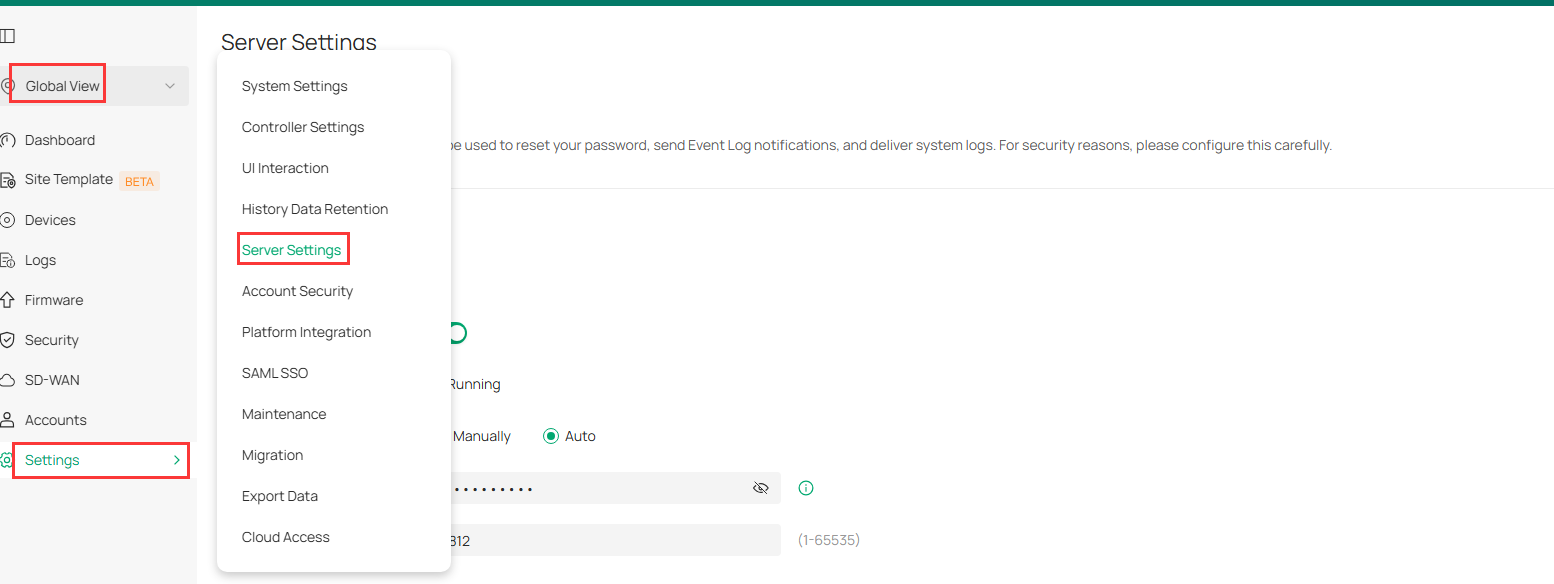
2.After finishing the mail server configuration, please go to Site View > Logs > Settings and confirm the Notifications feature is enabled. Under Content Settings, locate and enable the options for WAN is down, WAN Online Detection and WAN Link Backup, then check the box for EMAIL NOTIFICATION.
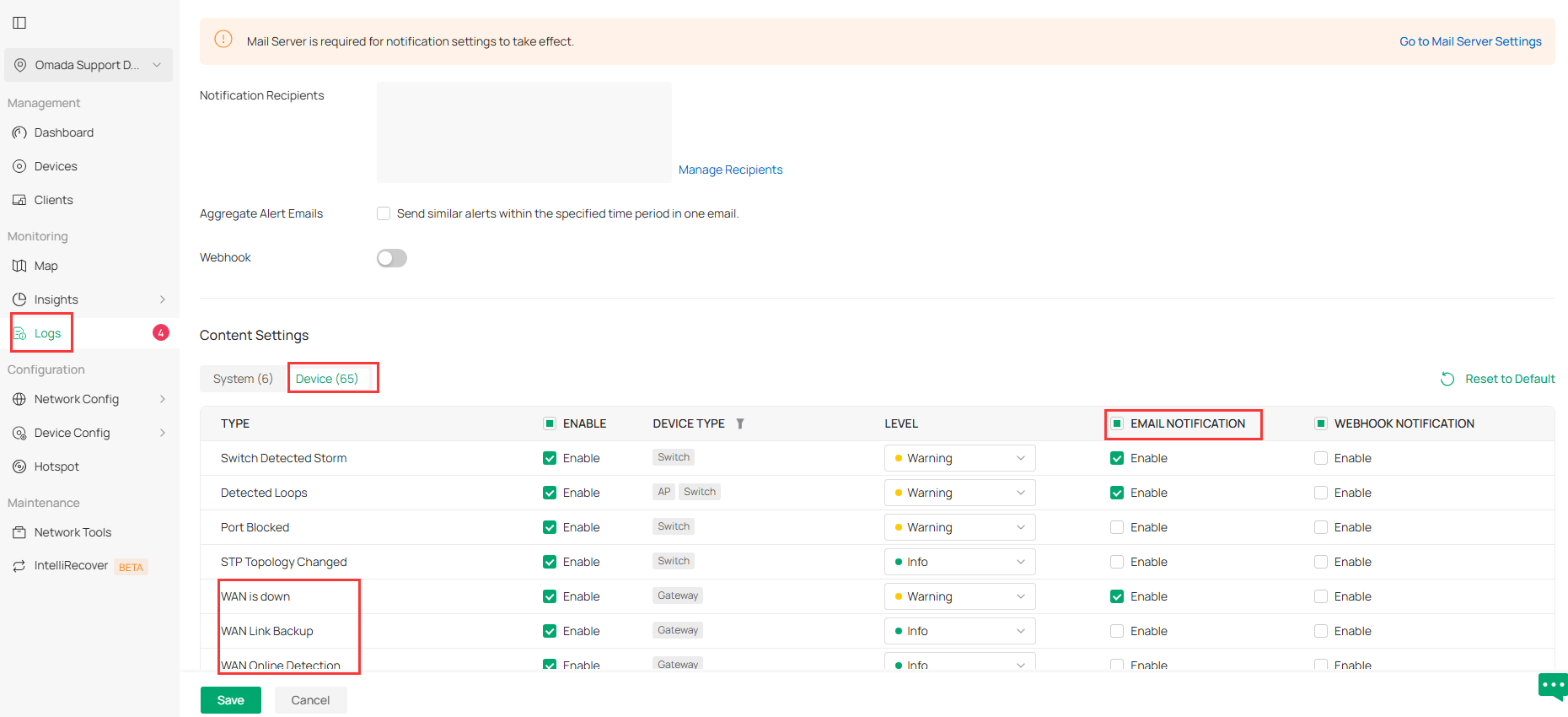
Once all configurations are done, you may run a test to verify whether you can receive the alert via email when a WAN down event occurs.
- Copy Link
- Report Inappropriate Content

Hi @Edd53
May I know what is the type and version of your Omada Controller? You may find the information here: https://omada.tplinkcloud.com/
The alerts you referred to is the email notification or something?
- Copy Link
- Report Inappropriate Content

- Copy Link
- Report Inappropriate Content
Hi,@Edd53
Thank you for posting on our business forum.
The Controller supports mail server configuration, which allows you to push log alerts to your designated email address. The WAN failover alert feature you mentioned is also supported via this setup. Below please find the step-by-step configuration instructions:
1.First, you need to configure the mail server on the Controller. Please navigate to Global View > Settings > Server Settings and enable the SMTP Server option.
Please complete the configuration following the SMTP Server configuration section of our reference documentation, and fill in the specific parameters per the requirements of your email service provider.
2.After finishing the mail server configuration, please go to Site View > Logs > Settings and confirm the Notifications feature is enabled. Under Content Settings, locate and enable the options for WAN is down, WAN Online Detection and WAN Link Backup, then check the box for EMAIL NOTIFICATION.
Once all configurations are done, you may run a test to verify whether you can receive the alert via email when a WAN down event occurs.
- Copy Link
- Report Inappropriate Content
@Edd53 Thanks for you help
- Copy Link
- Report Inappropriate Content
Information
Helpful: 0
Views: 656
Replies: 4
Voters 0
No one has voted for it yet.