
Guest SSID in Standalone Mesh with EAP653

Hello
I've set up a small Wifi Network with 3 EAP653 APs.
One is connected with LAN to the Router, the others are connected via Mesh to the first AP.
I've set up the Network with the Omada App on my Phone without a Controller.
I want to add a SSID to the Network that my guests and neighbours can use.
They should not have access to my NAS, printer or anything an my real Network.
I've seen this is possible when setting up the EAP via Webpage.
Why is it not possible via App in Standalone Mesh?
Do I need a OC200 or similar for that?
Thanks
- Copy Link
- Subscribe
- Bookmark
- Report Inappropriate Content


Hi @Bensch
Thanks for posting here.
The guest network is perfect for your scenario.

If you don't have other requirements, an Omada controller isn't necessary. You can configure it via the web management page of the EAP units.
How to login to the web management page of the Omada Device (Standalone mode)
Just create a new SSID and enable the Guest Network option for the SSID.
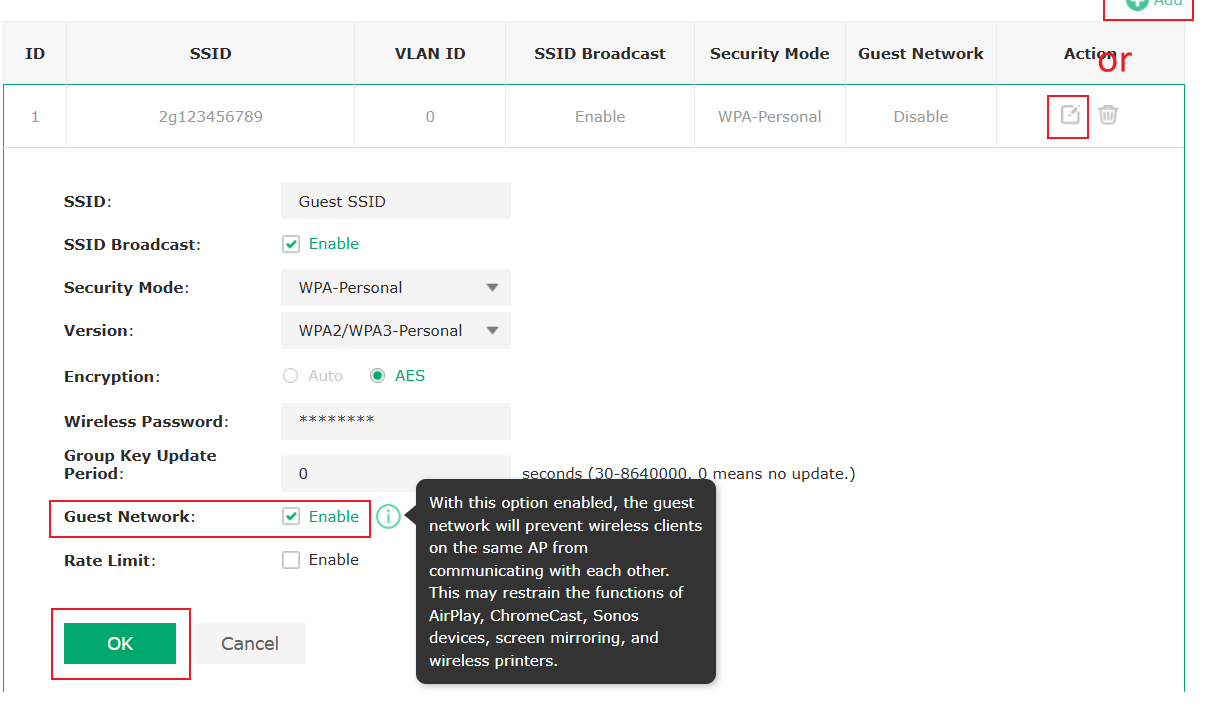
- Copy Link
- Report Inappropriate Content

@Bensch Theoretically you'd need to make a guest network on each AP. It's far easier just to configure the mesh with an Omada Controller (OC200, Cloud Controller, or Software Controller should all work for this)
- Copy Link
- Report Inappropriate Content
Hi @Bensch
Thanks for posting here.
The guest network is perfect for your scenario.
If you don't have other requirements, an Omada controller isn't necessary. You can configure it via the web management page of the EAP units.
How to login to the web management page of the Omada Device (Standalone mode)
Just create a new SSID and enable the Guest Network option for the SSID.
- Copy Link
- Report Inappropriate Content
I can't set this up via Web Management page, cause two EAPs are basically repeaters. There is no LAN cable, I must use Wifi.
That's why I set this up via the Omada App mit Standalone Mesh.
- Copy Link
- Report Inappropriate Content
Hi @Bensch
You can log in to the web interface with a Wi-Fi connection.
https://support.omadanetworks.com/en/document/112424/

- Copy Link
- Report Inappropriate Content
Information
Helpful: 0
Views: 610
Replies: 4
Voters 0
No one has voted for it yet.