
SG2452LP v1.0 Firmware 1.0.21 No POE

Hi all,
I just upgraded this switch to the latest firmware, 1.0.21, and all the POE ports stopped outputting power. They were all working fine before this update. Is there anything that can be done to fix this issue on this firmware version?
Thanks!
- Copy Link
- Subscribe
- Bookmark
- Report Inappropriate Content


Thanks for posting here.
Did you try to reboot the switch? Or roll back the firmware? Will it help?
If not, please kindly give us the following information:
1. How did you manage the switch? via a controller or its web interface?
2. Is the switch model SG2452LP or T1600G-52PS?
3. What kind of POE devices are plugged into the switch? Please also give us their model number.
4. How many POE devices are plugged into the switch?
5. Is the Internet access of the switch normal?
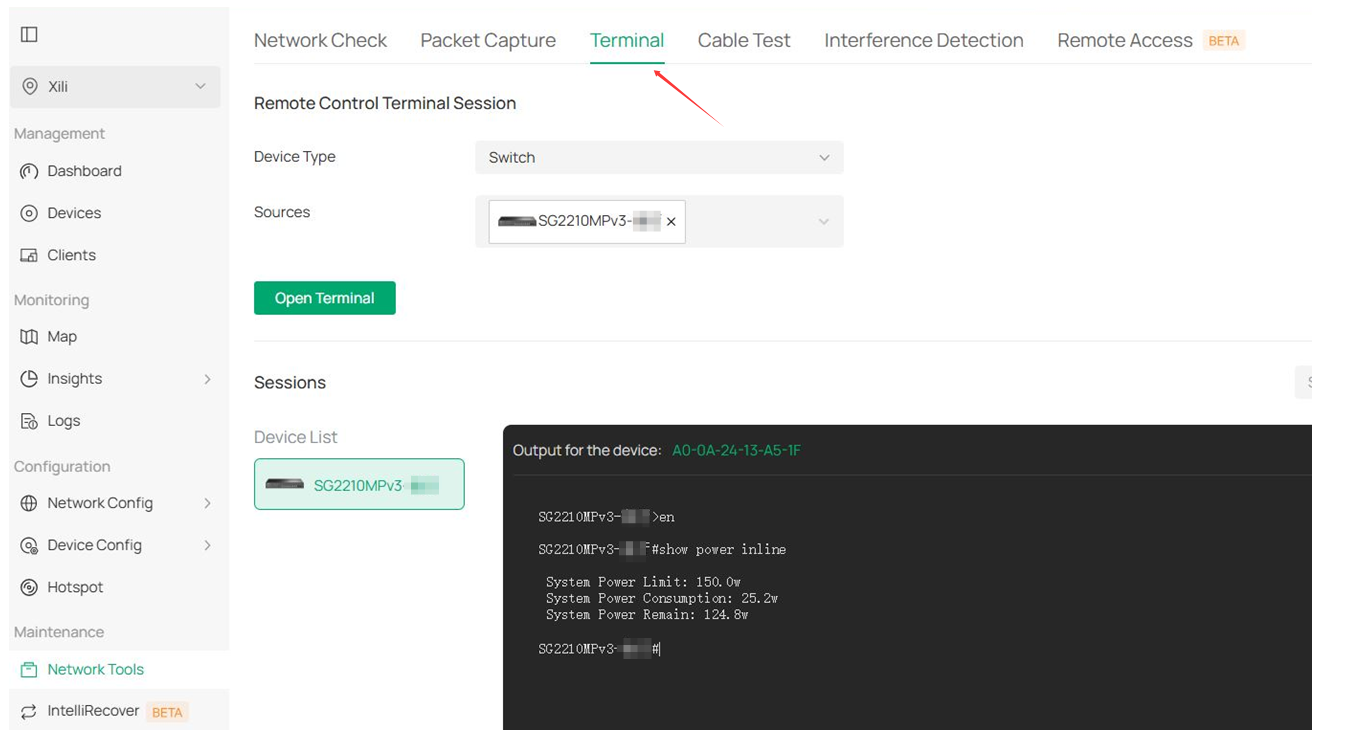
6. Please access the switch's terminal, type the following commands, and let us know the results. Thanks.
en
show power inline information interface
show power inline configuration interface
show power inline
- Copy Link
- Report Inappropriate Content

- Copy Link
- Report Inappropriate Content
Same problem here - PoE not working on any port. Downgrading to 1.0.15 solves the problem
- Copy Link
- Report Inappropriate Content

We are experiencing the same issue. The switch has been removed from service and replaced with a different model. We are currently working to either repair the switch or return it under warranty. All POE ports are effected. Possible around 10 ports used for POE. SG2452LP v1.0
Switch was Factory reset and adopted to another cloud key and left with all defaults.
Logs
60-83-E7-2A-70-D2>show power inline information interface
------------------^
Error: Bad command
60-83-E7-2A-70-D2>en
60-83-E7-2A-70-D2#show power inline information interface
Interface Power(w) Current(mA) Voltage(v) PD-Class Power-Status
---------- -------- ----------- ---------- -------- ----------------
Gi1/0/1 0.0 0 0.0 N/A OFF
Gi1/0/2 0.0 0 0.0 N/A OFF
Gi1/0/3 0.0 0 0.0 N/A OFF
Gi1/0/4 0.0 0 0.0 N/A OFF
Gi1/0/5 0.0 0 0.0 N/A OFF
Gi1/0/6 0.0 0 0.0 N/A OFF
Gi1/0/7 0.0 0 0.0 N/A OFF
Gi1/0/8 0.0 0 0.0 N/A OFF
Gi1/0/9 0.0 0 0.0 N/A OFF
Gi1/0/10 0.0 0 0.0 N/A OFF
Gi1/0/11 0.0 0 0.0 N/A OFF
Gi1/0/12 0.0 0 0.0 N/A OFF
Gi1/0/13 0.0 0 0.0 N/A OFF
Gi1/0/14 0.0 0 0.0 N/A OFF
Gi1/0/15 0.0 0 0.0 N/A OFF
Gi1/0/16 0.0 0 0.0 N/A OFF
Gi1/0/17 0.0 0 0.0 N/A OFF
Gi1/0/18 0.0 0 0.0 N/A OFF
Gi1/0/19 0.0 0 0.0 N/A OFF
Gi1/0/20 0.0 0 0.0 N/A OFF
Gi1/0/21 0.0 0 0.0 N/A OFF
Gi1/0/22 0.0 0 0.0 N/A OFF
Gi1/0/23 0.0 0 0.0 N/A OFF
Gi1/0/24 0.0 0 0.0 N/A OFF
Gi1/0/25 0.0 0 0.0 N/A OFF
Gi1/0/26 0.0 0 0.0 N/A OFF
Gi1/0/27 0.0 0 0.0 N/A OFF
Gi1/0/28 0.0 0 0.0 N/A OFF
Gi1/0/29 0.0 0 0.0 N/A OFF
60-83-E7-2A-70-D2#show power inline configuration interface
Interface PoE-Status PoE-Prio Power-Limit(w) Time-Range PoE-Profile
---------- ---------- -------- -------------- ---------------- ----------------
Gi1/0/1 Enable Low Class4 No Limit None
Gi1/0/2 Enable Low Class4 No Limit None
Gi1/0/3 Enable Low Class4 No Limit None
Gi1/0/4 Enable Low Class4 No Limit None
Gi1/0/5 Enable Low Class4 No Limit None
Gi1/0/6 Enable Low Class4 No Limit None
Gi1/0/7 Enable Low Class4 No Limit None
Gi1/0/8 Enable Low Class4 No Limit None
Gi1/0/9 Enable Low Class4 No Limit None
Gi1/0/10 Enable Low Class4 No Limit None
Gi1/0/11 Enable Low Class4 No Limit None
Gi1/0/12 Enable Low Class4 No Limit None
Gi1/0/13 Enable Low Class4 No Limit None
Gi1/0/14 Enable Low Class4 No Limit None
Gi1/0/15 Enable Low Class4 No Limit None
Gi1/0/16 Enable Low Class4 No Limit None
Gi1/0/17 Enable Low Class4 No Limit None
Gi1/0/18 Enable Low Class4 No Limit None
Gi1/0/19 Enable Low Class4 No Limit None
Gi1/0/20 Enable Low Class4 No Limit None
Gi1/0/21 Enable Low Class4 No Limit None
60-83-E7-2A-70-D2#show power inline
System Power Limit: 230.0w
System Power Consumption: 0.0w
System Power Remain: 230.0w
60-83-E7-2A-70-D2#
I have rolled back to an older firmware version which has resolved the issues.
- Copy Link
- Report Inappropriate Content
Thank you all for your feedback. We have identified the cause of the issue, and the affected firmware has been recalled. A firmware update to resolve the issue will be released this week. For now, please downgrade to v1.0.15. Thanks.
- Copy Link
- Report Inappropriate Content
Information
Helpful: 1
Views: 426
Replies: 5
Voters 1
