mDNS AirPlay not working at all anymore

mDNS AirPlay not working at all anymore

mDNS AirPlay not working at all anymore
Yesterday
Model: ER8411   TL-SG3428X-M2  
Hardware Version: V1
Firmware Version: 1.20.25 and 1.20.20

I got a problem with my home network.

I have my smart TVs in my IoT VLAN and my Apple devices in my main VLAN.

With version 1.3.6 [2025.12.30] of the ER8411 and the version 1.20.20 (or maybe an older one 1.20.1X) AirPlay worked.

After upgrading to the pre-releases 1.20.22 and later 1.20.24 and later 1.20.25 airplay did not work at all.

Now I downgraded the switch to 1.20.20 and AirPlay still does not work in the other VLAN, when my iPhone is natively in the IoT VLAN it works totally fine. 

Since I also upgraded my Gateway I can not say anymore it is definetly the Switches fault or the Gateways fault (or maybe both?). I also do not remember anymore if 1.20.20 was the last version airplay worked properly. 


The issue I have is, that my Apple devices can't even find the AirPlay TV in the other VLAN, which means mDNS is not working at all.


Besides that, I already had a support ticket, but whyever after the e-mail adress change of my TP-Link account, I never received a reply of them, after the forum escalation E-Mail, could that be checked before, because if that is not working, a forum escalation does not make sense. 

Home: 1x ER8411, 1x SG3428X-M2, 1xSG2210P, 2x ES205GP,1x EAP-775 Wall, 1xEAP773, 1x EAP772 EU, 2x EAP653 EU, 1x 650 Desktop EU External: 1x ER7412-M2 Controller: OC220 v1
  0      
0
#1
Options
2 Reply
Re:mDNS AirPlay not working at all anymore
7 hours ago

Hi @Julian2111 


Thanks for reaching out to TP-Link Business Forums.


To better assist with this issue, may I know how do you manage the devices currently? Standalone mode or Controller mode? Are you still using OC220?

If you are using OC220 to manage the devices, please help DM me and provide the information below:

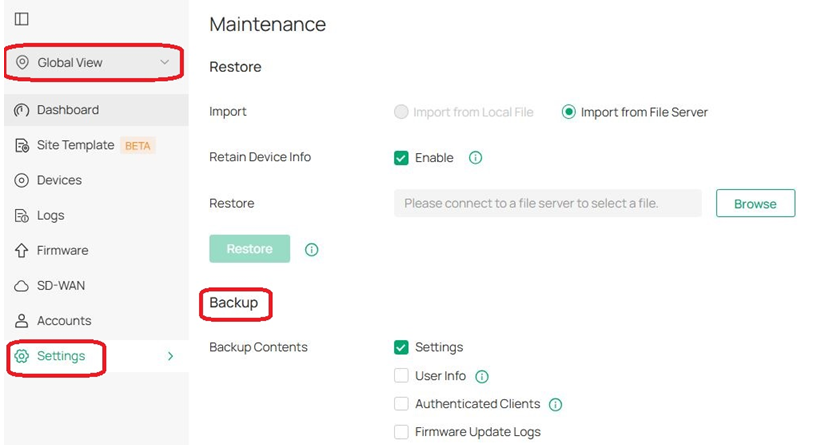
1. Please navigate to Global View > Settings > Maintenance to export the Settings to us.

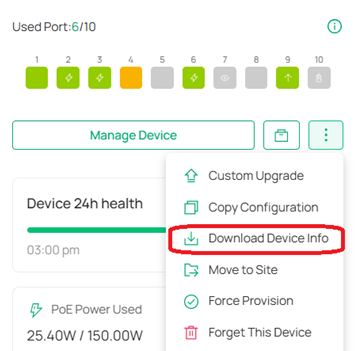
2. Please navigate to Site View > Gateway/Switch > Download Device Info, and then export the file.

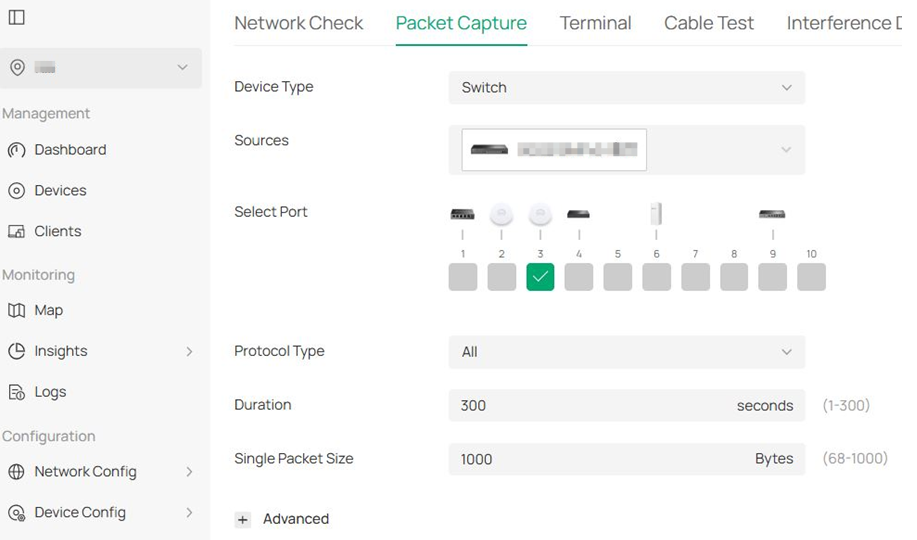
3. Perform packet captures:

(1) Select the port on SG3428X-M2 connected to the AP where the iPhone is connected, start packet capture, then try AirPlay on your phone. When finished, download the pcap files.

(2) Then switch to the port on SG3428X-M2 connected to the Smart TV (if the Smart TV is also wirelessly connected to a certain AP, select that AP's port), start packet capture, then try AirPlay on your phone, and finally download the pcap files.

(3) Next, switch to the port on SG3428X-M2 connected to the ER8411, start packet capture, then attempt an AirPlay, and finally download the pcap files.


If you are managing the devices in Standalone mode, please go to System Tools to back up the config file (for both gateway and switch) and offer the login credentials.

As you are using the devices in Standalone mode, performing a packet capture might be complicated. May I kindly ask if you are willing to do that?

  0  
0
#2
Options
Re:mDNS AirPlay not working at all anymore
4 hours ago - last edited 4 hours ago

  @Gabriel-TP That OC220 is outdated, I switched to the Software Controller (Windows).


I did extract them all, the question is now where shall I send them to?

Maybe we try E-Mail again and you just let me know via E-Mail or the Forum if you received it?

Home: 1x ER8411, 1x SG3428X-M2, 1xSG2210P, 2x ES205GP,1x EAP-775 Wall, 1xEAP773, 1x EAP772 EU, 2x EAP653 EU, 1x 650 Desktop EU External: 1x ER7412-M2 Controller: OC220 v1
  0  
0
#3
Options