
Gateway of camera altered by NVR

Hi all,
My last question has new progress and is not answered, so I think it might be better to open a new thiread.
My NVR and cameras are in different sites across VPN, so they are in different subnets.
But when the VPN shortly disconnects due to PPPoE IP change, the cameras and NVR reconnect and the NVR reset the gateway of cameras, which does not match the the real gateway for the cameras as below.
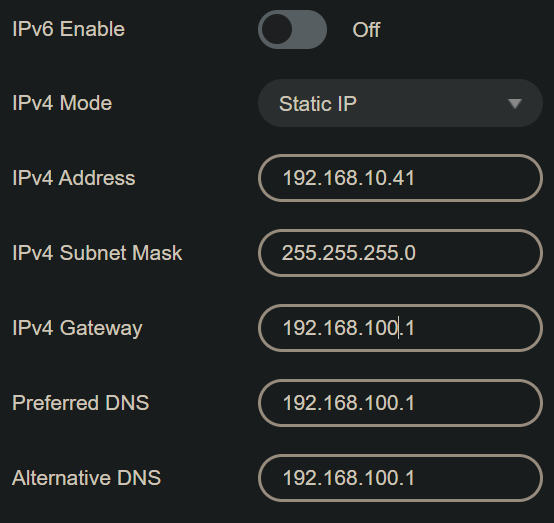
So some functions like object detection notification don't work.
I need the functions and I don't think I'm the only person with this scenario.
Is there a way to stop the NVR from altering the gateway of the cameras? Or will there be an update for it?
- Copy Link
- Subscribe
- Bookmark
- Report Inappropriate Content


Based on our initial lab reproduction, we have the following findings:
1. When the NVR discovers a camera and adds it automatically, it does indeed change the camera’s default gateway to match its own; this is the current product design.
2. We suspect that, during the brief disconnection, the NVR may have obtained a new gateway from the upstream network and then pushed this new gateway to the IPC when it re-connected, leaving the IPC unable to reach the cloud (e.g., object-detection notifications fail).
Please confirm whether the NVR’s site and the IPC’s subnet use different gateways (you only provided the IPC’s network screenshot; we still need the NVR’s). Also check whether any whitelist/blacklist forces the camera to use a specific gateway to access the Internet.
3. If the camera is added via “Add Manually,” the NVR is designed not to overwrite the camera’s gateway. Try adding the IPC through the “Add Manually” option in the camera-add screen and see if this resolves the issue.
- Copy Link
- Report Inappropriate Content
Thank you for your post.
Please let us know the hardware and software versions of all your devices, including the NVR and the cameras.
In addition, which specific features are affected by the issue you described? Do you mean that after the camera’s gateway is reset, everything else works normally except for certain functions?Also, does the gateway reset occur on both cameras?Please share your network topology so we can analyze the problem more effectively.
- Copy Link
- Report Inappropriate Content
Based on our initial lab reproduction, we have the following findings:
1. When the NVR discovers a camera and adds it automatically, it does indeed change the camera’s default gateway to match its own; this is the current product design.
2. We suspect that, during the brief disconnection, the NVR may have obtained a new gateway from the upstream network and then pushed this new gateway to the IPC when it re-connected, leaving the IPC unable to reach the cloud (e.g., object-detection notifications fail).
Please confirm whether the NVR’s site and the IPC’s subnet use different gateways (you only provided the IPC’s network screenshot; we still need the NVR’s). Also check whether any whitelist/blacklist forces the camera to use a specific gateway to access the Internet.
3. If the camera is added via “Add Manually,” the NVR is designed not to overwrite the camera’s gateway. Try adding the IPC through the “Add Manually” option in the camera-add screen and see if this resolves the issue.
- Copy Link
- Report Inappropriate Content
Information
Helpful: 0
Views: 286
Replies: 2
Voters 0
No one has voted for it yet.