
LAN DNS not working
 This thread has been locked for further replies. You can start a new thread to share your ideas or ask questions.
LAN DNS not working
This thread has been locked for further replies. You can start a new thread to share your ideas or ask questions.
Configured LAN DNS under Site > Network Config > LAN > LAN DNS.
I added two records with domains that need to resolve to the same LAN IP (a web server with virtual hosts).
[Record 1]
Domain name: domain1.internal
Type: IP
IP: 192.168.1.200
Apply to LAN: Private LAN (default)
[Record 2]
Domain name: domain2.internal
Type: IP
IP: 192.168.1.200
Apply to LAN: Private LAN (default)
Whatever I try, I can't get it to work. On connected LAN computers these domains cannot be resolved.
All computers use DHCP. In the Omada controller the DHCP settings are all default, so the assigned DNS address is the one of the router (ER707-M2, fw 1.3.1).
Looked up a few topics here on the community forums, but to no result unfortunately. Due to the extremely poor performance of the OC200, I migrated my entire controller to a virtual one but with the same end results.
nslookup results: *** UnKnown can't find x.local: Non-existent domain
Any suggestions?
- Copy Link
- Subscribe
- Bookmark
- Report Inappropriate Content
Got in contact with the TP-Link support team and this is what they said:
After verification, this issue occurs because the Network Name configured for DNS LAN currently supports only a combination of numbers, letters, and underscores, and does not support spaces, hyphens, or other symbols.
Please try modifying the Network Name and then test again.
Initially I didn't immediatly understood his answer as I was focussed on the inputs of the LAN DNS entry which don't mention "Network Name" anywhere.
The Network Name however....is just the name of the network/VLAN (doh!) and I was looking in the wrong place.
As per his instructions I renamed the networks and removed illegal characters:
- Private LAN --> Private
- Guests LAN --> Guests
- IoT LAN --> IoT
This did not immediately solve the issue though. To make it work I removed all LAN DNS entries and recreated them. Now everything works as it should, great success!
- Copy Link
- Report Inappropriate Content

This might be a browser issue. On my main computer, the first time I access a LAN domain name I need to type in "http://name.domain" for it to resolve correctly. After that, I only need to type in "name.domain" in the address bar. Another thing... You should be able to ping the local domain name from the PC if everything on the gateway is working correctly. The nslookup should also work.
- Copy Link
- Report Inappropriate Content
@jra11500 i have not tried with http prefix, but that should not be necessary.
Pinging doesn't work because LAN DNS is failing and the domain is not resolved into an IP address.
Happens from all computer in my network, so this is not a caching issue either.
Pinging the target host (web server with vhosts) directly is no issue at all.
- Copy Link
- Report Inappropriate Content
When using nslookup, you should see the DNS server address in the response. If it is OK (i.e. the router's address), then you might try a different domain, such as ".home" or ".local". I just tried to add a test name in my controller with the ".internal" domain and the controller says it is not valid. ICANN officially reserved ".internal" in 2024 for private network use but apparently it is a reserved domain (within Omada) even though there is no documentation to support this.
- Copy Link
- Report Inappropriate Content
Even with different domains it is not working.
I am running the following command in a Powershell window: nslookup domain1.mydomain
The reply is:
Server: UnKnown
Address: 192.168.0.1
*** UnKnown can't find domain1.mydomain: Non-existent domain
All info is good, but it just won't resolve...
Is there a relation between the LAN network's domain name (e.g. "lan") and the domain name entered in the LAN DNS? I would not expect so, but still...
- Copy Link
- Report Inappropriate Content
- Copy Link
- Report Inappropriate Content

@jra11500 I have regualary the same issue with my ER8411, when I set up Lan DNS, e.g. today I setted up my new Mediaserver, no problem at all Mediaserver.mydomain, I changed it's IP and now it always outputs me the public IP (meaning the router ignores Lan DNS at all, for me it means as well that I can not access the media server since I only allowed local access).
All already set up Lan DNS rules work fine just the edited one not, I tried recreating and all that did not change anything, same for restarting and reapplying the configuration.
As long as I don't touch it works, if it works, but when applying something new boom. "never change a running system"
EDIT:
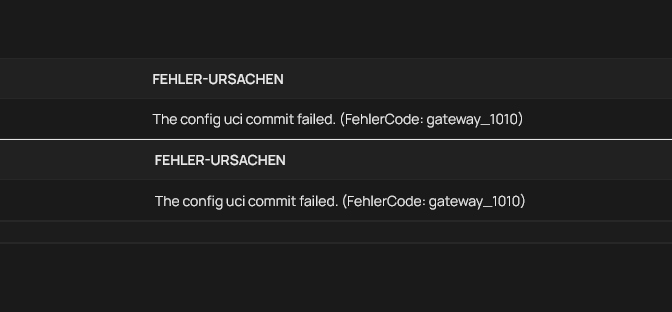
Something else I experienced is that error code when turning it off/ re-enabling it/ changing something.
- Copy Link
- Report Inappropriate Content
@Julian2111 Update, the issue is caused, by the port profile, is the device has selected the profile VLAN1 and I say in the Lan-DNS apply on VLAN1 and VLAN2 the setting gets ignored, when I say port profile "all" or profile VLAN1+VLAN2 and reapply the configuration to the gateway it works. Maybe for you @Theedoek it is the same issue.
- Copy Link
- Report Inappropriate Content
Where do you see this error? I looked at logs but could not find anything similar.
I don't quite get how this is related to a specific port and its port profile. Are you referring to the LAN port that connects the router to the network, or another one?
I will test with the "All" assignment instead of a specific one. It is not what I want, but fine for a short test.
- Copy Link
- Report Inappropriate Content
@Theedoek I don't get it as well, why does something the Gateway does relate to a switch port setting, even when using nslookup from VLAN1 the Gateway in VLAN2 it shows the correct IP, connected my phone to VLAN2 used nslookup, it outputs my public IP instead of my private one I don't get what causes that all. It just does not make any sense, since it worked previously perfectly fine though.
It kind of destroys the sense of the integrated Lan-DNS function though the idea is (at least what I think) to put e.g. on my smart TVs into Emby "emby.mydomain" but just let it resolve to my Emby Server instead of the public IP.. in case I wanna change the server's ip for whatever reasons.
What I'm trying right now is to mess around with the ACL, there is something that causes that issue I just don't get what.
- Copy Link
- Report Inappropriate Content
After some looking around, I noticed that I have these messages too: The config uci commit failed. (ErrorCode: gateway_1010)
- Copy Link
- Report Inappropriate Content
Information
Helpful: 0
Views: 2890
Replies: 18
Voters 0
No one has voted for it yet.