
EAP ACL Rule to block Tuya local discovery broadcast on UDP port 6667

Hi all,
My tuya ACs broadcast every few seconds to 255.255.255.255 using udp port 6667. I have many of these devices essentially congesting the 2.4ghz band.
I have tried to create an IP-Port group and then an EAP ACL rule to block this traffic but no success so far. To begin with, I cannot add an IP subnet like 255.255.255.255 when creating an IP-Port group.
Any ideas?

- Copy Link
- Subscribe
- Bookmark
- Report Inappropriate Content


Hi @Tournas
Thanks for the reply.
This is as expected.
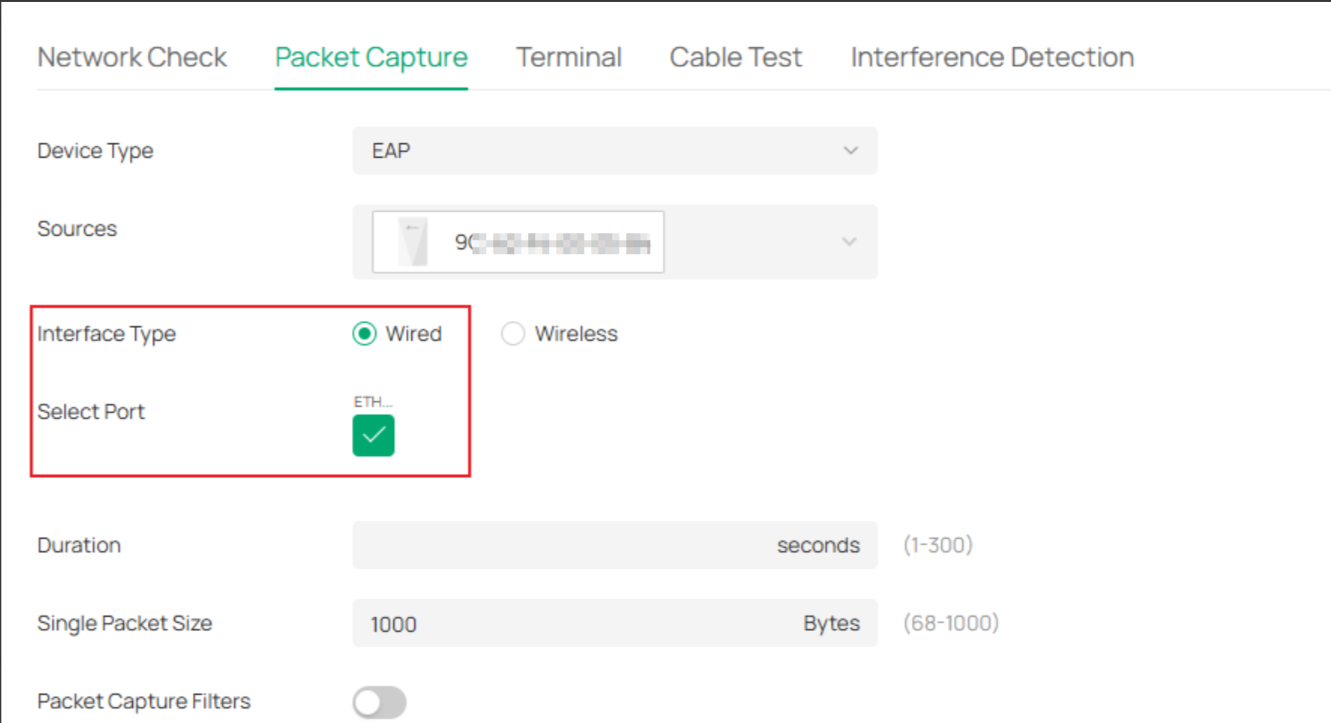
The packets captured through the EAP’s SSID are those that have not undergone ACL processing.
You may capture the packets through the ETH port:
- Copy Link
- Report Inappropriate Content

Only guessing here... I would create an IP-Port group with the Tuya device subnet and port 6667 and use it as the source in a Deny ACL. For the destination, I would try IPGroup_Any to see what happens.
Side note... Even if you manage to block the broadcast traffic with an ACL, the band congestion will still remain the same as the devices will continue to transmit.
- Copy Link
- Report Inappropriate Content

You can also try making an IP-Port-Group with just the port - if you dont add a subnet it applies to 0.0.0.0/0 (any IP) and use that as the source and destination IP_any in a switch ACL, i dont think EAP ACLs can actually block stuff on the broadcast subnet 255.255.255.255 - i have tried to do similar in the past to prevent clients on a particular SSID from getting DHCP on TCP/UDP 67-68, it just would not work at all, i had to use a hacky switch ACL to do it
- Copy Link
- Report Inappropriate Content
At the moment I am doing
source: the whole IoT network and
destination: the ip-port group with the udp ports only
for both the switch acl rule and the eap acl rule.
the switch rule seems to work, in the sense that I do not see this broadcast travelling in the rest of the network. The eap side does nothing, and I dont know how a switch rule could help further as the traffic remains in the AP side?
i will also try your suggestion
source: the ip ports group
destination; any
but this will presumably block udp 6667 on all my vlans?
- Copy Link
- Report Inappropriate Content
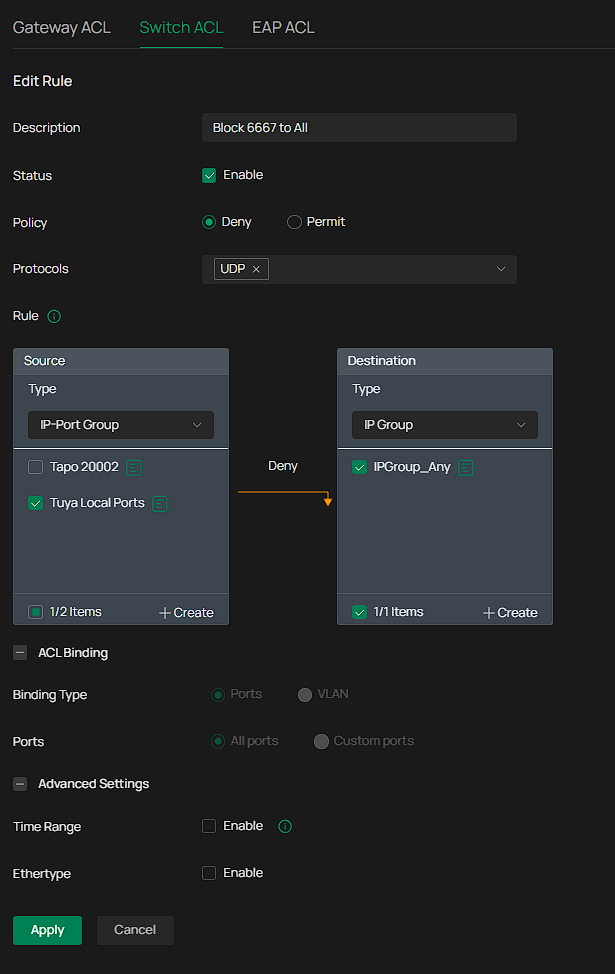
I tried it but still see the broadcasts
5 2.143322 192.168.20.6 255.255.255.255 UDP 218 49153 → 6667 Len=172
6 2.808258 192.168.20.5 255.255.255.255 UDP 218 49153 → 6667 Len=172
7 2.831090 192.168.20.10 255.255.255.255 UDP 218 49153 → 6667 Len=172
- Copy Link
- Report Inappropriate Content
Hi @Tournas
Thanks for posting here.
To better understand the situation, please let us know the following info:
1. A screenshot of the Device page of the controller, showing the firmware version of the SDN devices;
2. What kind of controller are you using? What's the firmware version?
3. The topology of the network;
4. Are the tuya ACs all connecting to the EAPs?
5. How did you capture the packets? Is the device connecting to the same SSID of the tuya ACs'? if not, how did the device connect to the network?
- Copy Link
- Report Inappropriate Content
@Vincent-TP
There appears to be some problem uploading or pasting pictures currently.
I am using OC220 running
Firmware Version
1.2.11 Build 20251128 Rel.52802
I have three EAP772s, two are connected on my core switch SG2210MP and one is connected on another switch SG2206MP which in turn is connected to the SG2210MP.
All the tuya ACs are connected to the IoT 2.4ghz dedicated wifi through the EAPs of course. I only capture packets using the built it network capture tool of the controller, selecting either EAP -> Wireless -> and the IoT ssid.
Regards
- Copy Link
- Report Inappropriate Content
Hi @Tournas
Thanks for the reply.
This is as expected.
The packets captured through the EAP’s SSID are those that have not undergone ACL processing.
You may capture the packets through the ETH port:
- Copy Link
- Report Inappropriate Content
@Vincent-TP
Thanks, but its these packets that cause the 2.4ghz to be congested nonetheless, correct?
So no way to block those?
- Copy Link
- Report Inappropriate Content
Hi @Tournas
If connected to the same SSID, it is not possible to block, which is why the current 2.4G network is so congested.
However, these traffic flows should not be large.
You could also consult Tuya support to see if there is a way to prevent these devices from broadcasting these packets.
- Copy Link
- Report Inappropriate Content
Information
Helpful: 0
Views: 1468
Replies: 9
Voters 0
No one has voted for it yet.