
Certificate Management Tab not visible

 Hi
Hi
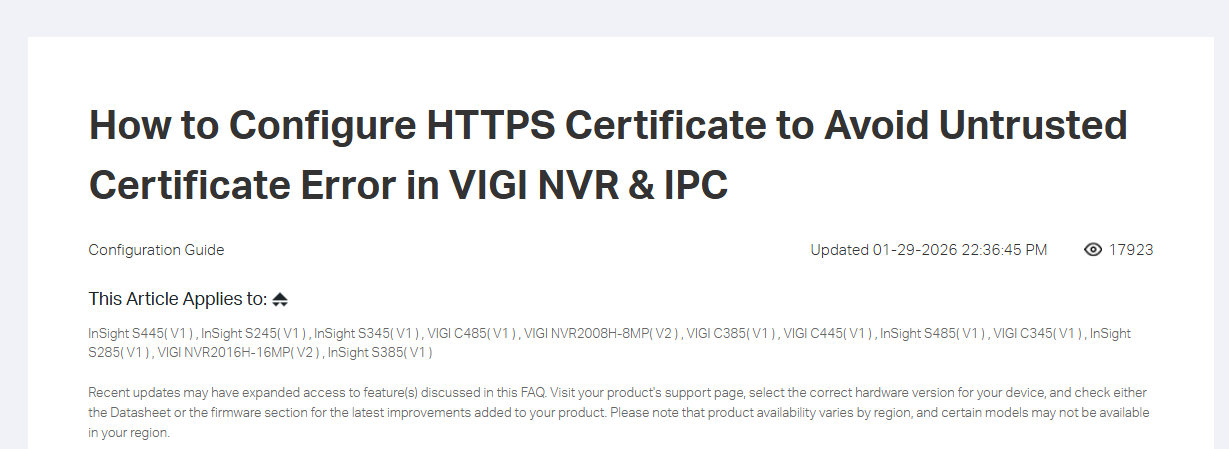
My problem is the live feed and playback feed is not loading when i access the NVR web interface. I get the error Ch1:Load Failed. The feed shows correctly in the HDMI output of the NVR. I believe this error is because of the Untrusted Certificate error. Tplink has provided a solution for this at How to Configure HTTPS Certificate to Avoid Untrusted Certificate Error in VIGI NVR & IPC | TP-Link Portugal
However this requires me to access a setting in the NVR web interface Settings > System > System Management > Certificate Management tab,
But this tab does not exist in my screen. The only tabs i see in Settings > System > System Management are "System Management", "System Maintenance", "Diagnostic Tools"
So how do i enable this Certificate Management Tab ?
- Copy Link
- Subscribe
- Bookmark
- Report Inappropriate Content


Hi,@jinu123
Thank you for posting on our business forum.
This article is only applicable to the following specific models, and your NVR model is not included in its applicable scope. We may release a new firmware update in the future to add support for this feature on your NVR model.
Regarding the "ERR CERT AUTHORITY INVALID" error message you mentioned: this error is triggered by a self-assigned TLS certificate, so it is normal to see this prompt in the console. It does not affect the normal usage of your device, nor will it compromise your security. You may refer to this post: LAN local vigi nvr website cannot play live camera feed ssl certificate errors - Business Community
Thank you for your understanding.
- Copy Link
- Report Inappropriate Content
The problem is if you look at the screenshot i attached, the feed is not loading in live or playback tab. It gives the error Ch1:Load Failed.
The problem seems to be related to the certificate error.
So how do i get the Live and playback screens to load the feed and not give the error "Ch1:Load Failed."
- Copy Link
- Report Inappropriate Content

Hi @jinu123
Thanks for reaching out to TP-Link Business Forums.
May I double confirm if your NVR hardware is V2.2?
If it's V2.2, then you can try to upgrade it to the latest firmware V1.5.1, which now supports downloading certificates via the Web interface under Settings > System > System Configuration > Certificate Management.
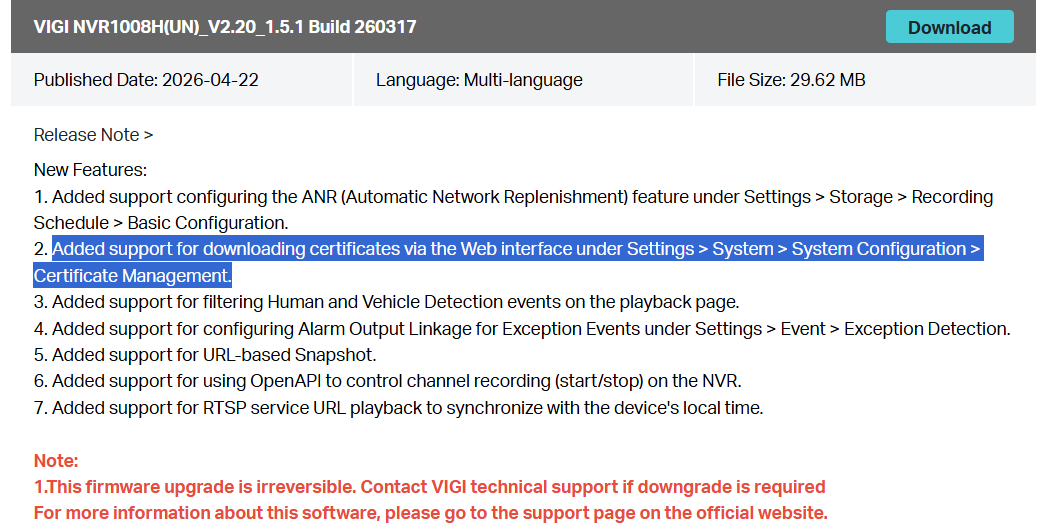
You can observe if the same issue still persists.
If yes, please help collect the information below:
1. Please kindly provide your whole network topology, i.e., router - - switch - - VIGI NVR1008H - - VIGI IPC, etc., including the devices that access NVR interface. Since the certificate error appears to be caused by a mismatch between the accessed IP and the certificate, understanding your network layout will help us identify potential causes.
2. Please also provide your browser version information.
3. Please help check if the issue occurs intermittently or consistently. How often does the issue occur?
4. Please help collect console logs from your browser's developer tools, including any errors in the console tab and network requests/responses in the network tab. This information will help us identify which request is failing and the server's reply.
Thanks for your understanding and cooperation.
- Copy Link
- Report Inappropriate Content
@Gabriel-TP Thanks for the response
Answers to the queries raised
My NVR hardware version is 2.2 but when i try update firmware using VIGI Config Tool it says i am on the latest version and that is 1.4.3 Build 251121 Rel.34128n. I my region website the latest version is 1.4.3
Toplogy is Router -- POE switch -- NVR and Cameras. PC is connected to Router from which NVR is accessed
Browser version - 147.0.3912.86 (Official build) (64-bit)
The issue is always happening. the error shown on screen is Ch1:Load Failed
Console logs not allowing to attach har file. But here are the details
Console is showing following errors
===============================
class.js?random=20251121092120:438 load!!!
:8443/stream:1 Failed to load resource: net::ERR_CERT_COMMON_NAME_INVALID
tp.min.js?random=20251121092120:1 [IOController] > Loader error, code = -1, msg = Failed to fetch
value @ tp.min.js:1
tp.min.js?random=20251121092120:1 [TransmuxingController] > IOException: type = Exception, code = -1, msg = Failed to fetch
value @ tp.min.js:1
tp.min.js?random=20251121092120:1 [TPPlayer] > PlayerEvents: IOError, type = NetworkError, code = -1, msg = Failed to fetch (Exception)
value @ tp.min.js:1
tp.min.js?random=20251121092120:1 [TPPlayer] > onIOError
distroy!!!
load!!!
:8443/stream:1 Failed to load resource: net::ERR_CERT_COMMON_NAME_INVALID
[IOController] > Loader error, code = -1, msg = Failed to fetch
value @ tp.min.js?random=20251121092120:1
value @ tp.min.js?random=20251121092120:1
(anonymous) @ tp.min.js?random=20251121092120:1
value @ tp.min.js?random=20251121092120:1
value @ tp.min.js?random=20251121092120:1
value @ tp.min.js?random=20251121092120:1
value @ tp.min.js?random=20251121092120:1
value @ tp.min.js?random=20251121092120:1
value @ tp.min.js?random=20251121092120:1
r.load @ class.js?random=20251121092120:438
Ab @ (unknown)
Nb @ (unknown)
[TransmuxingController] > IOException: type = Exception, code = -1, msg = Failed to fetch
value @ tp.min.js?random=20251121092120:1
value @ tp.min.js?random=20251121092120:1
value @ tp.min.js?random=20251121092120:1
(anonymous) @ tp.min.js?random=20251121092120:1
value @ tp.min.js?random=20251121092120:1
value @ tp.min.js?random=20251121092120:1
value @ tp.min.js?random=20251121092120:1
value @ tp.min.js?random=20251121092120:1
value @ tp.min.js?random=20251121092120:1
value @ tp.min.js?random=20251121092120:1
r.load @ class.js?random=20251121092120:438
Ab @ (unknown)
Nb @ (unknown)
[TPPlayer] > PlayerEvents: IOError, type = NetworkError, code = -1, msg = Failed to fetch (Exception)
value @ tp.min.js?random=20251121092120:1
(anonymous) @ tp.min.js?random=20251121092120:1
n.emit @ tp.min.js?random=20251121092120:1
(anonymous) @ tp.min.js?random=20251121092120:1
Promise.then
value @ tp.min.js?random=20251121092120:1
n.emit @ tp.min.js?random=20251121092120:1
value @ tp.min.js?random=20251121092120:1
value @ tp.min.js?random=20251121092120:1
(anonymous) @ tp.min.js?random=20251121092120:1
value @ tp.min.js?random=20251121092120:1
value @ tp.min.js?random=20251121092120:1
value @ tp.min.js?random=20251121092120:1
value @ tp.min.js?random=20251121092120:1
value @ tp.min.js?random=20251121092120:1
value @ tp.min.js?random=20251121092120:1
r.load @ class.js?random=20251121092120:438
Ab @ (unknown)
Nb @ (unknown)
[TPPlayer] > onIOError
======================================================
Network Tab showing following URLS
https://<DVR IP>/web-static/images/channelChecked.png?random=20251121092120
https://<DVR IP>/stok=75239dd98408f13c3da6e7806351ea9c/ds
https://<DVR IP>/stok=75239dd98408f13c3da6e7806351ea9c/ds
https://<DVR IP>:8443/stream
https://<DVR IP>:8443/stream
https://<DVR IP>/stok=75239dd98408f13c3da6e7806351ea9c/ds
https://<DVR IP>/web-static/images/ptz/quickPark_disabled.png?random=20251121092120
Status of all links except stream showing 200. Stream link status is blank
- Copy Link
- Report Inappropriate Content
Hi @jinu123
Before starting troubleshooting, please always make sure that your device is up-to-date.
You can click on the article - Method 2 and try to upgrade it manually. How to upgrade the firmware of VIGI NVR | TP-Link
Here's the firmware link: Download for VIGI NVR1008H | TP-Link
- Copy Link
- Report Inappropriate Content
Information
Helpful: 0
Views: 225
Replies: 5
Voters 0
No one has voted for it yet.